Bilal Siddiqui
Key takeaways
The Account Health Rating (AHR) is a 0 to 1,000 color-coded score that reflects your account's risk of deactivation from policy non-compliance.
The metrics on the Account Health page, like Order Defect Rate and shipping performance, are shown alongside the AHR but are not direct numeric components of that score, and they can trigger their own enforcement.
New accounts start at 200, and the score reflects roughly the previous 180 days of policy adherence and selling activity.
A violation that Amazon classifies as Critical turns the AHR red and brings the score to zero. Amazon's current guidance generally gives the seller three days to address it before deactivation, but Amazon can act immediately, regardless of score, when it suspects fraudulent, deceptive, illegal, or otherwise harmful activity.
Follow the exact action and deadline in each notice, and treat prevention as an ongoing routine rather than a one-time fix.
If you sell on Amazon long enough, account health stops being an abstract number and becomes the thing that decides whether your business keeps running. The good news is that it is largely manageable. Many account-health problems build from notices, metric trends, or recurring policy issues that were not addressed early. However, Critical violations and suspected fraudulent, deceptive, illegal, or harmful activity can trigger urgent or immediate enforcement. This guide explains what the Account Health Rating actually is, what the wider Account Health page measures, how to respond when something goes wrong, and how to build a routine that keeps your account out of trouble. It is written from an operator's point of view, and it is practical rather than legal guidance.
What Is the Amazon Account Health Rating?
The Account Health Rating, or AHR, is a single color-coded score from 0 to 1,000 that summarizes how much deactivation risk your account carries because of non-compliance with the Amazon policies included in the rating. You find it in Seller Central under Performance, then Account Health, where it sits at the top of the page.
It is worth being precise about what the AHR is and is not. The AHR reflects policy compliance. The broader Account Health page also shows customer-service and shipping-performance metrics next to your rating, but those metrics are not fed directly into the AHR number as line-item components. They matter a great deal, and they carry their own consequences, but they are a separate part of the same page. Keeping that distinction straight is the difference between managing your account accurately and chasing the wrong fix.
AHR Score Bands and How the Score Works
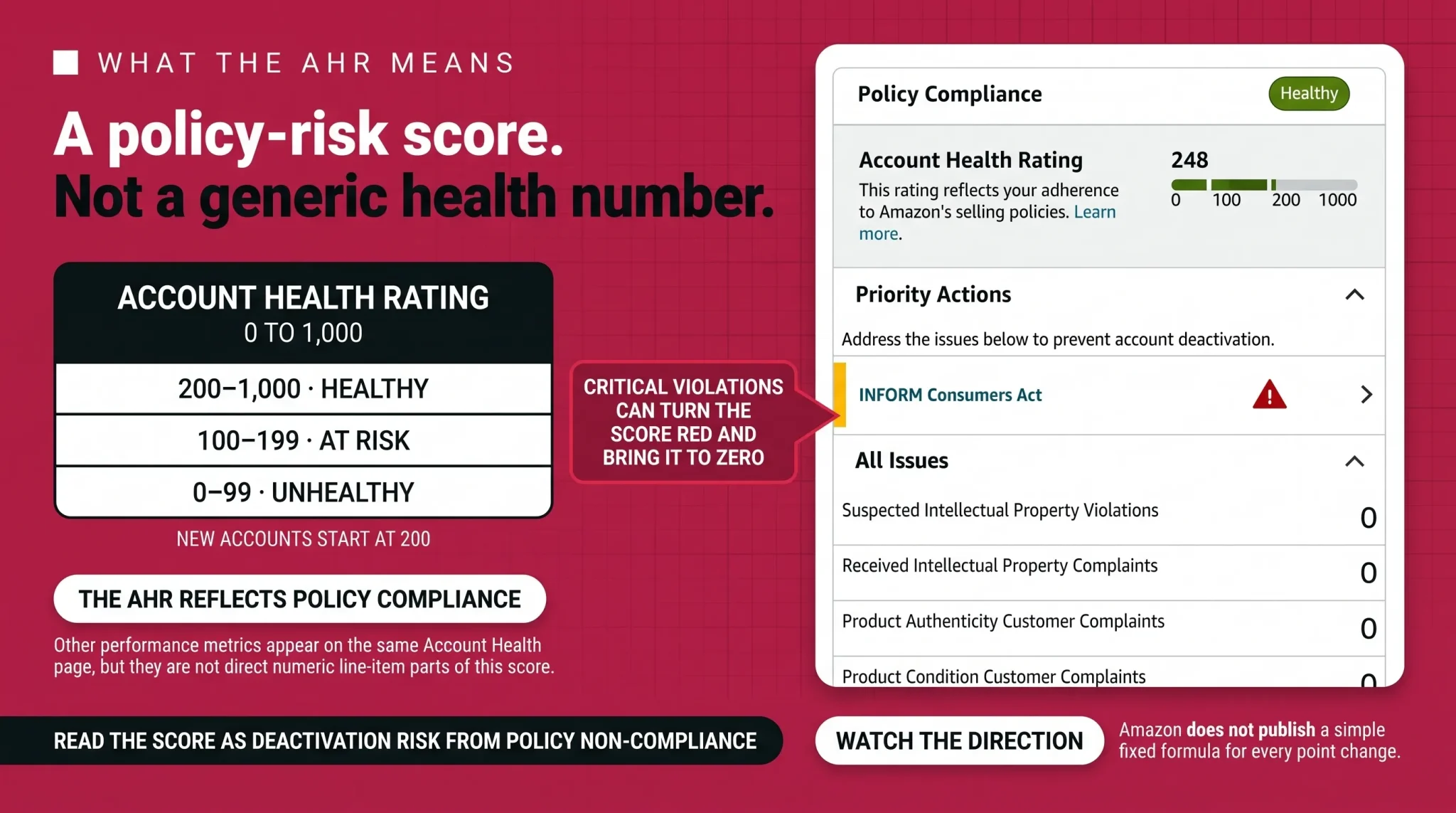
The score is grouped into three color-coded bands:
Healthy, shown green, is 200 to 1,000.
At Risk, shown yellow, is 100 to 199.
Unhealthy, shown red, is 0 to 99, where the account is eligible for deactivation or already deactivated.
Every new seller starts at 200. That is the minimum score within the Healthy band, not the lowest possible score and not a target to sit on. The score reflects your policy adherence and selling activity over roughly the previous 180 days. New policy violations deduct points, and successfully addressing violations can restore points. Amazon also grants points based on successful order volume, so consistent, clean selling builds a buffer over time. Repeat violations can carry increasing impact.
When Amazon labels an issue as a Critical violation, its current AHR guidance states that the rating turns red, the score becomes zero, and the seller generally receives a three-day grace period to address the violation before account deactivation. This is specific to Critical violations, not a universal deadline for every Account Health notice. Amazon may still take immediate action regardless of the score when it suspects fraudulent, deceptive, illegal, or otherwise harmful activity. All other notices must be handled according to the exact deadline and action shown in Seller Central.
Non-critical violations generally receive severity-based point deductions, and order volume can add points back, but Amazon does not publish an exact point value for every policy and can change how the score is calculated. Treat the bands and the direction of travel as what matters, not a precise formula.
One caution about the 180-day window. The AHR reflects policy compliance and selling activity across a rolling 180-day period. Sellers should still resolve every notice through the action shown in Seller Central rather than waiting for time to pass. Repeat violations, unresolved notices, separate enforcement actions, and repeat-violation limits can all still matter, so aging is not a substitute for fixing the underlying issue.
What the Account Health Page Measures
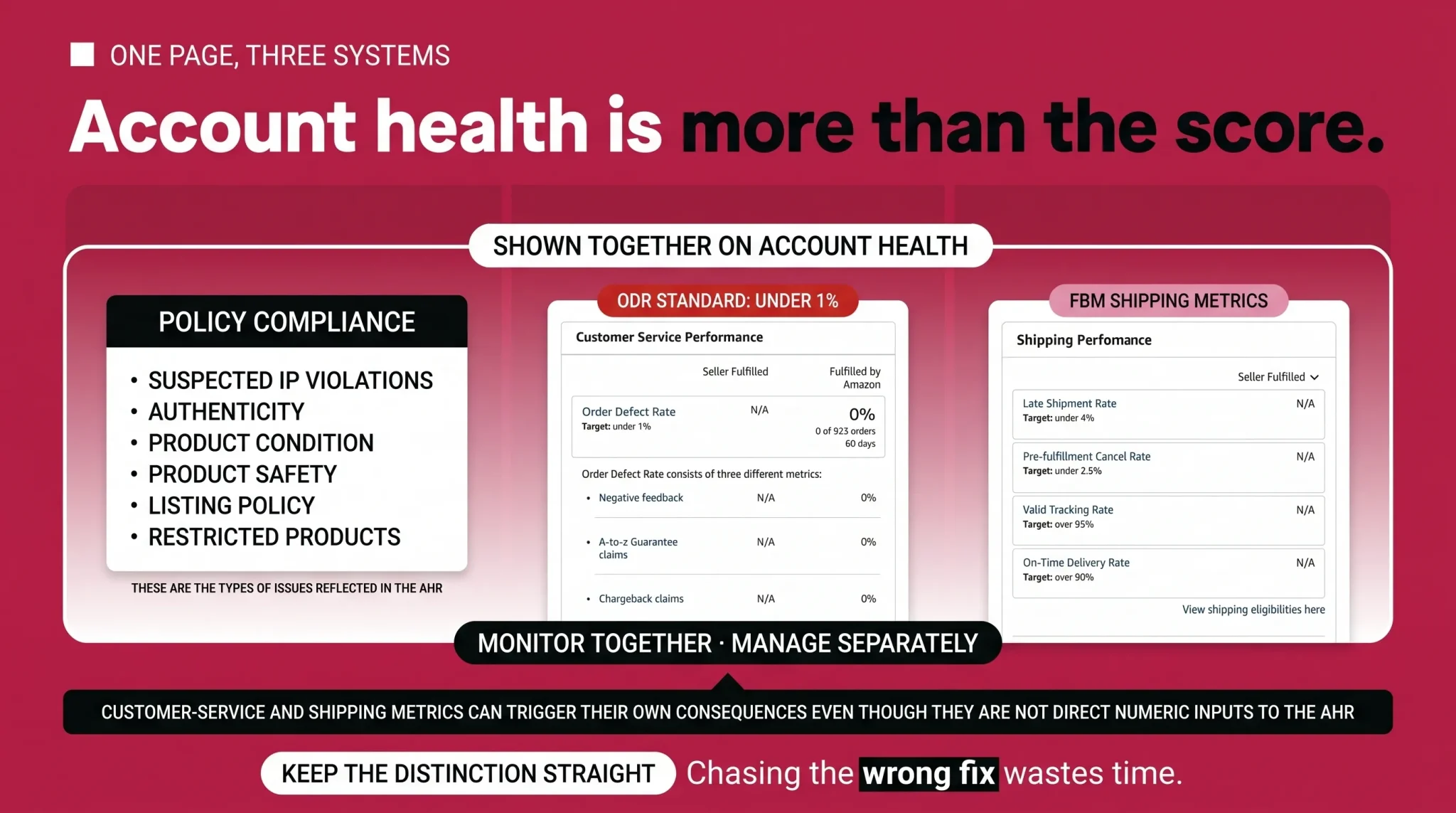
The Account Health page brings three things together in one view, and it helps to read them as distinct:
The first is your Account Health Rating and policy compliance, which covers issues such as suspected intellectual property violations, product authenticity and condition complaints, product safety, restricted-product policy, and listing policy. These are the compliance signals reflected in the AHR.
The second is customer-service performance, measured chiefly through your Order Defect Rate.
The third is seller-fulfilled shipping performance, measured through Cancellation Rate, Late Shipment Rate, Valid Tracking Rate, and On-Time Delivery Rate.
Customer-service and shipping metrics are shown alongside the AHR and should be monitored together with it, but they can independently cause offer restrictions, loss of selling privileges, or other enforcement when their standards are not met. They are not presented as direct numeric inputs to the AHR score.
Current Customer-Service and Shipping Metrics
Here are Amazon's current US standards for the metrics on the Account Health page. These are Amazon's published performance standards, and because Amazon adjusts them periodically, confirm the current numbers on your own Account Health page.
Metric | Current standard | Scope |
|---|---|---|
Order Defect Rate | Under 1% | Customer-service performance |
Cancellation Rate, also shown as Pre-Fulfillment Cancellation Rate | Under 2.5% | Seller-fulfilled orders |
Late Shipment Rate | Under 4% | Seller-fulfilled orders |
Valid Tracking Rate | 95% or higher | Eligible seller-fulfilled shipments, evaluated at the product-category level |
On-Time Delivery Rate | Minimum 90%, and Amazon recommends 95% or higher | Tracked seller-fulfilled units |
Consequences differ by metric. For Valid Tracking Rate, falling below the applicable threshold can restrict seller-fulfilled listings in the affected category and may affect Premium Shipping eligibility. Other missed standards can lead to consequences based on the metric and issue. Crossing one threshold does not automatically deactivate your whole seller account, but it should never be ignored either.
A word on fulfillment. Cancellation Rate, Late Shipment Rate, Valid Tracking Rate, and On-Time Delivery Rate apply to seller-fulfilled orders and do not apply to FBA orders in the same way because Amazon controls fulfillment for FBA. Order Defect Rate can still be relevant to FBA orders, but Amazon considers whether a defect was attributable to the seller. Claims Amazon determines were not the seller's fault do not count toward ODR.
Using Fulfillment by Amazon does not remove your responsibility for product authenticity, product condition, product safety, restricted-product compliance, listing compliance, intellectual-property issues, or the inventory and documentation you supply to Amazon. If you run both FBA and merchant-fulfilled orders, you still need to monitor the seller-fulfilled metrics for your FBM orders. The Inventory Performance Index is a separate FBA inventory-management metric and is not part of the Account Health Rating.
Policy Violations and Severity
Policy violations are grouped by severity, commonly described as critical, high, medium, and low, and the severity drives both the point impact and the urgency. Amazon assigns severity based on the customer impact, applicable laws and regulations, and the rights involved. A violation that Amazon classifies as Critical turns the AHR red and brings the score to zero. Sellers should not assume that every counterfeit, safety, authenticity, listing, or intellectual-property complaint will receive one fixed severity. Lower-severity issues do less damage individually, but repeated low and medium violations of the same type add up and signal a pattern that Amazon watches.
Many of these violations originate at the listing level, for example a restricted-product issue or a detail-page policy problem, and they then affect account-level health. This page does not re-teach those listing rules. Where a violation traces back to your detail pages or to prohibited words and claims, resolve it using the dedicated guidance for those topics and keep this page focused on the account-level response. Intellectual property complaints work the same way: they hit account health, but the tools for handling them live in the brand protection material rather than here.
What to Do When Your Rating Drops
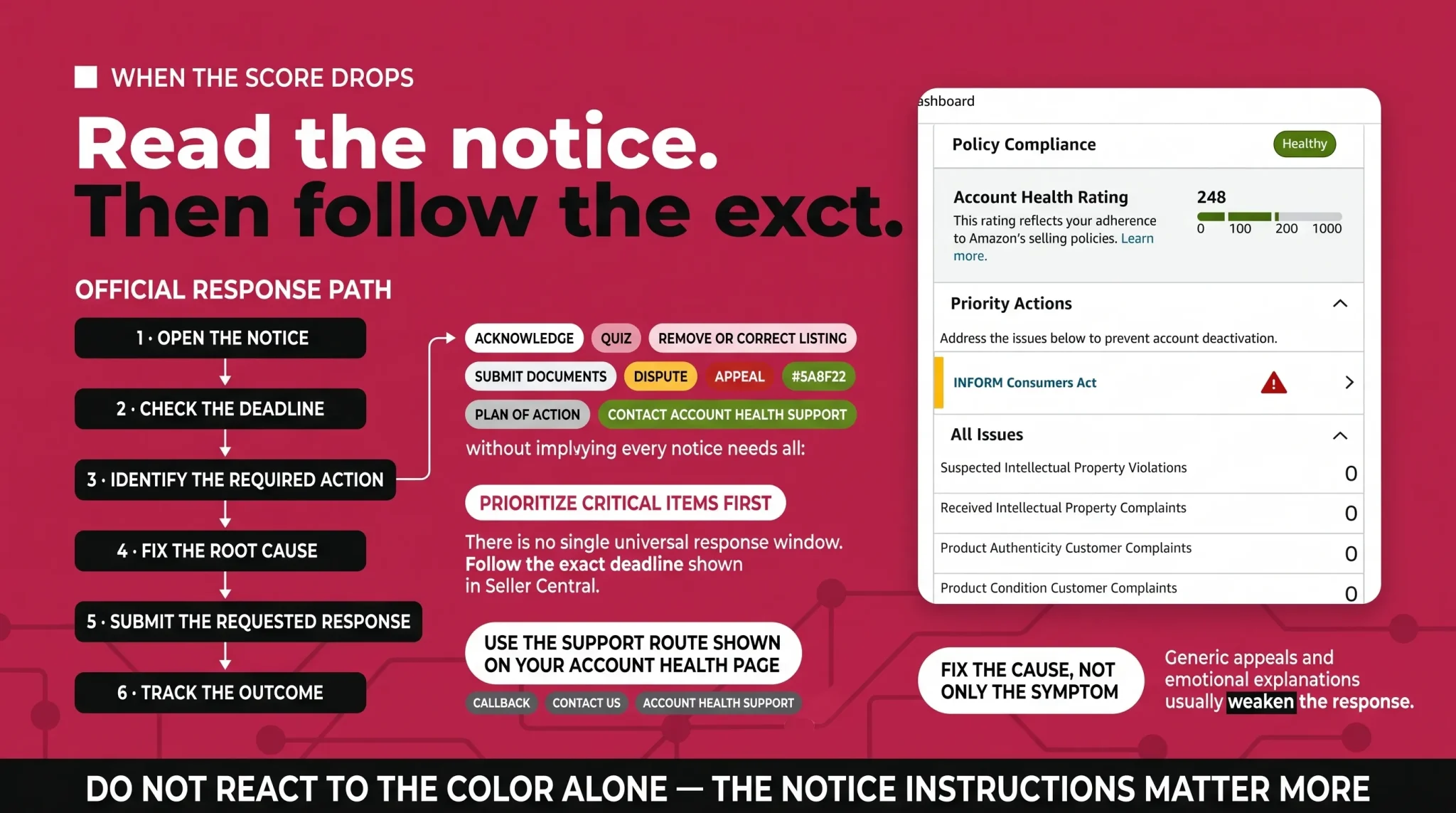
When a violation appears or your rating moves into yellow or red, the first job is to slow down and read the actual notice rather than react to the color. Each notice on the Account Health page comes with its own required action, instructions, and deadline, and those vary by case. Depending on the notice, Seller Central may ask you to acknowledge the violation, complete a short quiz, remove or correct the affected listings, provide invoices or compliance documents, dispute the violation, submit an appeal, submit a Plan of Action, or contact Account Health Support.
Do exactly what the notice asks, within the deadline it states. There is no single universal response window, and no one can promise you an appeal decision or a reinstatement timeline, so anyone who guarantees either is not being straight with you. Keep your emergency contact current in Seller Central so Amazon can reach you quickly, prioritize critical items first, and address the root cause rather than the symptom.
For support, use the route displayed on your Account Health page. Where available, Professional sellers may see options such as Contact us, Call me now, Account Health Support, or a callback from an Account Health Specialist. Use those official channels rather than unofficial escalation email addresses or internet-sourced contact tricks, which are not standard routes and can waste time you do not have.
Appeals and Plans of Action
Not every issue needs a formal appeal or a Plan of Action. Many are resolved by simply correcting a listing or submitting a requested document. When a notice does ask for a Plan of Action, there is no single required template, and you should be wary of anyone selling a one-size-fits-all letter. A strong response generally addresses the verified root cause of the problem, the immediate corrective action you took, the long-term preventive controls you have put in place, and the supporting evidence the notice specifically requested.
Just as important is what weakens a response. Generic templates, emotional explanations, blaming Amazon or a customer, unsupported claims, and irrelevant documents tend to hurt rather than help. Amazon does not always require the same headings, and using a tidy structure does not guarantee reinstatement. Keep the response accurate, specific, and matched to the exact issue in front of you. If a case is complex or the account is at real risk, that is a reasonable point to bring in experienced help, but no format and no helper can promise an outcome.
Account Health Assurance
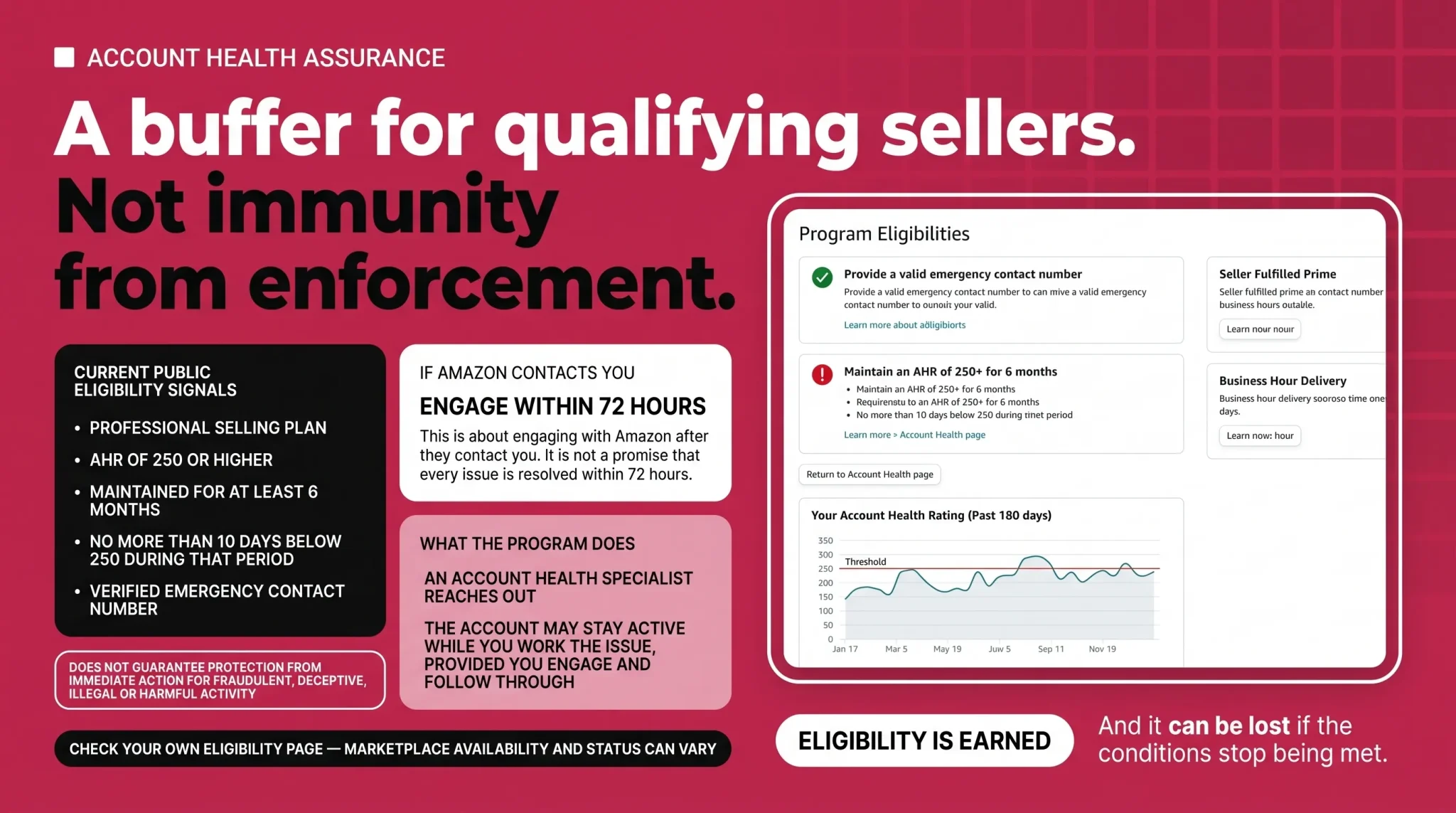
Account Health Assurance is an automatic program for qualifying Professional sellers, not an application and not a general guarantee against deactivation. Current public eligibility includes a Professional selling plan, an AHR of 250 or higher maintained for at least six months, no more than ten days below 250 during that qualification period, and a verified emergency contact number on file.
The idea is a buffer. When an urgent issue arises, an Account Health Specialist reaches out, and your account can stay active while you work the problem, provided you engage within 72 hours and follow through. That 72-hour requirement is about engaging with Amazon after they contact you, not about resolving every issue within 72 hours. Continued participation depends on keeping your emergency contact current, engaging within that window, working with the team to fully resolve the issue, meeting regulatory-compliance obligations, avoiding repeated policy problems, and keeping the AHR from remaining below 250 for more than ten consecutive days. Amazon currently documents an additional temporary allowance for some enrolled sellers whose score falls because of lower order volume and who have no new policy violations, so sellers should confirm their personalized status on the Account Health Assurance eligibility page. Account Health Assurance also does not protect you from immediate action when Amazon suspects fraudulent, deceptive, illegal, or otherwise harmful activity. Marketplace availability varies, so confirm your status on your own Account Health page.
Building an Account Health Prevention Workflow
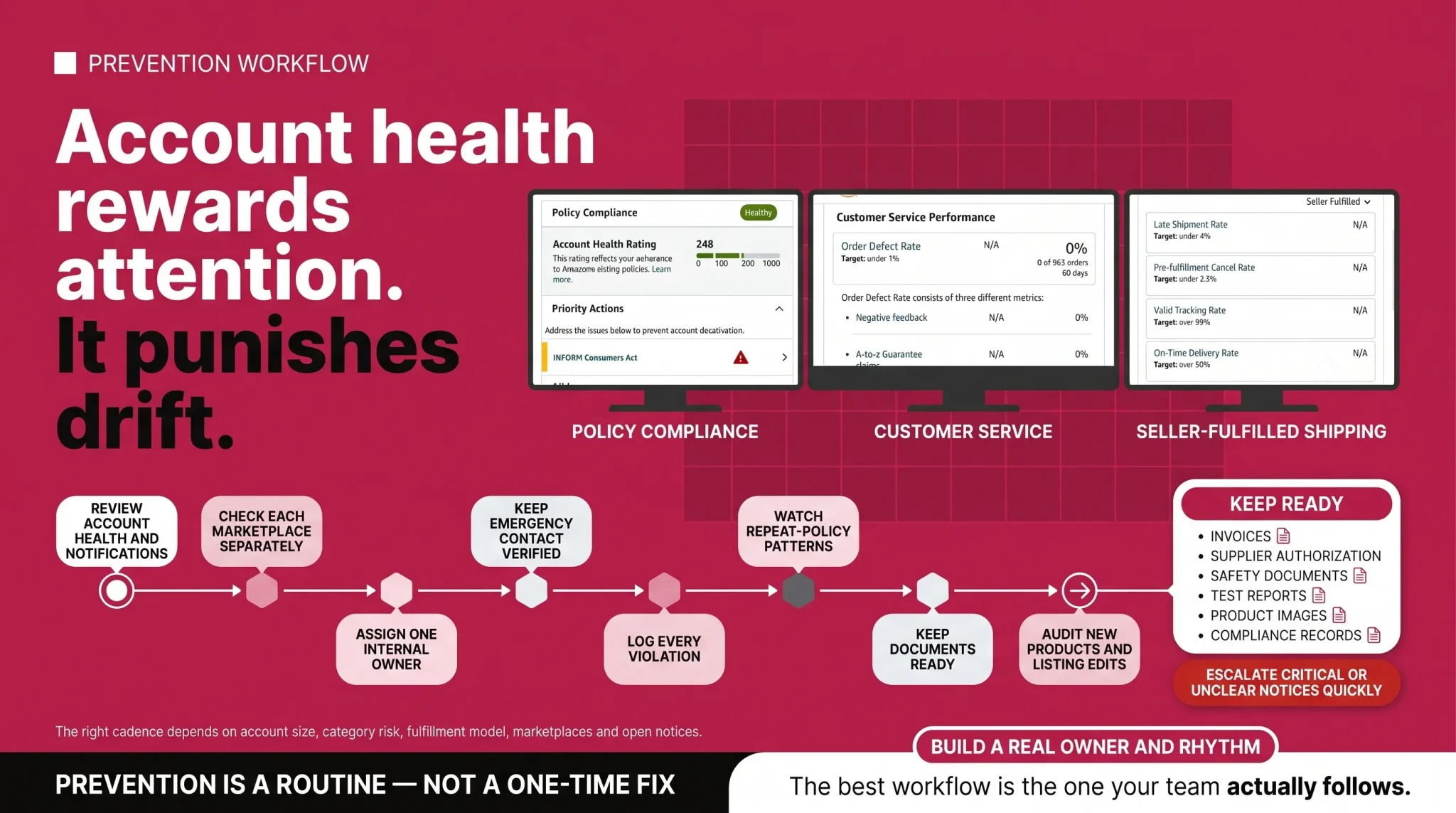
This is where the real payoff is. Many avoidable account-health problems become more serious when small issues have no clear owner and are allowed to compound. A prevention routine turns account health from a recurring scare into a managed part of operations, while urgent and Critical notices still require immediate attention.
The right cadence depends on your account size, fulfillment model, category risk, number of marketplaces, and current open notices, so do not force a single universal daily or weekly schedule onto every account. What matters is that the routine below actually happens on a rhythm that fits your business.
Review the Account Health page and Performance Notifications on a cadence that fits your account, and check every marketplace separately, since the rating is shown per store.
Assign one internal owner for account-health notices so nothing sits unread past its deadline.
Keep your emergency contact verified in Seller Central.
Log every violation with its ASIN, marketplace, notice date, deadline, required action, evidence submitted, and outcome.
Monitor repeat violations by policy type so patterns surface before they escalate.
Review your seller-fulfilled metrics against their relevant reporting windows.
Keep invoices, supplier authorization, safety documents, test reports, product images, and compliance records organized and ready.
Audit new products before launch for policy and compliance risk.
Review listing edits and any compliance-sensitive claims before they go live.
Train staff and agencies not to file unsupported or careless policy appeals.
Escalate critical or unclear notices quickly rather than waiting for the score to fall.
Keep Your Account Health Under Control
Account health rewards attention and punishes drift. If your rating has slipped, or you simply want a system that catches problems before Amazon does, the fastest path is an honest review of where your real risks sit and a routine to manage them. Flairox helps sellers audit account health, prioritize the issues that actually threaten the account, and build a prevention workflow that fits how you operate. If you want a clear read on your account and a plan to protect it, talk to our team. We cannot promise Amazon's outcomes, but we can help you act on the right things in the right order.
Frequently asked questions
A score from 200 to 1,000 is Healthy. A score above 200 provides more room for future non-critical deductions, but no score overrides a Critical violation or Amazon's ability to act immediately against suspected fraudulent, illegal, deceptive, or harmful activity.