Bilal Siddiqui
Key takeaways
LPN stands for License Plate Number.
Amazon uses LPN labels to track specific physical units, especially in return and fulfillment workflows.
Sellers usually see LPN stickers on FBA returned inventory or removal order units.
An LPN does not automatically mean the item is damaged, but it does mean the unit should be inspected carefully.
The main place to check an LPN is the FBA Customer Returns report in Seller Central.
Avoid third-party “free LPN lookup” tools. LPN history is tied to your Seller Central account.
Photograph the LPN sticker before removing, disposing, or relabeling the unit.
LPN tracking is useful for return investigations, reimbursement claims, and preventing “Used Sold as New” complaints.
You receive a returned FBA unit from Amazon. The product looks familiar, but there is a new barcode sticker on the packaging. It starts with LPN.
Now the questions start.
What does this LPN sticker mean?
Was the item returned by a customer?
Is the unit damaged?
Can you search the LPN number in Seller Central?
Should you remove the sticker, restock the product, or open a support case?
For Amazon sellers, an LPN number is not just another barcode. It can help you trace a specific returned unit, understand its return history, document its condition, and decide what to do next.
This guide explains what an Amazon LPN number is, where sellers can check it, and how to handle LPN-labeled FBA units without creating inventory, reimbursement, or account-health problems.
What Does LPN Stand for on Amazon?
On Amazon, LPN stands for License Plate Number.
In fulfillment and warehouse operations, a License Plate Number is a unique tracking code assigned to a specific physical unit. It helps Amazon identify and follow that exact item as it moves through receiving, fulfillment, returns, inspection, removal, or other internal workflows.
This is different from a normal product barcode.
A product barcode tells Amazon what the product is.
An LPN helps Amazon identify which exact physical unit is being handled.
For example, if you send 500 units of the same product to FBA, they may all share the same ASIN and FNSKU. But if three of those units are returned by customers, each returned unit may receive its own LPN label so Amazon can track those individual units separately.
What Is an Amazon LPN Sticker?
An Amazon LPN sticker is a barcode label applied to a specific unit inside Amazon’s fulfillment network.
Sellers most commonly see it when:
A customer returns an FBA item
Amazon sends removed inventory back to the seller
A unit goes through inspection
A product is separated from normal sellable inventory
A unit needs special internal tracking
Amazon needs to connect a physical item to return or fulfillment records
The sticker usually contains a scannable barcode and an alphanumeric code that begins with LPN.
The important point is this:
An LPN sticker tracks a specific unit, not just the product listing.
That is why sellers should not treat it like a normal FNSKU, UPC, or SKU label.
What Does an LPN Number Mean in a Warehouse?
An LPN number in warehouse operations is used to track a specific physical item, carton, pallet, or unit as it moves through a fulfillment process.
For Amazon sellers, this matters because FBA inventory does not always move as a general product batch. Sometimes Amazon needs to track one exact unit separately.
This usually happens when a product is:
Returned by a customer
Inspected by warehouse staff
Moved between fulfillment workflows
Removed from sellable inventory
Repackaged or relabeled
Marked for special handling
So when you see an Amazon LPN sticker, it usually means that unit has been separated from normal inventory and tracked individually inside Amazon’s warehouse system.
Amazon LPN Number vs ASIN, SKU, FNSKU, and UPC
Sellers often confuse LPN labels with other Amazon identifiers. Here is the difference.
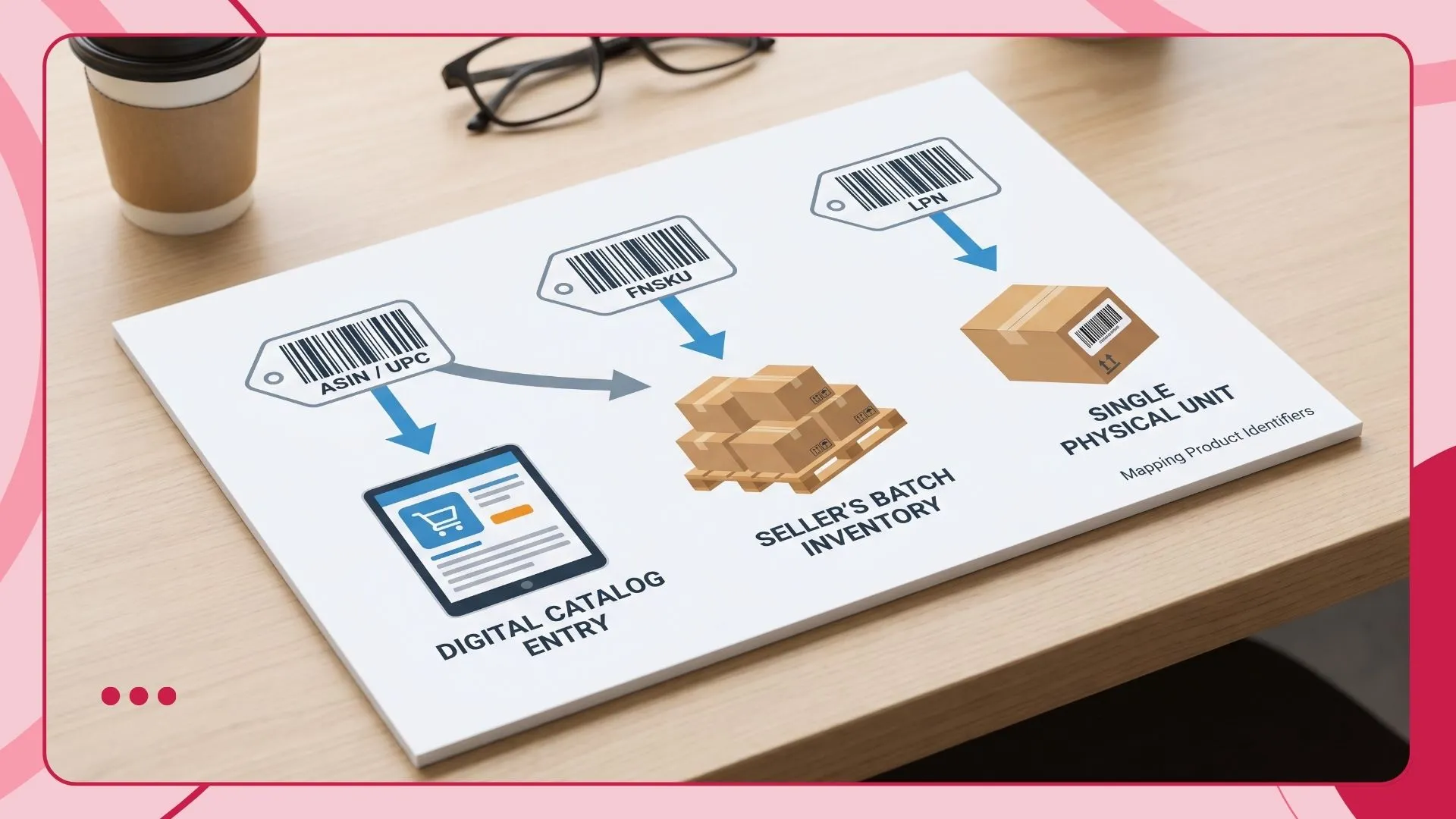
The simplest way to understand it:
ASIN tells Amazon what product it is.
FNSKU tells Amazon whose FBA inventory it is.
LPN tells Amazon which exact physical unit it is.
Why Amazon Puts an LPN Sticker on a Product
Amazon does not apply LPN labels randomly. A unit usually receives an LPN when it needs to be tracked separately from normal inventory.
The most common reason is a customer's return.
When an FBA customer returns an item, Amazon has to receive it, inspect it, assign a disposition, and decide whether it should go back to sellable inventory, become unsellable, be removed, or be handled another way.
An LPN helps Amazon track that specific returned unit through this process.
Other possible reasons include:
Internal fulfillment center processing
Return inspection
Repackaging or relabeling workflows
Removal order handling
Unit-level tracking for isolated inventory
Damaged or questionable unit review
Warehouse movement between facilities
For sellers, the practical meaning is simple:
If you receive a product with an LPN sticker, treat it as a unit that has been through an Amazon internal workflow and should be checked before any next action.
Does an LPN Sticker Mean the Product Was Returned?
Usually, sellers see LPN stickers on returned FBA units.
But an LPN sticker does not always prove the item is damaged, used, or unsellable.
A returned item can have different outcomes. It may be:
Returned to sellable inventory
Marked customer damaged
Marked carrier damaged
Marked defective
Marked warehouse damaged
Sent back to the seller through a removal order
Reimbursed depending on the case
Disposed or liquidated depending on seller settings
This is why sellers should avoid assumptions.
Do not assume every LPN unit is damaged.
Do not assume every LPN unit is safe to resell.
Do not assume the customer’s return reason tells the full story.
The correct approach is to check Seller Central reports and inspect the unit physically.
Can You Do an Amazon LPN Number Lookup?
Yes, but not through a public website.
There is no universal public Amazon LPN lookup tool where any seller can enter an LPN and see the full product history.
LPN information is internal to Amazon and tied to the seller account, order history, return records, and fulfillment reports. A third-party barcode scanner may read the printed code, but it will not tell you the return reason, order ID, disposition, or reimbursement status.
The proper way to investigate an Amazon LPN number is through Seller Central reports.
The main report to check first is:
FBA Customer Returns report
Depending on the case, you may also cross-check:
Manage FBA Inventory
Inventory Ledger
Removal Order Details
Seller Support case logs
FBA inventory adjustment records
The goal is not just to “decode” the barcode. The goal is to connect that physical unit with the return record, condition status, and financial impact.
Can You Use an LPN RR Barcode Scanner?
Some sellers search for an LPN RR barcode scanner because they find an LPN RR label on a returned FBA unit and want to scan it like a normal product barcode.
A barcode scanner may read the printed LPN code, but it will not explain the full return history by itself. The scanner can usually capture the barcode number, but the useful information behind that code is connected to Amazon’s internal fulfillment and return records.
That means you should not rely on a random scanner app to understand whether the product was returned, damaged, reimbursed, or safe to resell.
Use the scanner only to capture the LPN code faster. Then check the relevant Seller Central reports to understand what happened to the unit.
How to Find the LPN Number on Amazon
If you are trying to find an LPN number on Amazon, first check the physical returned unit.
The LPN usually appears on a white or yellow barcode sticker placed on the product packaging, polybag, box, or item label. It often starts with the letters LPN, followed by a longer barcode or alphanumeric code.
You may find it on:
Returned FBA units
Removal order inventory
Products sent back from Amazon fulfillment centers
Items with warehouse processing labels
Units that went through return inspection
After finding the LPN sticker, write down the full code and take a clear photo before removing or covering the label.
Then use Seller Central reports, especially the FBA Customer Returns report, to connect the LPN with the related return or inventory record.
How to Check an Amazon LPN Number in Seller Central
Use this workflow when you receive an LPN-labeled unit from Amazon.
Step 1: Record the full LPN code
Before removing any sticker, write down the full LPN number.
Also take clear photos of:
The LPN sticker
The product packaging
Any damage
Any customer-opened seals
Any missing parts
The shipping box if relevant
Any FNSKU, ASIN, or SKU label still visible
This creates a record before the unit is changed, relabeled, repaired, or disposed of.
Step 2: Open the FBA Customer Returns report
In Seller Central, go to your FBA reports and open the FBA Customer Returns report.
This is the first report sellers should use when trying to connect an LPN-labeled unit with a customer return.
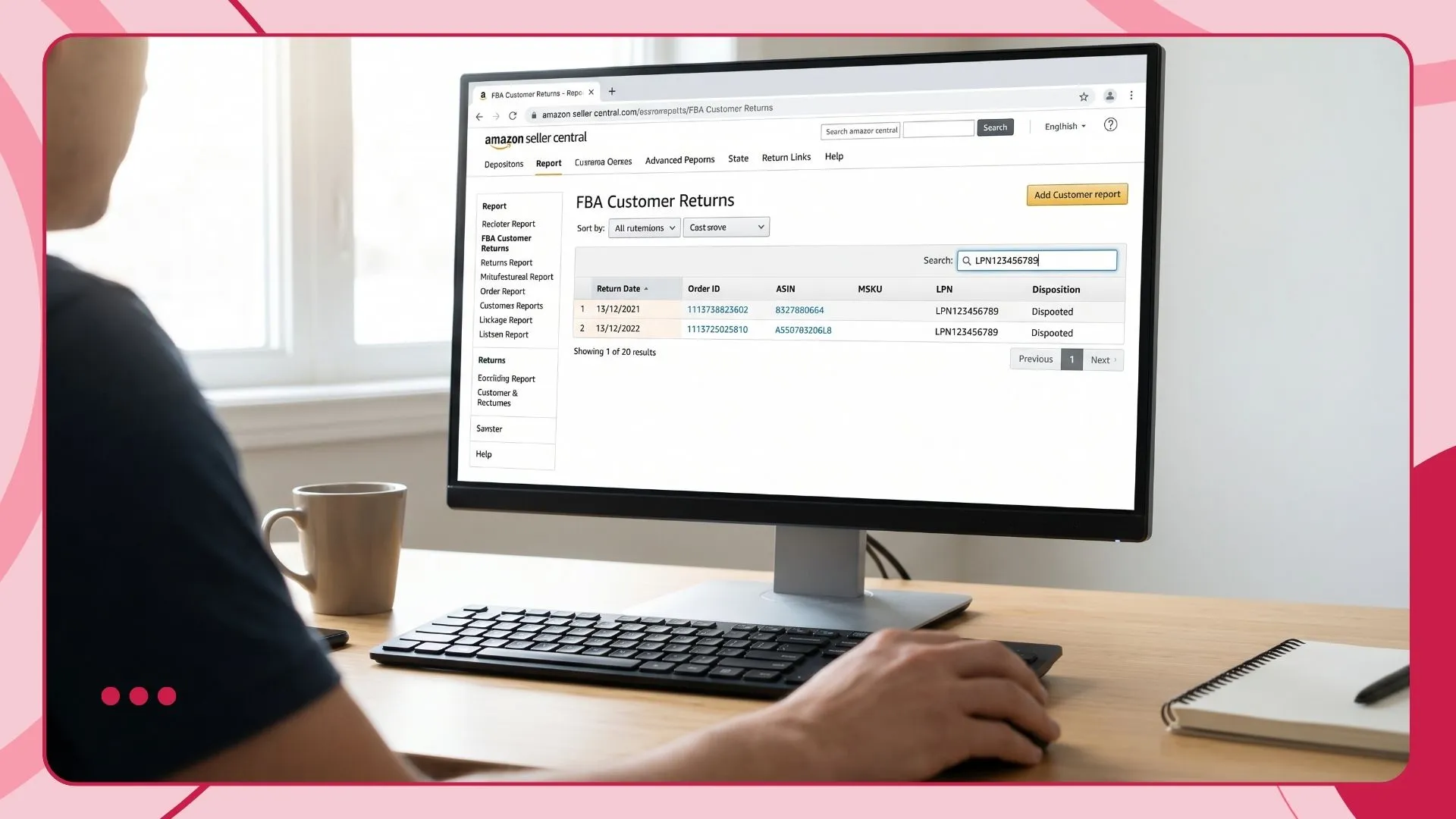
Search using available details such as:
LPN
Order ID
ASIN
FNSKU
SKU
Return date
Removal order timing
The exact filtering options can vary depending on account access and report format, so use the fields available in your Seller Central report view.
Step 3: Match the LPN to the return record
Once you find the related return, check:
Order ID
Return date
Customer return reason
Item disposition
ASIN
SKU
FNSKU
Quantity
Current status
This helps you understand whether the unit was returned, why it was returned, and how Amazon classified it.
Step 4: Compare the report with the physical product
Do not rely only on the return reason.
Customers may choose inaccurate return reasons. Amazon may classify the item differently after inspection. The physical unit may also show damage that is not obvious in the report.
Check whether:
The product is sealed or opened
The item looks used
Accessories are missing
Packaging is damaged
The item matches the correct ASIN
The product is safe to resell
The unit could trigger a “Used Sold as New” complaint
The condition matches Amazon’s disposition
This step protects you from sending questionable inventory back to FBA.
Step 5: Check removal and reimbursement records
If the unit was removed from FBA, compare the LPN with your removal order records.
If the item is damaged, missing parts, or appears mishandled, check whether Amazon has already reimbursed you.
Look at:
Removal Order Details
Inventory Ledger
FBA inventory adjustments
Seller Support case history
If the item appears eligible for investigation, prepare evidence before opening a case.
Step 6: Decide the next action
After checking the report and inspecting the unit, decide what to do with it.
Possible actions include:
Restock internally as used or open-box
Repair or repackage if allowed and appropriate
Dispose of the item
Sell on another channel with accurate condition
Relabel and send back to FBA only if the unit is truly new and compliant
Open a Seller Support case if Amazon damage or reimbursement issue is suspected
The key is to make the decision based on both data and physical inspection.
What Is LPN PM Amazon?
Some sellers see labels or references such as LPN PM, LPN RR, or other LPN variations.
This is where sellers need to be careful.
Amazon does not publish a complete public glossary that confirms every LPN prefix or label variation sellers may see. Because of that, you should not treat the prefix alone as proof of the unit’s full history.
For example, some sellers may associate certain prefixes with returns, processing, or internal warehouse workflows. But that does not mean the prefix by itself proves why the unit was labeled, whether it was damaged, or whether it is eligible for reimbursement.
The safe rule is:
Use the LPN prefix as a clue, not as evidence.
Always verify the unit through Seller Central reports and physical inspection.
Is LPN PM Amazon Lookup Free?
Yes, the proper lookup process is free inside Seller Central.
You do not need a paid tool to check your own returned FBA unit records. You need your Seller Central reports and the LPN code from the returned item.
Avoid external sites that claim to offer “free Amazon LPN decoding” or “LPN PM Amazon lookup free” if they ask for account access, sensitive business information, or login details.
A third-party website cannot safely show your private FBA return history unless it is properly connected to your seller data through authorized systems. For most sellers, the safest first step is to use Amazon’s own reports.
LPN Sticker vs FNSKU Sticker
The FNSKU and LPN both appear as barcodes, but they do very different jobs.
Your FNSKU identifies inventory connected to your seller account and product. It is used when sending inventory into FBA so Amazon knows which seller owns that unit.
Your LPN identifies one specific physical unit after Amazon needs to track it separately.
Example:
You send 200 units of a supplement bottle to FBA. All 200 units use the same FNSKU. Later, 5 units are returned by customers. Each returned unit may receive a different LPN so Amazon can track the return, inspection, and disposition of each physical unit.
So the FNSKU is about seller inventory identification.
The LPN is about unit-level tracking.
Should Sellers Remove an LPN Sticker?
Do not remove the LPN sticker immediately.
First, document it.
Before peeling off, covering, disposing of, or relabeling the product, take photos of the LPN label and the product condition. This is especially important if you may need to contact Seller Support about damage, missing parts, wrong item received, or reimbursement concerns.
After documentation, your next step depends on what you plan to do with the unit.
If you want to open a support case
Keep the LPN visible and photograph it clearly.
Include:
LPN sticker photo
Product condition photo
Packaging damage photo
Removal order details
Return report details
ASIN and SKU
Short explanation of the issue
This can help Seller Support understand which exact unit you are discussing.
If you want to resell the item outside Amazon
Remove or cover the LPN sticker before selling it to a customer on another channel.
Internal Amazon warehouse labels can look unprofessional and may confuse buyers. Also make sure the product condition is described accurately.
If you want to send the item back to FBA
Be very careful.
Do not send returned inventory back to FBA just because it looks acceptable from the outside. Inspect the item fully and make sure it meets Amazon’s condition guidelines.
If the product is truly new, complete, compliant, and safe to sell as new, remove the LPN and apply the correct FNSKU label before sending it back.
If there is any sign of use, damage, missing parts, broken seals, or customer handling, do not send it back as new.
Common Seller Mistakes With Amazon LPN Numbers
Mistake 1: Assuming every LPN unit is damaged
An LPN label does not always mean the item is damaged. It means the item was tracked individually.
Better action: Check the report and inspect the unit.
Mistake 2: Assuming every LPN unit is safe to resell
Some returned units look fine at first glance but have missing accessories, opened packaging, used components, or hidden defects.
Better action: Use a physical inspection checklist before resale.
Mistake 3: Removing the LPN before documentation
Once the sticker is removed, it becomes harder to connect the physical item to the return record.
Better action: Photograph the LPN first.
Mistake 4: Using random online lookup tools
External lookup tools may not have access to your actual Amazon return data.
Better action: Use Seller Central reports first.
Mistake 5: Sending returned units back to FBA too quickly
This can lead to bad customer experiences, negative reviews, return complaints, or “Used Sold as New” issues.
Better action: Only send back units that are truly new, complete, and compliant.
Mistake 6: Ignoring repeat LPN patterns
If the same ASIN keeps coming back with LPN stickers and similar return reasons, there may be a product, packaging, listing, or expectation problem.
Better action: Track return reasons by ASIN and fix the root cause.
Seller SOP: What to Do When You Receive an LPN-Labeled Unit
Use this simple SOP for your warehouse or operations team.
1. Separate the unit
Do not mix LPN-labeled units with new stock.
Create a separate area for:
FBA returns
LPN-labeled removals
Damaged units
Units pending inspection
Units pending reimbursement review
2. Photograph the unit
Take photos before making changes.
Capture:
LPN label
Product front and back
Packaging condition
Seals
Accessories
Damage
Any other Amazon labels
3. Search Seller Central reports
Use the FBA Customer Returns report first.
Then cross-check removal, reimbursement, and inventory records if needed.
4. Inspect the product
Check:
Is the item opened?
Is the product used?
Is anything missing?
Is the packaging damaged?
Does the product still match the listing?
Would a buyer accept this as new?
Could this cause a complaint?
5. Assign a condition decision
Mark the unit as:
New and eligible for restock
Open-box
Used
Damaged
Missing parts
Unsellable
Pending support case
Pending reimbursement review
6. Take the next action
Based on the condition, choose the correct path:
Relabel and send to FBA
Sell through another channel
Hold for support case
Dispose
Repair or repackage if appropriate
Record loss internally
7. Track patterns by ASIN
If the same product keeps generating returns, do not stop at the LPN level.
Look for root causes such as:
Confusing product images
Inaccurate bullet points
Weak size or compatibility details
Packaging damage in transit
Product quality issues
Wrong customer expectations
Missing usage instructions
This is where LPN tracking connects back to listing optimization and return reduction.
Why Amazon LPN Numbers Matter for Sellers
LPN numbers matter because they help sellers move from guessing to investigating.
Without LPN tracking, you may only know that inventory came back from Amazon. With LPN tracking, you can connect a physical returned unit with its return record, condition, and possible financial impact.
That matters for five reasons.
1. Better return tracking
LPN numbers help sellers connect returned units with return records.
This is useful when checking whether a product was returned for damage, buyer remorse, wrong item, defect, or another reason.
2. Cleaner inventory decisions
Returned units should not be mixed blindly with new inventory.
LPN tracking helps your team separate handled units from fresh stock and make better restocking decisions.
3. Stronger reimbursement investigation
If a returned or removed unit appears damaged, the LPN helps identify the specific item involved.
Photos of the LPN label, product, and packaging can support your case when contacting Seller Support.
4. Lower account-health risk
Sending used, damaged, or incomplete items back as new can create customer complaints.
A simple LPN inspection process can reduce the risk of “Used Sold as New” complaints.
5. Better product and listing feedback
If many LPN-labeled returns come from the same ASIN, the problem may not be warehouse handling. It may be the product, packaging, instructions, images, or listing copy.
That is why smart sellers do not treat LPN labels as random warehouse stickers. They use them as part of a return intelligence process.
When an LPN Issue May Point to a Listing Problem
An LPN sticker itself is not a listing issue.
But repeated returns connected to LPN-labeled units can reveal listing problems.
For example:
Customers return the product because size was unclear
Buyers expected a different material or feature
Images make the product look bigger than it is
Compatibility details are missing
Instructions are weak
Product packaging does not protect the unit
Bullet points overpromise the product’s use case
If the same return reason appears again and again, the fix may not be in Seller Central. The fix may be in your listing content.
In that case, review:
Bullet points
Size charts
Usage instructions
Compatibility information
FAQ or image text
LPN tracking helps you identify the returned unit. Listing optimization helps you reduce the reason it came back in the first place.
💡 PRO TIP: STOP TRANSIT RETURNS AT THE SOURCE
Are Repeated LPN Returns Killing Your Margins?
If the same ASIN keeps racking up LPN tracking stickers due to size confusion, weak instructions, or unmet customer expectations, the fix isn't in your warehouse, it's in your copy. Use Flairox Listings to run a direct competitor analysis against your top 5 direct competitors, extract critical missing customer keywords from Amazon data, automatically map your unique brand voice, and write compliant, high-converting copy that stops buyer remorse before it ships.
Optimize Your First 2 Listings Free Now →
Amazon LPN Number Lookup Checklist
Use this checklist whenever you receive a returned FBA unit with an LPN sticker.
Record the full LPN number
Take photos before removing the label
Search the FBA Customer Returns report
Match the unit to the correct ASIN and order
Check the customer return reason
Review Amazon’s disposition
Inspect the physical product
Check for missing parts or used condition
Compare with removal order details
Check reimbursement records
Decide whether to restock, resell, dispose, or escalate
Do not send questionable units back to FBA as new
Track repeated return reasons by ASIN
Final Thoughts
An Amazon LPN number is not something sellers should ignore.
It is a unit-level tracking label that can help you understand what happened to a returned or removed FBA item. When used correctly, it helps with return investigation, inventory decisions, reimbursement documentation, and account-health protection.
The best approach is simple:
Do not guess from the sticker alone.
Do not rely on random lookup tools.
Do not restock returned units blindly.
Instead, record the LPN, check Seller Central reports, inspect the product, document the condition, and decide the next action based on evidence.
That small barcode can tell you a lot about your FBA operations, but only if you build a process around it.
What does LPN stand for on Amazon?
LPN stands for License Plate Number. It is a unique tracking number Amazon uses to identify a specific physical unit inside its fulfillment process.
What is an Amazon LPN sticker?
An Amazon LPN sticker is a barcode label placed on a specific unit, often during returns or internal fulfillment processing. It helps Amazon track that individual item separately from normal inventory.
Does an LPN sticker mean the item was returned?
In many seller cases, yes, LPN stickers are commonly seen on returned FBA units. But the sticker alone does not prove the item is damaged or unsellable. Sellers should verify the return record and inspect the item.
Can I scan an LPN RR barcode?
You can scan the barcode to capture the printed LPN code, but a scanner alone will not show the full Amazon return history. To understand the unit’s status, check the LPN against your Seller Central reports.
Frequently asked questions
LPN stands for License Plate Number. It is a unique tracking number Amazon uses to identify a specific physical unit inside its fulfillment process.