Bilal Siddiqui
Key takeaways
Zero Supply Chain Overhead: Virtual bundles allow eligible sellers to combine 2 to 5 existing FBA ASINs into a single buyable offer without physical kitting, repackaging, or separate inbound shipments, since Amazon picks and ships each component from existing inventory.
Role-Specific Eligibility: Brand Registry enrollment alone is not enough; sellers must hold the specific "Brand Representative" role, and all bundled ASINs must be active, US-marketplace FBA items in "New" condition.
Availability Hinges on the Weakest Link: A virtual bundle is only as available as the component with the lowest inventory. If a single item in the bundle stocks out, the entire bundle listing is automatically suppressed until inventory is replenished.
Pricing Ceilings and Margin Realities: A bundle's price must remain at or below the combined sum of its component prices to retain Buy Box eligibility. Because standard FBA and referral fees apply to each individual unit shipped, any bundle discount comes directly out of your contribution margin rather than fulfillment savings.
Most brands sitting on a catalog of complementary products eventually ask the same question: is there a way to sell these together without building a new physical SKU, printing new labels, and shipping a fresh pallet into a fulfillment center? Amazon Virtual Bundles are the answer to exactly that question. They let an eligible brand combine products it already stocks into a single offer, at a single price, on a single detail page, while Amazon continues to pick and ship each item from existing inventory.
The idea is simple. The execution is where sellers get tripped up, usually because they misunderstand who qualifies, how the main component works, or what happens when one item in the bundle runs out of stock. This guide covers the program requirements as Amazon states them, the full setup workflow, how pricing and inventory actually behave, realistic examples, and the situations where a virtual bundle is genuinely worth building.
What an Amazon Virtual Bundle Is
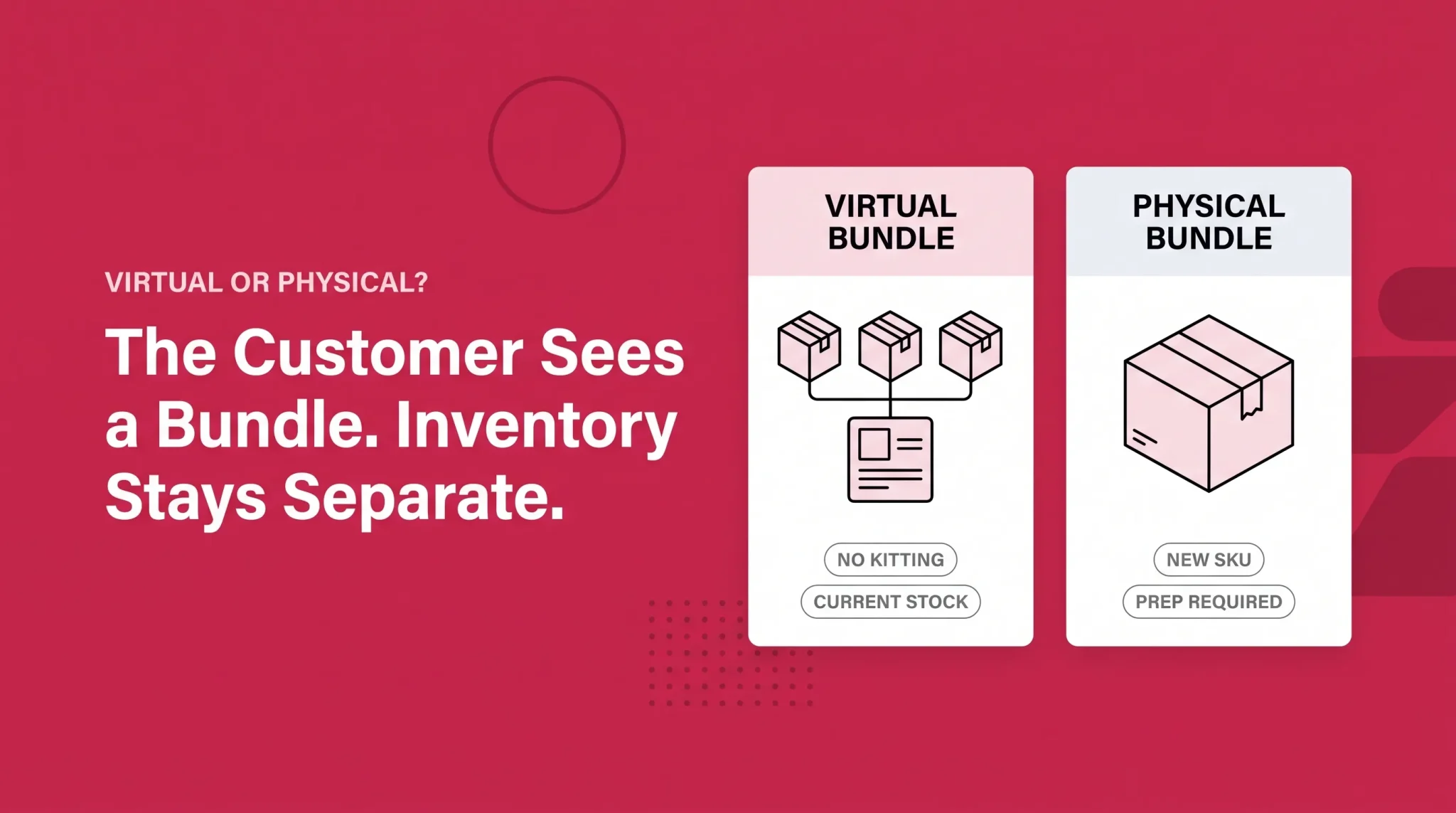
A virtual bundle is a separate listing that presents two to five of your existing FBA products as one purchase. The virtual product bundles tool for FBA allows Brand Representatives to create bundles made up of two to five complementary ASINs that are bought together from a single detail page, without packaging items together or changing FBA inbound inventory.
The word "virtual" is doing real work in that description. Nothing about your supply chain changes. You do not assemble a kit, you do not create a new physical unit, and you do not send anything additional to Amazon. When a shopper buys the bundle, Amazon pulls each component from its own existing inventory pool and ships it. The customer may receive more than one package, because the items are not stored together.
The bundle itself does get a new ASIN and its own detail page, with its own title, images, bullet points, description, price, and its own review history. That last point surprises people. A bundle built from two well reviewed products starts at zero reviews, because the ratings belong to the component ASINs, not to the new bundle listing.
This is also what separates a virtual bundle from a physical bundle and from a multipack. A physical bundle is one packaged unit that ships as a single item under one ASIN, which means real prep work and real inbound shipping. A multipack is several units of the same product, which the virtual bundle tool does not create, because every component in a bundle has to be a distinct, individually buyable ASIN.
Virtual bundle | Physical bundle | |
|---|---|---|
New physical SKU required | No | Yes |
Prep, kitting, and labeling | None | Required before inbound |
Inbound shipment changes | None | New units must be sent in |
How it ships | Each component ships from its own inventory | One packaged unit ships together |
Speed to launch | Fast, works from current stock | Slower, gated by production and inbound |
Inventory risk | Committed stock stays sellable individually | Units are locked into the bundle |
Reviews | Starts fresh on the new bundle ASIN | Starts fresh on the new bundle ASIN |
Amazon Virtual Bundle Requirements
Eligibility is stricter than most summaries suggest, and the distinction that matters most is the role you hold, not just whether your brand is registered.
The feature is only available to sellers who have a Brand Representative role assigned to a brand in Brand Registry. The seller must be internal to the brand and responsible for selling the brand in the Amazon store. If you do not have access to the feature, you have not been identified as a Brand Representative, and you can visit the Brand Benefit Eligibility page to identify yourself as one and gain access.
That is why some brand registered sellers open Seller Central, look under Brands, and find no Virtual Bundles option at all. Being enrolled in Brand Registry is necessary but not sufficient. The role assignment is the gate.
The product level requirements are shorter, and Amazon states them plainly.
Requirement | What Amazon specifies |
|---|---|
Brand ownership | ASINs must belong to a brand that you own and that is registered in Brand Registry |
Fulfillment and condition | ASINs must have active FBA inventory in the "New" condition |
Marketplace | Virtual product bundles can be created only in the US Amazon store |
Bundle size | Two to five complementary ASINs |
Excluded items | Gift cards, electronically delivered products such as digital music, video, and books, and renewed or used ASINs |
Two practical consequences follow from that list. Merchant fulfilled inventory cannot be used, so a brand running a mixed fulfillment model can only bundle its FBA side. And because the program is US only, a brand selling across multiple marketplaces cannot replicate the same bundle strategy internationally through this tool.
Creating a virtual bundle is free. Standard selling fees and FBA fees still apply. There is no bundle discount on fulfillment. Each component is picked, packed, and shipped as its own unit, so you pay what you would have paid if the customer had bought the items separately.
How to Create a Virtual Bundle on Amazon
The workflow runs through Seller Central and takes a few minutes once your products are identified. The harder work happens before you open the tool.
1. Confirm your role and your candidate ASINs. Check that the Virtual Bundles option appears under the Brands menu. Then verify that every ASIN you intend to use is active, in New condition, held in FBA, and buyable on its own.
2. Open the virtual bundles tool. In Seller Central, go to Brands and select Virtual Bundles.
3. Select two to five component ASINs. Add each product you want in the bundle. You can adjust the quantity of an individual component rather than including a single unit of each.
4. Choose the main component deliberately. One ASIN acts as the base of the bundle, and it influences how the bundle is categorized and surfaced. Treat this as the most consequential decision in the whole setup, for reasons covered in the next section.
5. Build the listing content. Write a bundle title, short title, bullet points, and description, and upload images that show the full set together rather than reusing a single component's hero shot. Shoppers land on the bundle page without context about what is included, so the imagery has to answer that immediately.
6. Set the bundle price. The price has to sit at or below the combined price of the components. More on the mechanics below.
7. Submit and wait. New bundles need processing time before they appear correctly. Amazon support has pointed sellers to roughly 24 hours of processing time as one of the common reasons a newly created bundle does not show up right away, alongside stock issues. If a bundle looks broken an hour after submission, that is usually impatience rather than a defect.
Why the Main Component Decision Is Permanent
Every bundle is anchored to one component ASIN. That ASIN carries the "make it a bundle" style placement on its own detail page, and it shapes how the bundle gets categorized and discovered. The other components in the bundle do not display the bundle offer on their pages.
The part sellers miss: once a virtual bundle is created, the main component cannot be changed. If you pick the wrong anchor, the fix is to delete the bundle and rebuild it. Amazon support has also advised that when you rebuild, you should use a different SKU or wait 24 hours before reusing the same one.
There is a second constraint that follows from this. You cannot create a second bundle using the same ASINs in the same quantities just to give it a different main component. Sellers who try this receive an error telling them the bundle already exists. So if you want the bundle offer to appear on two different product pages, you cannot achieve it by duplicating the same combination twice with different anchors. You would need genuinely different bundle compositions.
Practically, the main component should usually be the product with the strongest existing traffic and conversion, because the bundle inherits its categorization and sits on its page. Anchoring a bundle to a slow, low traffic ASIN buries the offer where few shoppers will see it.
Pricing an Amazon Virtual Bundle
Amazon applies one hard rule to bundle pricing, and it functions as a ceiling rather than a suggestion:
Bundle price must be less than or equal to the sum of the current prices of all components.
Cross that ceiling and the bundle loses Buy Box eligibility, which effectively takes it out of circulation. The complication is that the ceiling moves. Component prices change, but the bundle price you set does not follow them automatically. If you discount a component or run a promotion on it, the sum of the individual prices drops, and a bundle price that was compliant last week can quietly breach the ceiling this week. Monitoring bundle prices against component prices is an ongoing task, not a setup step.
Beyond the compliance ceiling, the pricing question is a margin question. Each component still incurs its own referral and FBA fees, so bundling does not create a fulfillment saving you can pass on. Any discount you offer comes directly out of contribution margin, multiplied across however many units are in the bundle.
That leads to a straightforward test before you publish. Work out the contribution margin on the bundle at the price you intend to set, then compare it to the margin you would earn if that same shopper bought only the main component. If the bundle margin is meaningfully higher, the offer is doing its job. If it is lower, you have built a discount mechanism that cannibalizes your best seller, and the added order value is an illusion.
There is no correct discount percentage. The right discount is the smallest one that makes the bundle feel worth choosing over buying the anchor product alone, and that varies by category, price point, and how obvious the pairing is to the shopper.
How Inventory Behaves
A virtual bundle draws on the existing FBA inventory of every component, and it is only as available as its weakest component. When any one item runs out, the whole bundle stops being buyable until that stock is replenished. Availability on the bundle listing tracks the component with the fewest units remaining.
This has a real consequence for planning. A bundle built around a stable hero product and a volatile accessory will spend a meaningful portion of the year switched off, and the periods when it disappears are usually the periods when demand was highest. Forecasting has to happen at the bundle level, not just per ASIN, because the bundle adds demand on top of each component's standalone sales.
It also affects how you should treat the bundle during inventory planning. If a component is being wound down, discontinued, or moved to a different SKU, the bundle attached to it is exposed. Amazon's guidance is that you cannot change the products that make up an existing bundle, so the practical remedy is to rebuild.
Amazon Virtual Bundle Examples
The strongest bundles answer an obvious question the shopper was already asking. Three patterns account for most of the ones that work.
Routine bundles. A skincare brand selling a cleanser, a serum, and a moisturizer as separate ASINs can bundle all three as a complete routine. The shopper's real intent was never to buy a cleanser in isolation, it was to solve a skin concern, and the bundle matches the intent better than any single listing does. Routine bundles work best when the sequence is visually obvious, because most of the decision happens on a phone screen in a few seconds.
Hero plus accessory bundles. A kitchenware brand with a strong selling stand mixer and an underperforming attachment set can anchor the bundle to the mixer and attach the accessory. The bundle exposes the accessory to traffic it was never going to earn on its own, and the shopper gets a more complete purchase. The risk to watch is accessory stock volatility, since the accessory usually has the shallower inventory and will be the component that takes the bundle offline.
Occasion and gifting bundles. A coffee brand can combine a whole bean bag, a grinder cleaning brush, and a set of filters into a starter set that reads clearly as a gift. Occasion bundles are seasonal by nature, which makes them a good fit for the virtual format specifically, because you can build them from stock you already hold and retire them without being left holding assembled kits.
What these have in common is a single, coherent shopper intent. Bundles that combine two unrelated products because both need a sales boost tend to underperform, because the shopper cannot tell in one glance why the items belong together.
What Virtual Bundles Will Not Do
Setting expectations correctly matters here, because virtual bundles are often described as a pure upside with no trade-offs.
The bundle listing starts with no review history. It is a new ASIN, and the ratings on your component products do not carry over. In review sensitive categories, that alone can suppress conversion for the first stretch of the bundle's life.
Customers can receive multiple packages for one order, since components ship from wherever they are stored. Most shoppers accept this without complaint, but it does occasionally generate confused messages, particularly when one component arrives days before another.
Bundles can cannibalize component sales. Shoppers who would have bought the hero product at full price may now buy it at a discount inside the bundle. Sometimes the extra units and higher order value more than compensate. Sometimes they do not. This is worth watching in the first several weeks rather than assuming.
Advertising eligibility for bundle ASINs has shifted over time and has been a recurring source of confusion. Rather than relying on any published summary, check what campaign types are actually available for your bundle ASIN inside your advertising account before you build a promotional plan around it.
Troubleshooting Common Problems
Most virtual bundle issues fall into a handful of patterns.
The tool is not visible in Seller Central. This is almost always the Brand Representative role rather than a technical fault. Visit the Brand Benefit Eligibility page to identify yourself against the brand.
The bundle was submitted but has not appeared. Give it the processing window before escalating. If it still has not appeared after that, confirm every component is active, in stock, and in New condition.
An error says the bundle already exists. You are attempting a combination of ASINs and quantities that duplicates an existing bundle. Change the composition rather than only changing the anchor.
The bundle shows as unavailable while components look in stock. Check the component with the lowest available quantity first, and confirm that stock is genuinely available rather than reserved or in an inbound state.
The bundle lost the Buy Box. Compare the bundle price against the current sum of component prices. A price change or promotion on a component is the usual cause.
Amazon publishes a dedicated troubleshooting FAQ for virtual product bundles inside Seller Central, and it is worth checking against your specific error message, since interface details and processing behavior change over time.
When a Virtual Bundle Is Worth Building
Not every catalog benefits. Before you build one, work through the following:
At least two products in your catalog that a customer has an obvious reason to buy together
All intended components held in FBA, active, and in New condition
A main component with enough traffic to actually surface the bundle
Stable, forecastable inventory on the shallowest component
Enough margin room to fund a visible discount without going backwards
A one sentence explanation of why the bundle exists that a shopper would accept
Capacity to monitor bundle price against component prices on an ongoing basis
Willingness to measure cannibalization against the anchor ASIN, not just bundle revenue
If most of those hold, a virtual bundle is a low cost test with genuinely little downside, because you can delete it and lose nothing but the setup time. If several do not hold, particularly the inventory stability and the margin room, the bundle is likely to spend more time suppressed than selling.
For brands whose products are replenishable rather than complementary, a bundle may not be the right instrument at all. Repeat purchase behavior is a different problem with a different Amazon program attached to it, and it is worth evaluating separately rather than trying to force a bundle to serve that purpose.
Bundling well is less about the tool and more about knowing which combinations in your catalog are worth putting in front of shoppers, and what the margin math looks like once discounts and fees are accounted for. If you want a second opinion on where the bundle opportunities sit in your catalog, book a free strategy call.
Frequently asked questions
Virtual bundles are listings that combine two to five of your existing FBA products into one offer on a single detail page. Amazon ships each component from existing inventory, so no physical packaging or new inbound shipment is required.