Bilal Siddiqui
Most sellers think about brand protection only after something goes wrong. Someone makes unauthorized changes to their brand content, a counterfeit version of their product shows up, another listing infringes their trademark, copyright, patent, or design rights, or inaccurate information gets attached to their brand. Amazon Brand Registry is the program that puts you on the front foot instead. It verifies that you own your brand, helps safeguard the accuracy of your brand content, and unlocks a set of protection and brand building tools that unregistered sellers simply cannot reach.
This guide covers who qualifies, what you actually need, how enrollment works in practice, and what you get once you are approved. One quick note before we start: if you landed here looking for a wedding or baby gift list, that is Amazon's shopper Gift Registry, which has nothing to do with the seller program described below.
What Is Amazon Brand Registry?
Amazon Brand Registry is a free program for brand owners that helps you protect your intellectual property and manage how your brand appears in the Amazon store. It is open to brands even if they do not currently sell on Amazon, which matters for manufacturers and rights holders who want to defend their trademarks before they list a single product.
When Amazon recognizes you as the verified owner of a brand, two things change. First, Amazon applies additional protections to help safeguard the accuracy of information associated with your enrolled brand and reduce inaccurate or unauthorized changes. Second, you get access to a dedicated brand portal where you can report suspected violations, manage users, and reach the tools that help your brand grow.
How Amazon Brand Registry Works
The program is built around trademark verification. Amazon wants to be sure that only the genuine owner of a brand can control its listings, so it checks your trademark details against the issuing trademark office before granting access. Once your ownership is confirmed, your account is tied to the brand, and the protection and selling benefits become available based on your account type and the roles you hold.
That verification step is the heart of the process, and it is also where most delays happen, so it is worth understanding the requirements before you apply.
Amazon Brand Registry Requirements
Here is what you need to have ready before you start your application. You can also review Amazon's official Brand Registry requirements for the current details.
Requirement | What it means | Why it matters |
|---|---|---|
Eligible trademark | An active registered trademark, or an eligible pending trademark application, from an approved trademark office in a country with a corresponding Amazon store | Proves you legally own the brand and are entitled to control it |
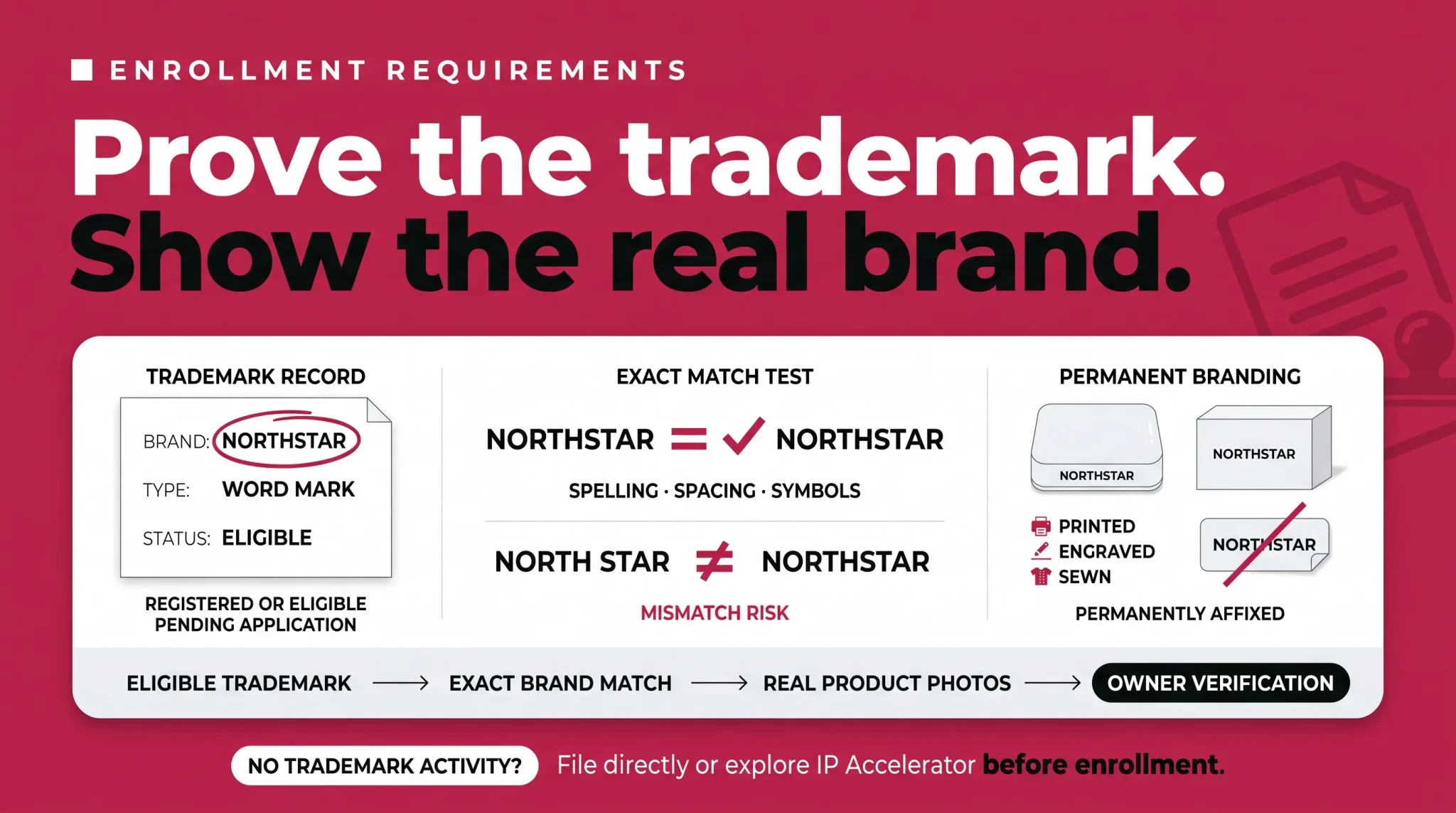
Brand name and logo | A logo that includes your brand name, permanently affixed to your products or packaging | Shows Amazon your goods are genuinely branded rather than generic |
Exact name match | The brand name on your application matches your trademark record in spelling, spacing, and symbols | Amazon verifies this closely, and mismatches are a common cause of rejection |
Trademark type | A word mark, or a design mark that contains words, letters, or numbers | Determines how Amazon verifies your brand and what you upload |
Trademark number | Your official registration or application number | Amazon checks it against the trademark office record |
Product categories | The categories your brand should be listed in | Routes your brand correctly during enrollment |
Account credentials | If you already sell on Amazon, the same login you use for Seller Central or Vendor Central | Keeps your selling and Brand Registry accounts connected, though a non-selling trademark owner can still enroll |
A few of these deserve extra attention. Your trademark must be a text based mark, known as a word mark, or an image based mark that contains words, letters, or numbers, known as a design mark. The brand name on your application should match your trademark record accurately across spelling, spacing, and symbols, and the trademark type and the branding on your products should line up with what you submit. Capitalization differences may be accepted, but treat an exact match as the safe standard and confirm current specifics in Seller Central. Your branding also needs to be permanently affixed to your products or packaging. The brand name or logo should be permanently applied to the product or its packaging during production, using a method such as printing, sewing, engraving, or laser etching. Removable stickers, labels, stamps, tags, stock images, digitally altered images, and computer generated mockups are not accepted.
You also need to be the trademark owner to enroll. If you are an agent or employee acting on a brand's behalf, the owner should complete the enrollment and then add you as a user, which we cover in the roles section below. If you already have a Seller Central or Vendor Central account, create your Brand Registry account with the same credentials so the accounts remain connected. A trademark owner who does not sell on Amazon can still enroll for protection benefits.
Can You Enroll Without a Trademark?
This is the most common sticking point, so here is the accurate picture. Eligible active registered trademarks and eligible pending trademark applications can qualify, subject to approved intellectual property offices and country specific requirements. IP Accelerator is an optional route that connects brands with vetted legal providers and can provide faster access to Brand Registry benefits while a qualifying trademark application is pending.
In other words, you do not always have to wait for a fully registered trademark. What you cannot do is enroll with no trademark activity at all. If you have nothing filed, your first step is securing a trademark, either directly through a trademark office or through IP Accelerator.
Amazon Brand Name Approval vs Brand Registry
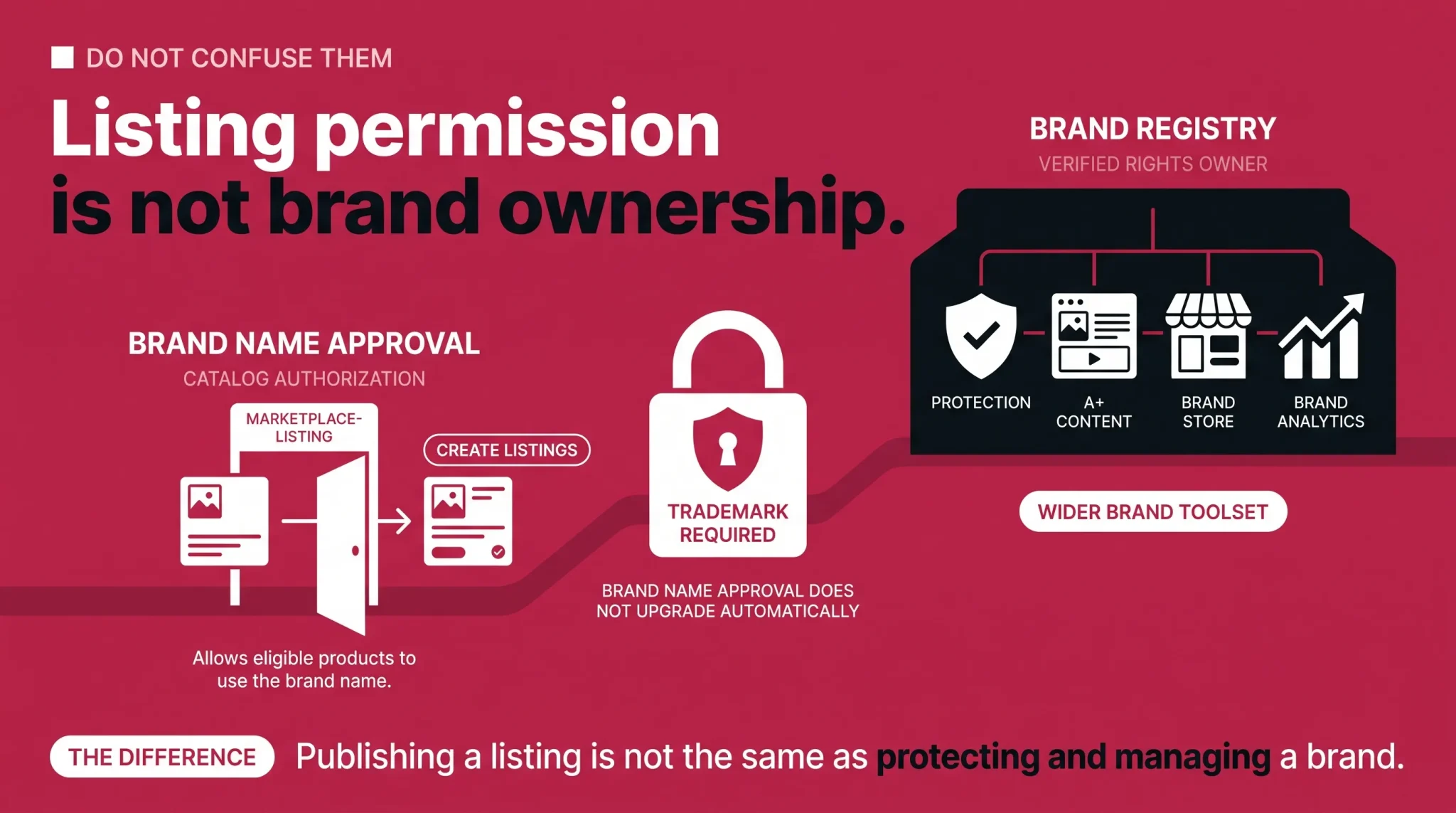
It is easy to confuse Brand Registry with simply being allowed to use your brand name on listings. They are not the same thing. Catalog authorization, sometimes called Brand Name Approval and governed by Amazon's Brand Name Policy, may let a seller create listings under a brand name so products can go live. That permission does not give you Brand Registry's wider benefits. The stronger protection tools, the enhanced content options, role and user management, brand analytics, and the broader brand building features all sit inside Brand Registry. If your goal is to protect and grow a brand rather than just publish listings, catalog authorization on its own is not enough.
Is Amazon Brand Registry Free?
Enrolling in Brand Registry costs nothing. The program itself is free. The costs sit around it. Registering a trademark involves government filing fees, and if you use IP Accelerator, the vetted legal providers charge for their services. So the honest answer to how much Brand Registry costs is that enrollment is free, but getting the trademark you need in order to enroll is not.
How to Enroll in Amazon Brand Registry
Once your requirements are in place, the enrollment itself is straightforward.
Go to the Amazon Brand Registry portal.
If you already sell on Amazon, sign in with the same Seller Central or Vendor Central credentials so your accounts stay linked. If you are a trademark owner who does not sell on Amazon, create a Brand Registry account without opening a selling account first.
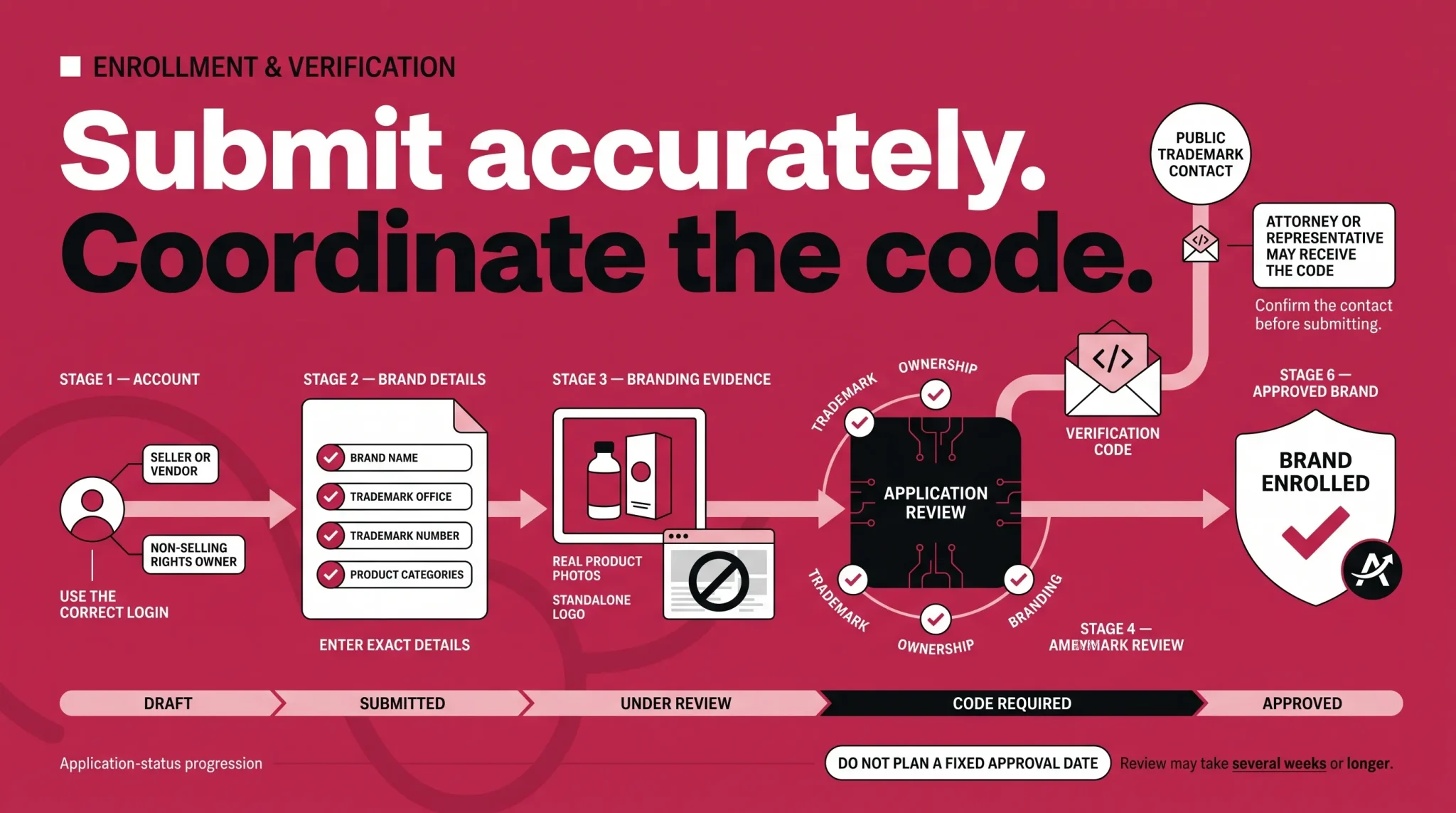
Select enroll a new brand and enter your brand name exactly as it appears on your trademark.
Choose your trademark office and enter your trademark registration or application number.
Upload a standalone image of your logo and clear photos showing your brand name on your products or packaging.
Add the product categories your brand sells in, and list your existing ASINs if your products are already on Amazon.
Provide your business, manufacturing, and distribution details as prompted.
Review everything for accuracy, especially the brand name and trademark number, then submit.
Watch your case log and email for a verification request, and respond promptly once you have the code.
Verification and What Happens After You Apply
After you submit, Amazon reviews your application and verifies your trademark. As part of this, Amazon typically contacts a publicly listed contact associated with the trademark record. That contact may be you, but it may also be the attorney or representative who filed the trademark. Amazon sends a verification code to that contact, who then needs to share it with you so you can submit it back to your open case in the brand portal. If that contact is slow to respond or unreachable, your application can sit in a pending state, so it pays to make sure whoever is listed on the trademark knows the code is coming.
Approval time varies. Amazon states that even when a brand already has a trademark, Brand Registry approval can take several weeks or longer. Pending applications, ownership verification, inaccurate information, or requests for additional documentation may extend the process. Because of that, avoid building your launch calendar around a fixed approval date.
While you wait, you can manage your application from the brand portal. You can check its status, edit an application you have not yet submitted, add documents to one already in review, or copy and correct an application that was rejected so you do not have to start again from scratch.
Common Reasons Applications Get Rejected
Most rejections trace back to a handful of avoidable mistakes. The brand name on the application does not match the trademark record exactly. The logo or product images are unclear, low quality, or computer generated mockups instead of real photos. The branding is not permanently affixed and looks like a temporary label. The applicant is not the trademark owner and does not have the standing to apply. Or the trademark number simply contains a typo. Correcting the cited issue and resubmitting may resolve the rejection, but Amazon can request further evidence or identify additional problems during the next review.
Brand Registry Roles and User Permissions
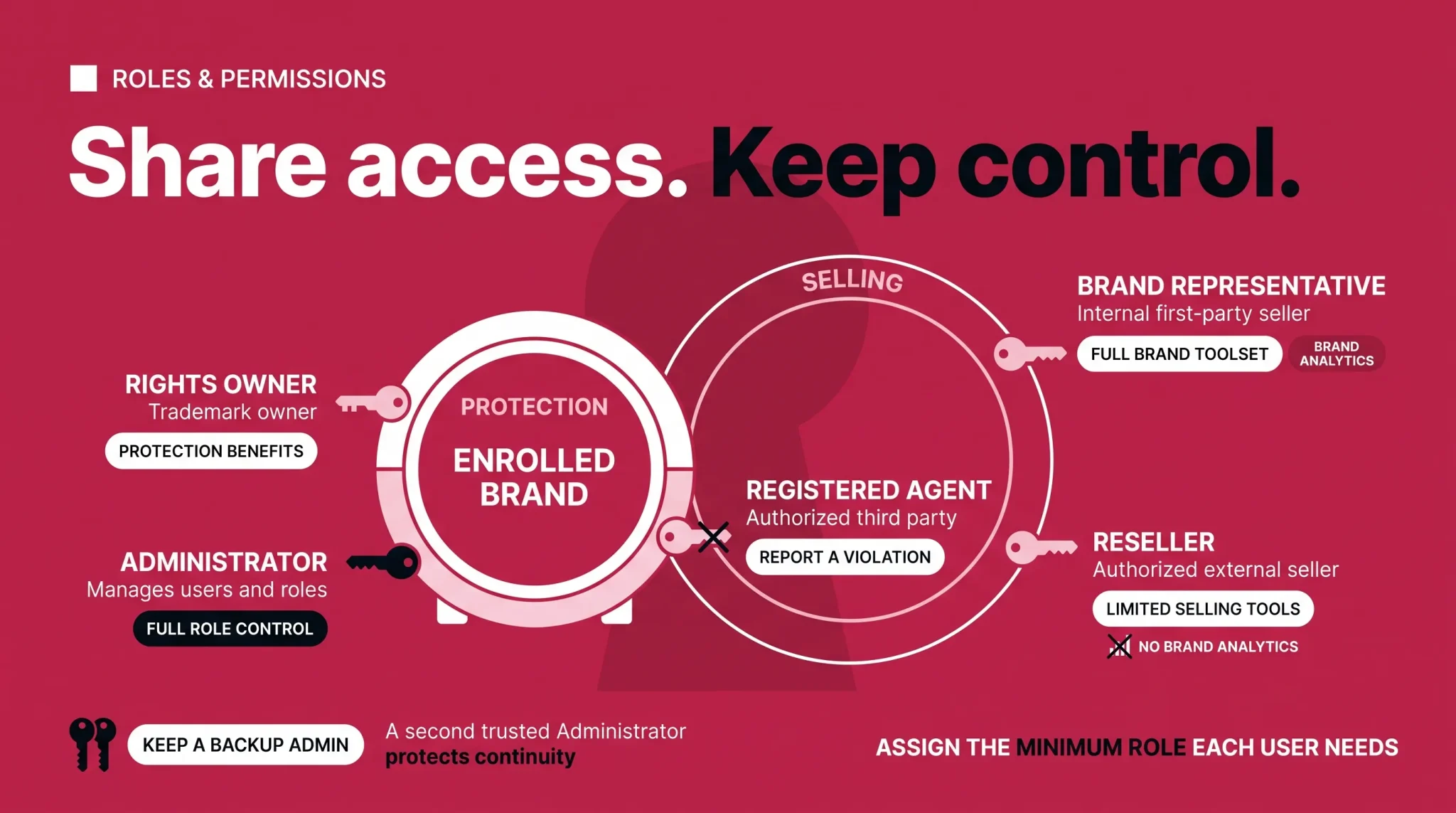
One of the most useful and least understood parts of Brand Registry is how it handles access. Instead of everyone sharing one login, you affiliate other Amazon accounts with your brand and assign them roles. There are two separate sets of roles, and keeping them straight is what protects your sensitive brand data.
Protection roles govern brand protection and administration. Selling roles govern access to the seller and vendor tools that help you list, advertise, and analyze your products.
Role | Type | Who it is for | Key access |
|---|---|---|---|
Rights Owner | Protection | The trademark owner who enrolls the brand | Report a Violation and other protection benefits, assigned automatically at enrollment |
Administrator | Protection | The trademark owner and trusted internal admins | Assigns and updates all roles, assigned automatically at enrollment |
Registered Agent | Protection | An authorized third party, such as an agency, reporting IP violations | Report a Violation access only |
Brand Representative | Selling | An internal, first party seller employed by the brand | Full brand toolset, including Brand Analytics, and the ability to create listings |
Reseller | Selling | An authorized external, third party seller | Limited brand selling tools, and no Brand Analytics |
Assign these carefully. As a short example, imagine you work with a distributor and an agency. You can connect the distributor's selling account as a Reseller so they can create compliant listings for your products without seeing your Brand Analytics data. Separately, you can add your agency as a Registered Agent so they can file Report a Violation cases on your behalf, again without any access to your selling data. The trademark owner keeps the Administrator and Rights Owner roles and stays in control of who else gets in.
One practical tip: keep more than one Administrator. If your only Administrator leaves the company, regaining control of the brand becomes a slow process, so a backup admin saves real headaches later.
What Brand Registry Unlocks
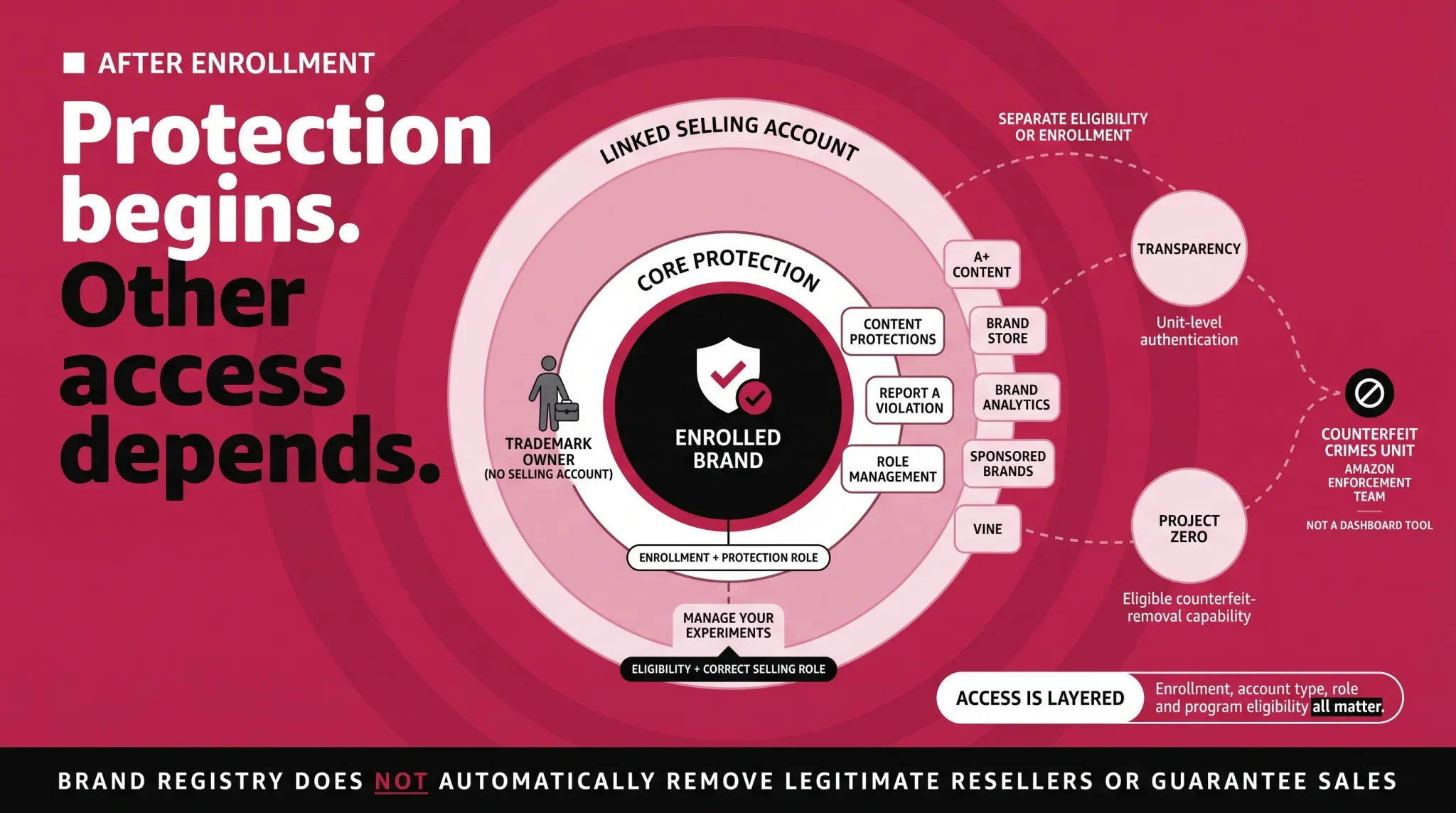
It helps to think about the benefits in three layers, because they do not all switch on the same way.
The first layer is core protection and listing control. Once you are enrolled, Amazon applies additional protections to help safeguard the accuracy of your brand content, and you get the Report a Violation tool to flag suspected trademark, copyright, or other infringement. It is worth being precise about what this does and does not do. Brand Registry provides tools for addressing suspected intellectual property infringement and inaccurate brand content. It does not automatically remove an otherwise legitimate reseller simply because the reseller is unauthorized or offers a lower price. These protection benefits are tied to your enrolled brand and your protection role, and a trademark owner can hold them even without an active selling account. For brands with a utility patent, Brand Registry also offers a Neutral Patent Evaluation option, which is a faster alternative to court for resolving certain patent disputes. Amazon documentation has also referred to this as Amazon Patent Evaluation Express in its detailed program materials.
The second layer is the seller and vendor toolset, and this is where accounts and roles matter. Tools such as A+ Content, Amazon Stores, Sponsored Brands and Sponsored Display ads, promotions like Subscribe and Save and virtual bundles, Amazon Vine, Manage Your Experiments, and Brand Analytics all require an eligible linked selling account and the correct role. A Brand Representative, meaning an internal first party seller, unlocks the full brand toolset including Brand Analytics. A Reseller, meaning an authorized external seller, gets a more limited set and does not receive Brand Analytics. Each of these tools has real depth, and several of them have dedicated guides, so treat this section as the map rather than the full manual.
The third layer is programs that require their own eligibility or enrollment. Transparency, which uses unique codes to authenticate individual units, and Project Zero, which gives qualifying brands the ability to remove certain counterfeit listings directly, are not switched on automatically when you enroll. You apply to them separately once you qualify.
One clarification is worth making here. The Counterfeit Crimes Unit is sometimes mentioned alongside these tools, but it is not a feature you turn on. It is Amazon's own enforcement team that works with law enforcement to pursue bad actors. It is part of why brand protection on Amazon has real teeth, but it is not something you operate from your dashboard.
Managing Multiple Brands and Marketplaces
Brand Registry is built to scale with you. You use one global Brand Registry account rather than a separate account for each country. During your initial enrollment you select one country based trademark office, and after your brand is approved you can connect additional country trademarks for the other marketplaces where you want protection and benefits. If you own more than one brand, you can enroll additional brands from your Brand Registry homepage. Because portal flows change over time, confirm the exact steps in the live portal when you get there.
Is Amazon Brand Registry Worth It?
For most businesses that own a trademarked brand and plan to build a long-term presence on Amazon, Brand Registry is usually worth pursuing. If you are reselling other companies' products and have no brand of your own, Brand Registry is not built for you. Keep in mind that enrollment is free, but the trademark, the internal administration of roles and users, and the use of the unlocked programs still take time and resources. Brand Registry gives you protection tools and access to content and analytics features, but it does not increase sales on its own or prevent every listing and reseller issue. Used well, it gives serious brands the control and the data they rely on to grow.
Before You Apply: Final Checklist
Run through this before you hit submit.
My brand name matches my trademark record exactly.
My trademark registration or application number is correct.
My trademark is a word mark, or a design mark with words, letters, or numbers.
I have a clear, standalone image of my logo.
I have real photos showing my brand name on the product or packaging.
My branding is permanently affixed, not a temporary label.
I know which product categories my brand belongs in.
I have my existing ASINs ready, if my products are already listed.
I am the trademark owner, or I have direct authorization from the owner.
The trademark contact knows a verification code may be coming and is ready to respond.
Ready to Register and Protect Your Brand?
If your trademark is already registered or you have an eligible pending application, you can begin the Brand Registry enrollment process. If nothing has been filed yet, start with a trademark application directly or through IP Accelerator. Remember that Brand Registry protection benefits begin after your brand is successfully enrolled, not simply when a trademark application is filed. And if you would rather have experienced hands manage the enrollment and set your brand up correctly from day one, Flairox can handle the whole process for you, from application to post approval brand setup. Book a call with our team and protect your brand the right way.
Frequently asked questions
It is a free Amazon program for brand owners that verifies your brand ownership, helps safeguard the accuracy of your brand content, and unlocks protection and brand building tools. It is separate from the shopper Gift Registry.