Bilal Siddiqui
Key takeaways
A Brand Store is free to build and maintain. Amazon does not require you to advertise in order to have one.
Amazon documents up to three hierarchy levels, with the homepage counting as the first. That is a depth limit, not a cap on total pages.
Each Store page allows a maximum of 20 sections, with hard caps on certain tile types, so layout decisions are budget decisions.
Brand Story is a type of A+ Content that lives on your product detail pages. It is related to your Store but it is not part of it.
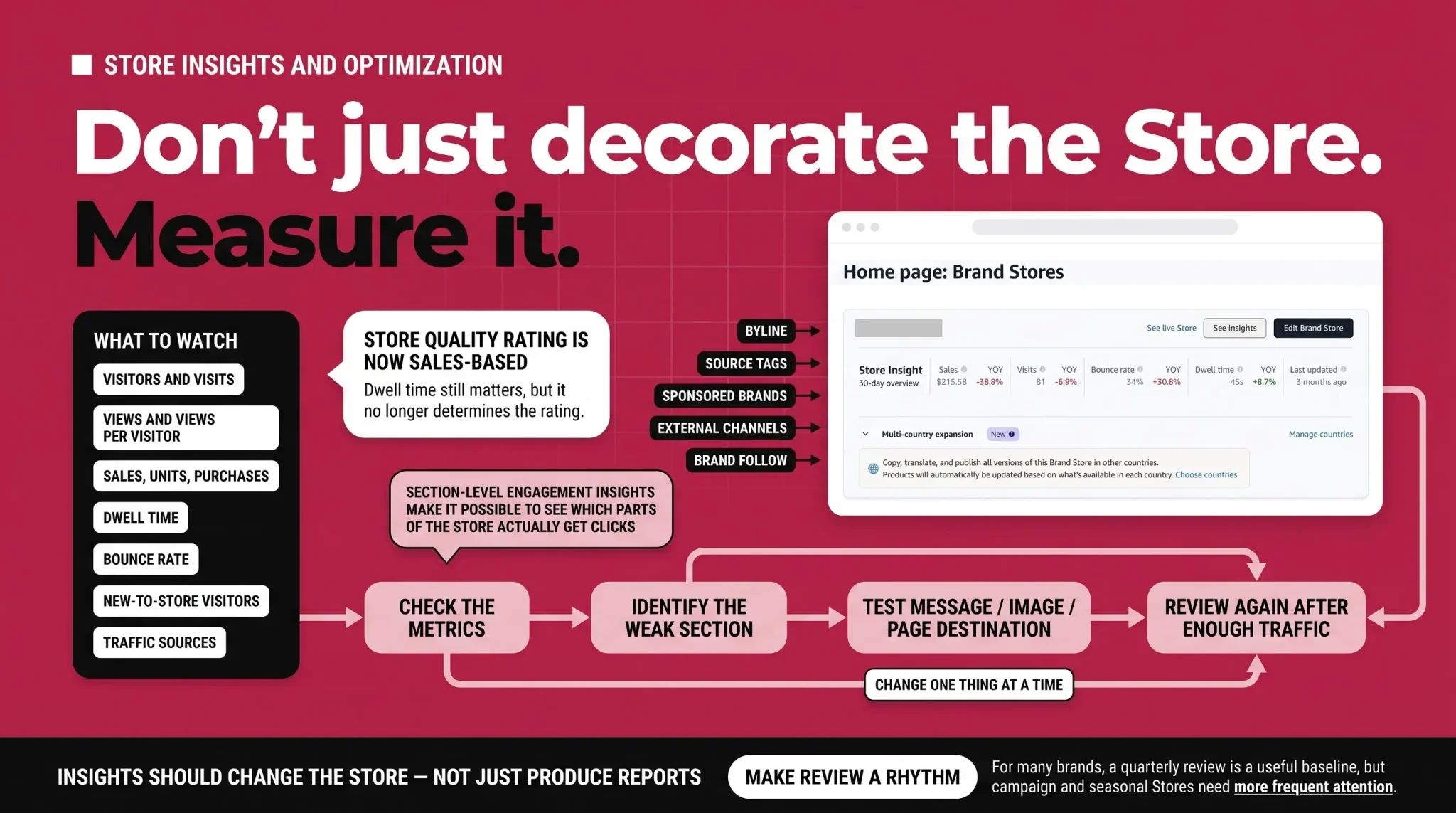
Amazon changed the Brand Store quality rating to a sales-based measure on December 12, 2025. Dwell time no longer determines the rating.
Section-level engagement metrics launched in beta with data available from January 10, 2026, which makes section-by-section Store analysis possible.
Most Amazon storefronts are built once and then left alone. A brand gets approved in Brand Registry, someone opens the builder during a launch sprint, drops the catalog into a single product grid, hits submit, and never goes back. The Store technically exists. It just does not do anything.
That is a waste, because the Storefront is one of the few Amazon surfaces where a brand can control the page hierarchy, layout, product journey, and wider brand narrative. It is free to build, but it still requires strategy, creative work, and ongoing attention.
This guide covers what an Amazon Storefront is, who can create one, how to structure it so shoppers can actually navigate it, which tiles and specifications you are working within, how Brand Story extends that same brand narrative onto your product pages, and how to read Store Insights well enough to improve the thing over time.
What an Amazon Storefront actually is
An Amazon Storefront is a free, multi-page destination inside Amazon where a brand can present its full catalog, organize products by category or use case, and add lifestyle imagery, video, and brand content. It has its own web address, its own navigation, and its own analytics.
One naming point worth getting straight early, because it causes real confusion. Shoppers and sellers say "storefront." Amazon's own product is called Brand Stores, and inside the advertising console you will find it under Brand Content. The two terms describe the same thing, and this guide uses them interchangeably.
There is a second source of confusion that matters more. The Amazon Influencer Program also produces something called a storefront, which is a curated page where a creator recommends products and earns commission on referrals. That is a different product for a different person. A Brand Store is created for an eligible brand account and, for sellers, generally requires Brand Registry. It does not operate as an affiliate storefront. If you arrived here looking for the influencer version, this is not it.
The clearest way to understand the Store is to compare it with a product detail page. On a detail page you are working inside Amazon's template. You control the images, the copy, and the A+ Content modules, but Amazon controls the wider page structure and may show other merchandising and advertising placements. Inside your Store, you choose the page hierarchy, sequence, and brand-led path within Amazon's tile system. One surface sells a product. The other sells a catalog and a brand.
Amazon's own measurement of that difference is worth citing carefully. According to Amazon internal data from August 2024, new-to-brand shoppers who visited a Brand Store were 62.7% more likely to purchase than those who did not, and spent 72.3% more on average when they did. Those are Amazon's figures for a specific measurement window rather than a guaranteed outcome, but the direction is consistent with what the Store is for: it gives an unfamiliar shopper a reason to trust you before they commit.
Who can build an Amazon Storefront, and what it costs
Creating and maintaining a Brand Store is free. You do not need to run advertising to have one, and there is no media cost attached to the Store itself.
For sellers, Amazon's current access requirements include:
A Professional selling account
Approved Brand Registry enrollment for the brand you want to build the Store for
The correct selling and brand roles on the account, since permissions determine who can open the builder
An active account in good standing
Vendors may also be eligible through Vendor Central. Agencies do not qualify independently. An agency builds and manages a Store on behalf of an eligible brand once it has been granted the necessary account access and permissions, which means the underlying eligibility always sits with the brand account.
Brand Registry itself has its own requirements around trademarks and verification. Those belong to the Brand Registry process rather than to the Store, and this guide treats Brand Registry approval as the starting line rather than re-explaining it.
The Store builder is reached through the advertising console, so you will authenticate against an Amazon Ads account when you open it. Treat that as the access route rather than as a separate eligibility test.
Brand Stores are available across North America, South America, Europe, the Middle East, Asia Pacific, and Africa. Amazon publishes the current marketplace list, and it is worth checking before planning a multi-market rollout.
Where your Storefront sits alongside your other brand surfaces
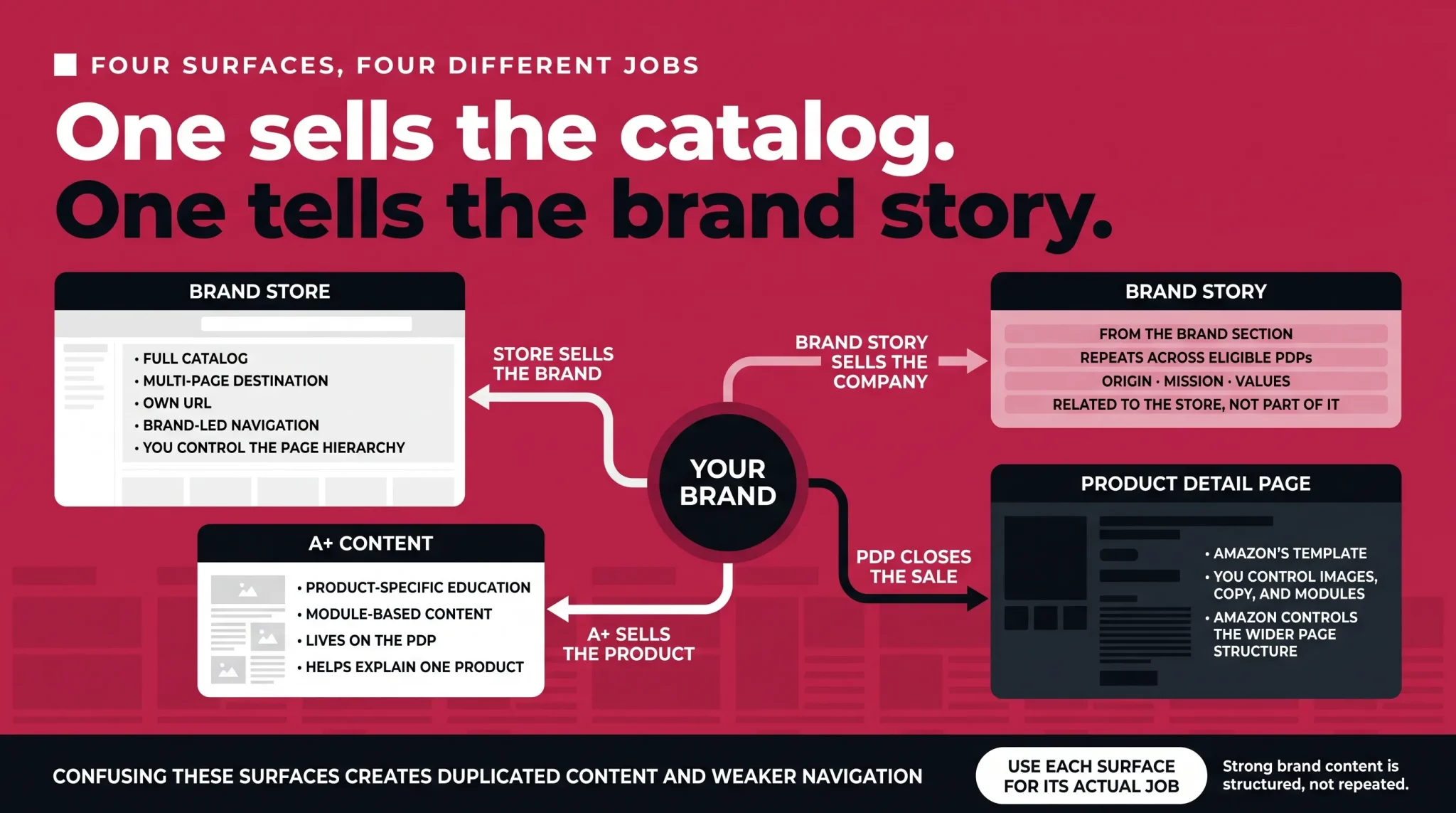
Brands routinely confuse four things that all look like "brand content" but do different jobs. Getting the distinction clear before you build saves a lot of duplicated effort.
Surface | What it sells | Where it lives | Who controls the layout |
|---|---|---|---|
Brand Store | Your catalog and your brand | Its own multi-page destination with its own URL | You, within Amazon's tile system |
Brand Story | Your brand's origin, values, and mission | In the "From the brand" section on eligible product detail pages | You, within fixed module layouts |
A+ Content | One specific product | Below Brand Story on the product detail page | You, within fixed module layouts |
Product detail page | One specific product | Amazon's standard listing template | Amazon, apart from your images, copy, and modules |
The pattern is worth internalising. Your detail page and A+ Content close the sale on a single product. Brand Story tells the shopper who you are, repeatedly, on every product page they land on. The Store is where someone goes when they have decided they are interested in the brand and want to see everything else you make.
Setting up your Amazon Storefront
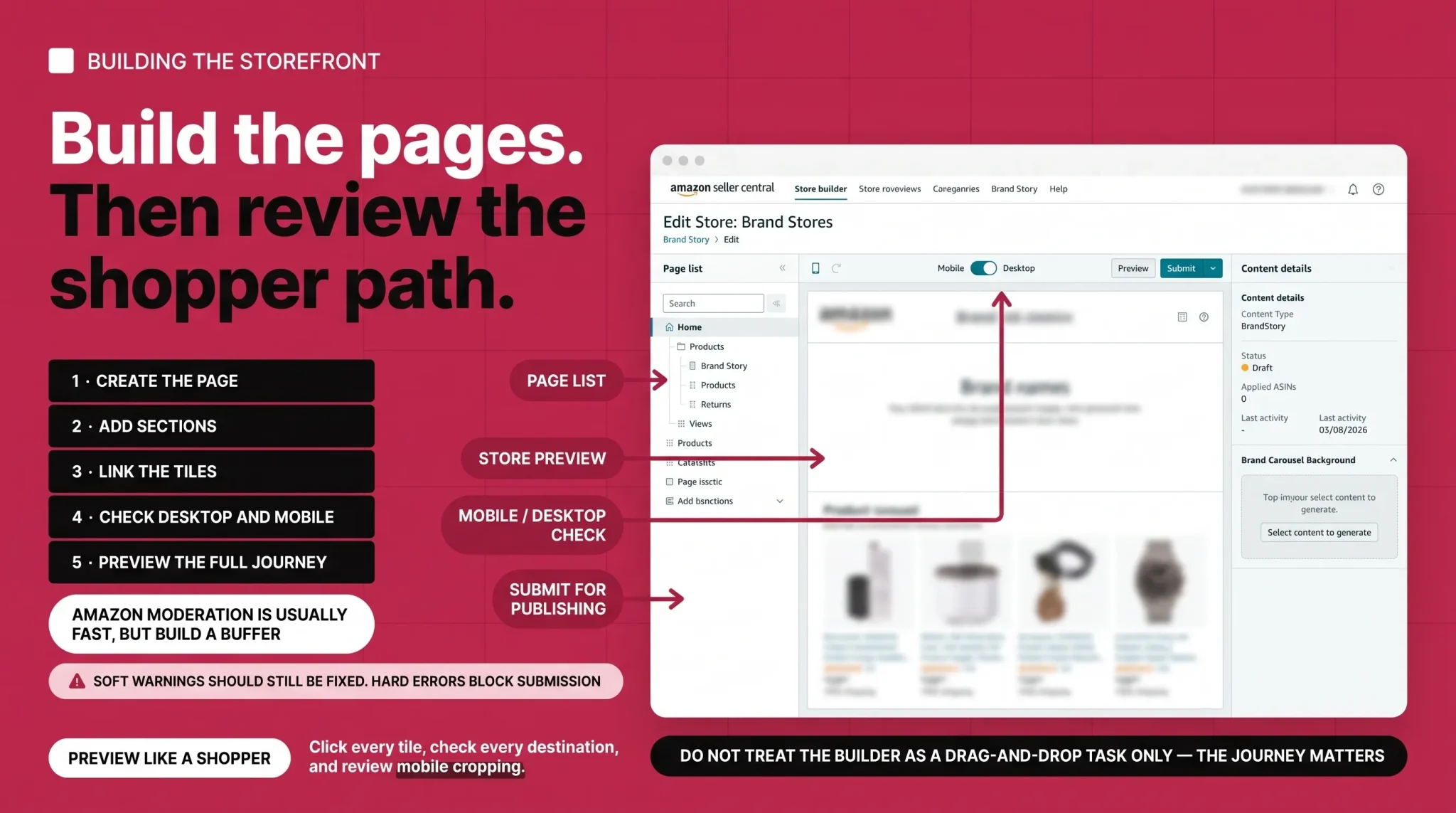
In the advertising console, follow Amazon's current Store creation path: go to Brand Content, then Brand Stores, then Create Brand Store. If you work primarily in Seller Central, hovering over Stores and selecting Manage Stores takes you to the same builder after you sign in with your Amazon Ads credentials.
The first screen handles brand identity. You enter the brand display name that shoppers will see, upload a brand logo of at least 400 by 400 pixels, and write a page meta description. Two details get missed here often enough to be worth flagging. There is a "Display logo in header region" toggle that needs to be switched on for the logo to appear, and the meta description is a real field that affects how your Store page is described in shopping and search experiences, so it deserves an actual sentence rather than the brand name repeated.
Next you choose how the page starts. Amazon documents three preset templates:
Marquee, designed as a brand or sub-brand gateway page
Highlight, for showcasing products alongside related content
Product Grid, for displaying a large number of products
You can also start from a blank page and build a custom layout from scratch. The blank page is a starting option rather than a fourth named template, and it is usually the right choice for a homepage once you know what you want the page to do.
Amazon also offers the Brand Store Builder Agent, a tool that can generate Brand Store pages using AI-produced content and layouts based on Store best practices. It is useful for getting a first draft of a page in place quickly, particularly when creative resources are thin or you are standing up a seasonal page under time pressure. Treat the output as a starting point rather than a finished asset. Generated copy, imagery, links, layout, and mobile presentation all need reviewing before you publish, and nothing in the tool guarantees that what it produces is compliant, on-brand, or high-performing.
When the Store is built, you submit it for publishing. You can either make it live as soon as it is approved or schedule it to go live on a specific date. Scheduling works for the first publish and for later updates, which is how brands stage a Prime Day or seasonal version of a Store without disturbing the version currently running.
Amazon says Store moderation is usually completed within 24 hours, but it may take up to three business days. Build that buffer into any launch timeline rather than assuming same-day approval.
Two kinds of rejection can appear before moderation. Soft rejections are warnings you can override, such as an image tile that has no link attached. They exist to catch mistakes, and they are usually worth fixing rather than ignoring. Hard rejections block submission entirely, and a page with no content is the classic example.
Before you submit, run through the page properly. Preview it on both desktop and mobile, since the builder lets you toggle between the two views. Click every tile and confirm it lands somewhere sensible. Read the copy for typos, because moderation does catch them. Check that nothing important in your imagery is sitting in an area that will be cropped, which the next section covers in detail.
Structuring your Store around how people shop
Structure is where most Storefronts win or lose, and it is the part that AI tools and templates cannot decide for you.
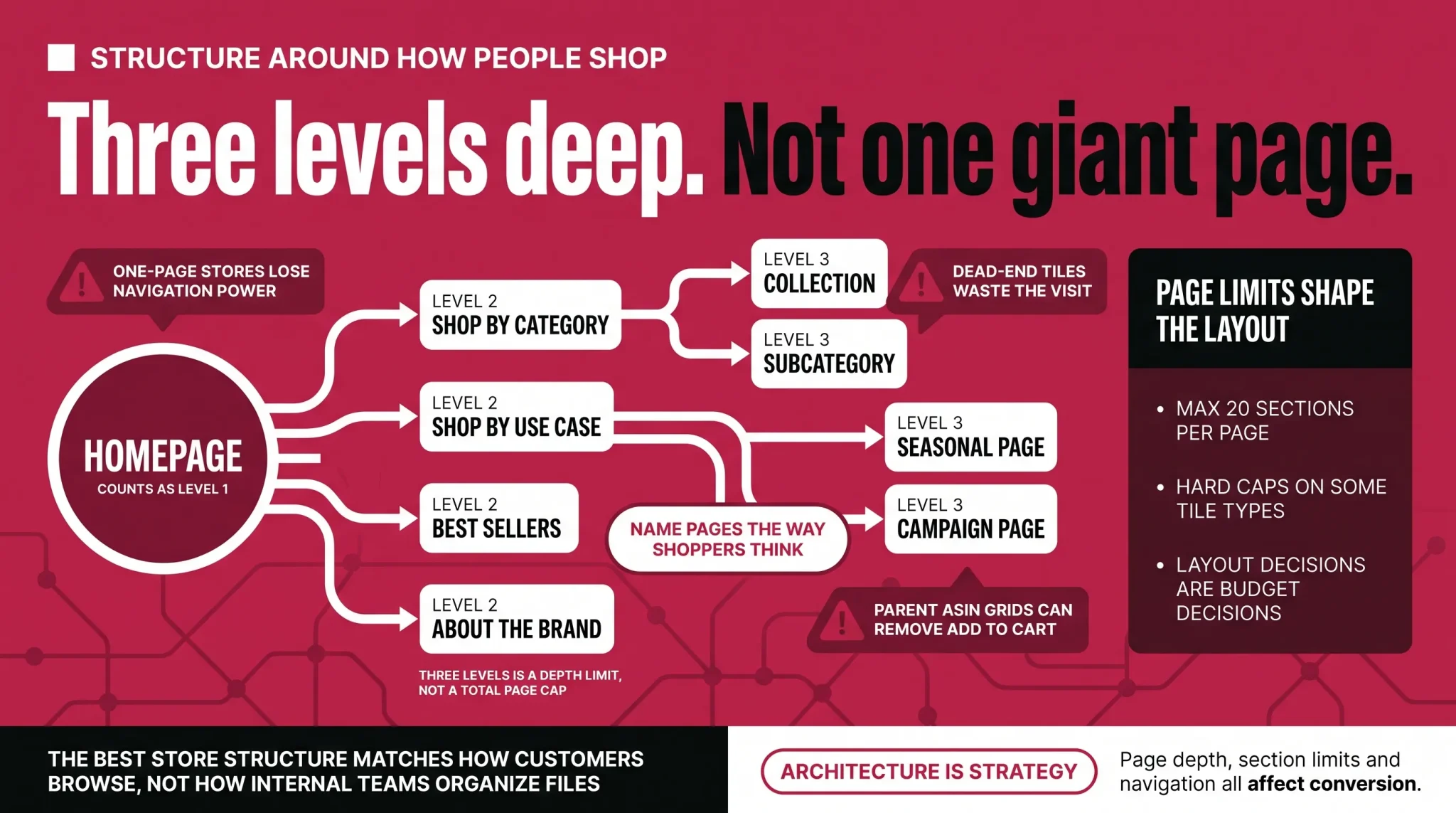
Amazon documents up to three hierarchy levels in total, with the homepage counting as the first level. So you have the homepage, one level of subpages beneath it, and one further level beneath those. This is a depth limit, not a page count. Amazon does not publish a maximum number of pages, and the two concepts get conflated constantly in guides that should know better.
A skincare brand might structure it like this:
Level 1: Homepage
Level 2: Skincare, Haircare, Body Care
Level 3: Under Skincare, the pages Cleansers, Moisturizers, Serums
Three levels total. Notice what that constraint forces: if your level-two pages are vague, your level-three pages have nowhere useful to sit. Decide the middle layer first.
The organizing logic matters more than the number of pages. Category is the obvious approach and works well for brands whose customers already think in categories. Use cases often work better for brands whose products cut across categories, where "For Sensitive Skin" or "Morning Routine" will resonate more than a product-type label. Collections work for brands with seasonal or capsule ranges. Pick the logic your customer already uses and name the pages in their language, not your internal one.
Beyond product pages, two additions earn their place for most brands. An About page gives you somewhere to tell the longer version of your story, with room for founder background, sourcing, manufacturing, or values that will not fit anywhere else. A hero product page is worth building if one product carries a disproportionate share of your revenue or introduces most new customers to the brand, because it lets you explain that product properly instead of burying it in a grid.
Whatever you build, avoid dead ends. Every clickable tile should lead somewhere, either to another page in your Store or to a product detail page. A shopper who taps an image and lands nowhere has been given a reason to leave.
Structure also has a direct advertising consequence. Store Spotlight, the Sponsored Brands format that sends shoppers into your Store rather than to a product page, requires a Store with at least four pages, each containing at least one unique product. In practice that means a homepage plus three subpages. If you build a one-page Store, that ad format is simply unavailable to you.
Choosing tiles, and the limits that shape your layout
Store pages are built from sections of tiles, and the limits are firm enough that they should shape your design rather than surprise you halfway through.
Every page has a header section built in and needs at least one additional content tile. Beyond that, each page allows a maximum of 20 sections, with per-page caps of:
4 background video tiles
1 product grid
1 gallery
1 featured deals tile
1 recommended products tile
Those caps are the reason a "put everything on the homepage" approach fails. You get one product grid per page. If you want three merchandised groupings, you need three pages, or you use product tiles and shoppable images instead.
The tiles themselves fall into three rough jobs. Storytelling tiles carry the brand: image, image with text, video, background video, gallery, and text. Merchandising tiles present the catalog: product tile, product grid, best sellers, and recommended products. Conversion tiles move people toward a purchase: shoppable image and featured deals.
A few behaviors are worth knowing before you design around them. Shoppable images support up to six interactive products, each linking to its detail page. The best sellers and recommended products tiles each show five products at a time and only work if your Store is associated with your brand's products in the catalog. The featured deals tile can automatically display supported active promotions, and it requires child ASINs because parent ASINs are not supported. Coupon-based promotions may not be eligible in every marketplace, so check the current Store Builder requirements for the country where the Store is published.
Specifications and limits
Element | Minimum size | Max file size | Notes |
|---|---|---|---|
Hero image | 3,000 x 600 px | 5 MB | Appears at the top of every page |
Brand logo | 400 x 400 px | 5 MB | Acts as the home button across the Store |
Image tile, full width | 1,500 x 20 px | 5 MB | 3,000 px width recommended for high-resolution display |
Image tile, large / medium / small | 1,500 x 1,500 / 1,500 x 750 / 750 x 750 px | 5 MB | Link titles obscure roughly 19% of rectangles, 12% of squares |
Image with text, full width, text over image | 3,000 x 1,500 px | 5 MB | Separate specs apply to the text-next-to-image layout |
Shoppable image, full width | 1,500 x 750 px | 5 MB | 3,000 x 1,500 px recommended; up to 6 products |
Video tile, full width | Cover 3,000 x 1,500 px; video 1,280 x 640 px | MP4, H.264, aspect ratio 6:4 to 8:3 | |
Background video, full width | 1,280 x 640 px | 2 to 20 seconds, silent autoplay, no player controls, max height 1,500 px | |
Gallery | 1,500 x 750 px | Up to 8 images | |
Product grid | 4 products minimum | 4 per row on desktop, 2 per row on mobile; up to 500 ASINs entered manually |
The hero image safe area
Your hero image will be cropped, and the cropping is not symmetrical. Amazon's Stores documentation states that at resolutions below 1,500 pixels wide, up to 16% of the left and right sides is cropped, and the brand logo covers roughly a further 18% of the left side on small screens. Amazon's creative guidelines page separately describes hero cropping of up to 30% overall.
The two descriptions do not match exactly, which is worth knowing rather than glossing over. The practical instruction is the same either way. Keep logos, text, and any critical subject matter well inside the center of the frame, and treat the left edge as the highest-risk area, because it absorbs both the crop and the logo overlay. Design the hero so it still reads when the outer thirds are gone.
Why your Add to Cart button disappeared
Products in a product grid normally show an Add to Cart button. Amazon documents five reasons a product will not:
It has multiple variations to choose from before purchasing, such as size or color
It allows for clipping coupons
It allows for Subscribe & Save
It is out of stock in your inventory but available through third-party sellers
It is categorized as Apparel
Amazon's creative guidelines add one more: the Add to Cart button is hidden for every product in a tall product grid, the layout intended for fashion and other vertical-image categories. If in-Store purchasing matters to you, the standard grid is the layout to use.
There is a related fix worth knowing. To get Add to Cart in grids and tiles, add child ASINs. Parent ASINs, active coupons, and out-of-stock items where a third-party offer holds the Buy Box will produce "See all buying options" instead.
Mobile and embedded text
Every image tile lets you upload a separate custom image and layout for mobile. Some text fields are not supported alongside the custom mobile layout and will only appear on desktop, so both views need previewing before you publish rather than one.
Finally, avoid uploading images with text baked into them. Amazon discourages the practice because embedded text cannot be read by search engines or by shoppers using screen readers. Use the image with text tile instead, which keeps the text as text.
Brand Story: your brand narrative on the product page
Everything above concerns a destination shoppers have to travel to. Brand Story solves the opposite problem: it puts a compressed version of your brand narrative on the product pages they are already looking at.
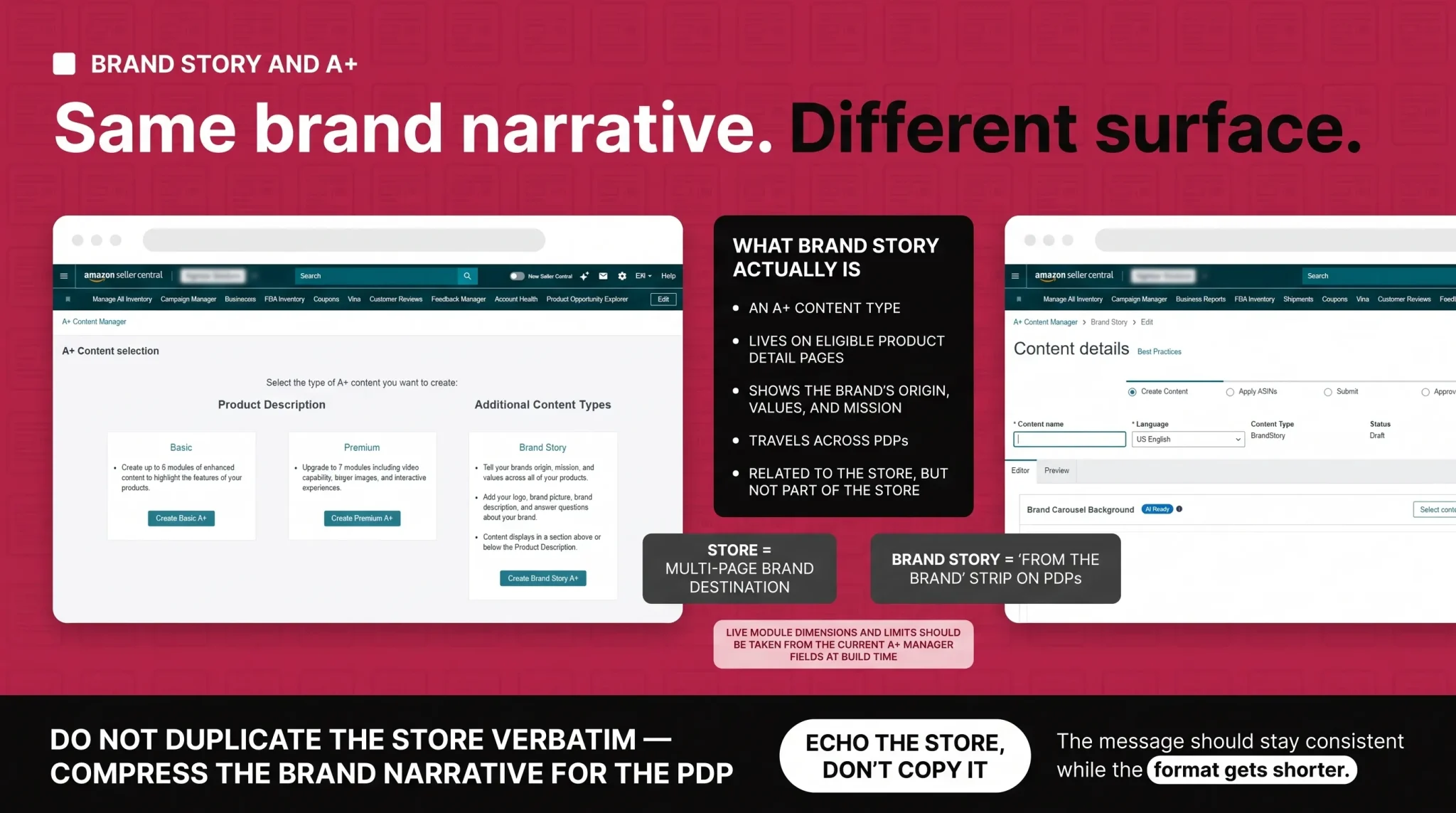
Brand Story is a type of A+ Content. It appears in the From the brand section on eligible product detail pages as a horizontal set of panels a shopper can scroll or swipe through. It is available to brands enrolled in Brand Registry, and it is built in A+ Content Manager, reached from the Advertising menu in Seller Central. Vendors create it through the equivalent path in Vendor Central.
The application model is what makes it efficient. Brand Story content can be applied to multiple eligible brand-owned ASINs and reused across a catalog or a product line, so you are not rebuilding it product by product. Brands can also create different versions where categories or product families genuinely require different narratives, which is useful if you sell into markets that have little in common with each other.
Amazon describes Brand Story as a way to share your brand's story, values, and mission, and it can include links to your products and to your Brand Store. That last part is the connective tissue between the two surfaces. A shopper who arrives on one product page can move from your story into your wider catalog without ever going back to search.
What belongs there is narrative, not specification. Origin, values, mission, what you make and why, the people or process behind the product. What does not belong is a feature list, a comparison chart, or anything that reads like a second set of bullet points, because that is what your A+ Content and your listing copy are for. The division is simple enough to hold in your head: A+ Content sells the product in front of the shopper. Brand Story sells the company behind it.
Brand Story should echo your Store rather than duplicate it. The same visual language, the same tone, the same core message, compressed. Your Store's About page is where the long version lives, with room for detail. Brand Story is the version that travels, seen by people who may never visit your Store at all, so it needs to work in a few panels and stand on its own.
One practical note on specifications. Module dimensions, image file limits, and module counts for Brand Story are shown in the upload fields inside A+ Content Manager, and Amazon revises them. Published numbers circulating online contradict each other, so take your dimensions from the live field at the moment you build rather than from a blog post, including this one.
Getting shoppers into your Storefront
A Store nobody reaches is just an unused asset. There are five reliable routes in.
The byline. Once a Store is live and approved, Amazon normally creates the brand byline link on eligible product detail pages within four to seven days. Correct Brand Registry and ASIN brand configuration matters because some product pages may not connect properly if the brand name or brand ID does not match.
Your Store URL. Every approved Brand Store receives a dedicated long URL automatically. Brands can also request a shorter homepage URL, such as amazon.com/brand-name, where available and approved by Amazon. Use the approved URL in email, social profiles, and other external marketing.
Source tags. Inside the Store Insights dashboard you can generate a tagged version of your Store URL for a specific channel, then evaluate that channel in the Sources view. If you send traffic from email, social media, or your own website, tags help separate those sources instead of grouping them together.
Sponsored Brands. Sponsored Brands campaigns can use your Store, or a specific subpage of it, as their landing destination, and the Store Spotlight format is built specifically to send shoppers into Store subpages. Campaign structure, targeting, and bidding are a separate discipline with their own decisions to make.
Brand Follow. Shoppers may be able to follow your brand from the Store and other supported Amazon surfaces, helping them stay connected with future brand activity. Availability and follow experiences can vary by marketplace.
A word on search, because this gets overstated. Store pages have dedicated URLs, a meta description field, and entry points from product pages, ads, and external channels. Treat the meta description as page information that may appear in shopping and search experiences rather than as a guaranteed ranking lever. Building or polishing a Store does not, by itself, improve where your products rank in Amazon search results.
Measuring your Storefront with Store Insights
Store Insights is reachable from the Store builder or the Stores main page, and it is the difference between optimizing a Store and redecorating one.
The current Store metrics cover traffic and outcomes. Visitors counts unique users or devices in your date range. Visits counts arrivals from a traffic source or page views within a single day. Views and views per visitor tell you how far people go once they arrive. Sales, units sold, and purchases are estimated for Store visitors within Amazon's currently documented 14-day attribution window. One labeling note: newer Amazon dashboards use Purchases, while some older Amazon documentation uses Orders for the same concept.
Alongside these sit average dwell time, average bounce rate, and new-to-Store visitors. Traffic is broken down by source: Sponsored Brands, Amazon organic traffic from your byline, your own tagged sources, and everything else.
Two developments changed how this dashboard should be read.
The quality rating is now about sales. On December 12, 2025, Amazon changed the Brand Store quality rating from an engagement-based measure to a sales-based one. Your High, Medium, or Low rating now reflects sales attributed to Store visits, benchmarked against similar brands in your category, rather than how long visitors spent browsing. Dwell time and bounce rate are still visible and still useful, but they no longer determine the rating, and optimization recommendations now show potential sales impact alongside dwell-time impact. In that same announcement, Amazon reported internal data from July 5 to September 6, 2025 indicating that high-quality Stores can see up to 97% more sales than low-quality Stores and up to 39% more than medium-quality Stores. That is Amazon's measurement of a specific period rather than a promise about your Store, but it is a reasonable argument for treating Store quality as a revenue question.
You can now see individual sections. Amazon launched section-level shopper engagement insights in beta, with metrics available from January 10, 2026, through a Sectional Performance tab in the Store Insights dashboard. It reports renders, viewable impressions, clicks, and click-through rate for each section of your Store, segmented by traffic source. Amazon lists the feature for advertisers with Brand Stores in the supported marketplaces named in its announcement. It remains labeled beta, so check current marketplace availability against Amazon's documentation before building a process around it.
What you see | What it usually means | What to do |
|---|---|---|
High renders, very low CTR on a section | Shoppers see it and are not motivated to act | Change the message or the image before you change the position |
High traffic to a page, low attributed sales | Wrong products, wrong depth, or an unclear next step | Re-merchandise the page and check that every tile leads somewhere |
Pages with almost no visits | A navigation problem, not a content problem | Rename the page in shopper language or move it up a level |
High bounce rate from a single traffic source | Message mismatch between the ad and the landing page | Point that campaign at a more relevant subpage |
Good dwell time, Medium quality rating | Engaging but not converting relative to peers | Move purchase-ready products higher and reduce steps to cart |
The practical value is that layout stops being a matter of taste. You can see that the video tile in position three is being rendered constantly and clicked almost never, and you can see whether that is true for everyone or only for shoppers arriving from ads.
Turning Store data into a review rhythm
A quarterly review is a sensible operating rhythm for most catalogs. It is frequent enough to catch problems and infrequent enough that you actually do it. It is not an Amazon rule, and it should not be applied mechanically. Seasonal Stores, Stores acting as landing pages for live campaigns, and Stores tied to a launch or a major shopping event need updating far more often than that. Let the calendar and the data set the pace.
A worked example of what a review turns up. Suppose your homepage carries a brand video near the top. Sectional Performance shows it rendering on nearly every visit, with a click-through rate close to zero, and the pattern is identical across traffic sources. The instinct is to move the video down the page. That is usually the wrong first move, because the data does not say the video is badly placed, it says the video is not compelling once seen.
Test the message first. Change the cover image so it shows a person or product rather than a title card. If that does not move the number, shorten the video or replace it with a shoppable image in the same slot, which gives shoppers something to click rather than something to watch. Only after those two tests would moving the section make sense, and by then you will know whether the slot or the content was the problem. One change at a time, reviewed after enough traffic to mean something.
Your quarterly Store review checklist
Does every page still reflect what you currently sell, and are discontinued products removed?
Does each clickable tile lead somewhere valid, on both desktop and mobile?
Are your best-converting products above the fold on the pages that get the most traffic?
Have you checked Sectional Performance for any section with high renders and weak clicks?
Are your Sponsored Brands campaigns pointing at the most relevant subpage, not just the homepage?
Are external channels tagged so you can see which ones are working?
Does your Store still match your current packaging, website, and social presence?
Is anything seasonal still live that should have come down?
Has your quality rating moved, and does the sales data explain why?
Mistakes that keep Storefronts underperforming
The failure patterns are consistent. One-page Stores are the most common, and they forfeit both navigation and the Store Spotlight ad format. Dead-end tiles send shoppers nowhere and cost you the visit. Text baked into images is invisible to search engines and screen readers. Overloaded homepages run into the 20-section limit and the single-product-grid cap, then get built badly to work around them. Untagged external traffic means you never learn which channel is working. Parent ASINs in grids quietly remove the Add to Cart button. And build-and-forget Stores slowly stop reflecting the brand, which is a slower failure but a more expensive one.
Where to go from here
The decision in front of most brands is not whether to have a Storefront. It is whether to treat it as a one-time build or as a surface with a structure, a measurement loop, and someone responsible for it. Amazon has spent the last two years making the second option far more viable, first by tying the quality rating to sales and then by exposing performance section by section. The tooling now rewards brands that come back.
If you want help with the harder parts, which are the information architecture, the creative production, and reading section-level data well enough to act on it rather than react to it, that is the kind of work we do at Flairox every day. We are happy to look at your Store and tell you what we would change first.
Frequently asked questions
Yes. Creating and maintaining a Brand Store costs nothing, and you do not need to advertise to have one. Your only costs are the creative work and the time to build and maintain it.