Bilal Siddiqui
Key takeaways
It’s a Standing Commitment, Not a Campaign: Subscribe & Save converts one-time purchases into recurring orders, requiring ongoing inventory management and a permanent margin commitment rather than acting as a temporary promotional lever.
Strict Eligibility Criteria Apply: To qualify, sellers must hold the specific Brand Representative role in Brand Registry, maintain an in-stock rate above 90%, and avoid exaggerated price increases.
FBM Sellers Can Also Participate: While FBA products can be auto-enrolled, Fulfilled by Merchant (FBM) sellers can join by submitting requests per product, provided they maintain strict logistics metrics like a >95% valid tracking rate for three consecutive months.
You Control the Base Discount: Sellers choose to fund a base discount of 0%, 5%, or 10%, which comes directly out of their contribution margin, not Amazon's fees. Amazon may also fund an additional 5% tier for customers with five or more subscriptions.
Promotions and Discounts Stack: Active deals or seller promotions are applied on top of the Subscribe & Save discount, making careful margin modeling essential before launching promotional events.
Product Fit is Crucial: The program works best for consumable items with predictable replenishment cycles (like a 30-day supply of supplements) and is poorly suited for durable goods where no natural reorder cycle exists
Stockouts Are Highly Penalized: Failing to maintain inventory leads to missed scheduled deliveries, which frequently triggers subscriber cancellations and can threaten your overall eligibility for the program.
Most sellers meet Subscribe & Save from the wrong side. You see the checkbox on a competitor's detail page, you notice the discount badge, and you assume it is a promotional lever you switch on. From inside Seller Central the program behaves quite differently. Enrollment for FBA sellers is largely automatic rather than opt-in, the discount you fund is a standing margin commitment rather than a campaign, and the offer only appears to shoppers under conditions you have to actively maintain.
This guide covers Amazon Subscribe & Save from the seller perspective: who qualifies, how enrollment differs by fulfillment method, how the funding tiers actually work, what the program costs you in margin, which products suit it, and the operational obligations that come with having subscribers.
What Amazon Subscribe & Save Is
Subscribe & Save is Amazon's recurring delivery program. Customers sign up for repeat deliveries of products they use regularly, choose how often they want to receive them, and continue receiving them automatically until they change the frequency or cancel. Amazon describes the customer-side discount as reaching up to 15 percent.
From the seller side, the useful framing is that Subscribe & Save converts a one-time purchase decision into a standing order. You are not running a promotion with an end date. You are agreeing to supply a customer on a schedule, at a discount, for as long as they stay subscribed, and taking on the inventory obligation that comes with that.
Two order types matter operationally. Sign-up orders are the first delivery when a customer subscribes. Replenishment orders are every scheduled delivery after that. Replenishment orders are the reason the program is often described as predictable revenue, and also the reason a stockout is more damaging here than on a standard listing: a missed replenishment is a delivery a customer was already counting on.
One structural detail that catches sellers out on shared listings: for your Subscribe & Save offer to display on a product, your offer needs to be the Buy Box offer. If you lose the Buy Box, new shoppers are no longer subscribing to you. This matters far more to resellers competing on the same ASIN than to a brand owner selling its own catalog, but it is worth knowing before you build forecasts on subscription growth.
Subscribe & Save Eligibility Requirements
Amazon publishes a short list of criteria that applies to every seller regardless of fulfillment method. To participate, a seller needs to be a Brand Representative for a brand enrolled in Amazon Brand Registry, have a strong fulfillment history with an in-stock rate greater than 90 percent, have an average selling price without exaggerated increases (not counting deals), and have a buyable offer.
Each of those is worth reading carefully.
The Brand Representative requirement is narrower than "brand registered." It refers to a specific role assignment inside Brand Registry, not simply the fact that a brand is enrolled. Sellers who cannot find the program in their account are often failing this check rather than a product-level one.
The in-stock threshold is a rolling operational standard, not a one-time gate. A brand with a seasonal supply gap or a recurring reorder crunch can qualify one quarter and fall out the next.
The pricing criterion exists to stop sellers inflating a list price so that a subscription discount looks larger than it is. Amazon evaluates average selling price behavior, and unusual price movement can affect eligibility independently of everything else.
Amazon also states the categories in which products should sit: Beauty, Grocery, Health & Baby Care, Automotive Parts & Tools, Electronics, Home Tools & Home Improvement, Industrial Supplies, Kitchen, Lawn & Garden, Musical Instruments, Office Supplies, Outdoors, Pet Supplies, Sports, and Toys.
That list is broader than the consumables stereotype, which surprises people. Office Supplies, Industrial Supplies, and Automotive Parts all contain genuinely replenishable items. Category presence alone does not make a product eligible, though. Amazon assesses replenishment suitability at the product level, and a durable item sitting in an eligible category will not qualify simply because its category is on the list.
How Enrollment Works: FBA Versus Fulfilled by Merchant
The enrollment path is the single biggest practical difference between fulfillment methods, and it is where most outdated advice goes wrong. Subscribe & Save is frequently described as FBA only. Amazon's own current guidance says otherwise.
Sellers can participate whether they sell through Fulfillment by Amazon or Fulfilled by Merchant, as long as the account is in good standing. FBA sellers can have eligible products auto-enrolled. Fulfilled by Merchant sellers need to submit a request in Seller Central for each product they want enrolled.
Seller-fulfilled participation also carries an additional performance bar.
Fulfillment by Amazon | Fulfilled by Merchant | |
|---|---|---|
Enrollment | Eligible products auto-enrolled at your default discount | Request submitted per product in Seller Central |
Baseline criteria | Brand Representative role, in-stock rate above 90 percent, no exaggerated price increases, buyable offer | Same baseline criteria apply |
Additional criteria | None beyond the baseline | Must be met for at least three consecutive months |
Shipping | Handled by Amazon | Free domestic shipping required |
Delivery estimate accuracy | Not applicable | Greater than 93.5 percent |
Average delivery promise | Not applicable | Fewer than five days for domestic shipments |
Valid tracking rate | Not applicable | Greater than 95 percent |
Order defect rate | Standard account health applies | Less than 1 percent |
Pre-fulfillment cancel rate | Standard account health applies | Less than 2.5 percent |
Late shipment rate | Standard account health applies | Less than 4 percent |
The three consecutive months condition is the part worth planning around. A seller-fulfilled operation cannot decide to join the program this week. It needs a clean quarter of delivery performance behind it first, which means the decision to pursue Subscribe & Save on the FBM side is really a decision about logistics standards.
Amazon has also announced changes to seller-fulfilled enrollment over time, including a period when eligible seller-fulfilled products were automatically enrolled at the default discount. Because this has moved more than once, treat the current behavior in your own account as authoritative and confirm the enrollment path in Seller Central rather than assuming.
Where to Find Subscribe & Save in Seller Central
The program sits under Growth in the main menu. Select Explore programs, then Increase conversion, then the Subscribe & Save card. From there, the tool has two tabs that do most of the work: Manage products and Dashboard.
Eligible FBA products are enrolled automatically at whatever default discount is set on the Manage products tab. That default is 0 percent unless you change it, and you change it by selecting "Change default enrollment discount" at the top of the page. Funding can also be adjusted for individual products from the same tab.
This default is where a lot of quiet inertia lives. Many accounts have products enrolled at 0 percent purely because nobody ever changed the default, which means the subscription option is technically live but offers most shoppers no reason to choose it.
Funding Tiers and What the Customer Sees
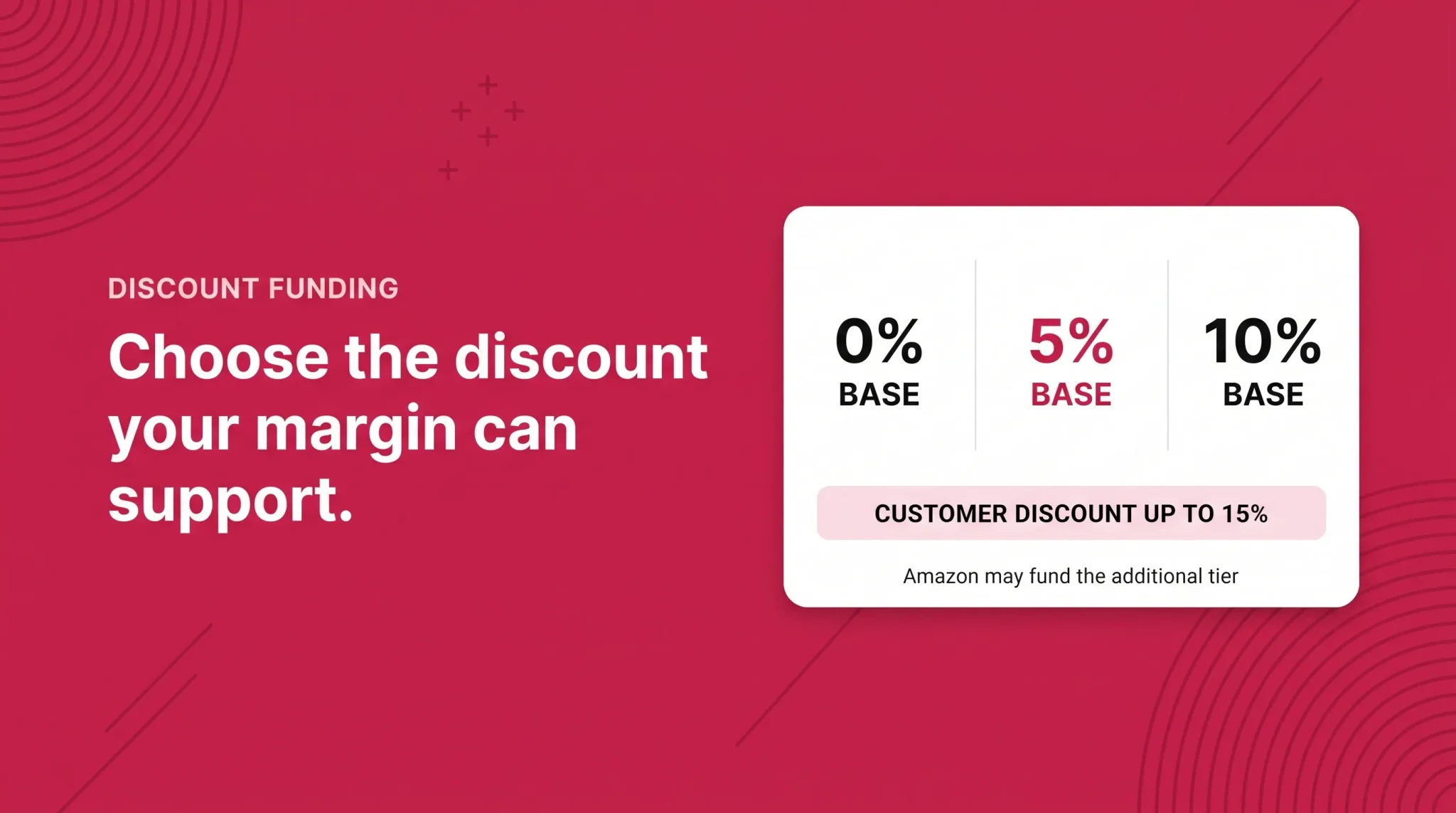
The discount structure has two parts: a base discount you fund, and a tiered discount Amazon funds when a customer receives enough subscriptions in one delivery.
Sellers choose between three base funding options: 0 percent, 5 percent, or 10 percent. At 0 percent, customers with four or fewer subscription items in a delivery see no discount, but customers with five or more see a 5 percent discount funded by Amazon. At 5 percent, customers with four or fewer see 5 percent, and customers with five or more see 10 percent total. At 10 percent, customers with four or fewer see 10 percent, and customers with five or more see 15 percent total.
Your base funding | Customer with 4 or fewer subscriptions | Customer with 5 or more subscriptions | Cost to you |
|---|---|---|---|
0 percent | No discount | 5 percent, funded by Amazon | None |
5 percent | 5 percent | 10 percent total | 5 percent of subscription price |
10 percent | 10 percent | 15 percent total | 10 percent of subscription price |
Read the right-hand column carefully, because the most common misreading of this program is assuming the headline 15 percent comes out of your margin. It does not. Your exposure is capped at the base tier you selected. The additional tiered discount is Amazon's contribution, and Amazon has described it as a limited-time arrangement rather than a permanent feature, so it should not be treated as a fixed input in a long-range model.
The tiered threshold also varies by marketplace. Amazon's program policies have specified different item counts for reaching tiered status in different European stores, so a brand operating across marketplaces should not assume the US structure applies everywhere. Confirm the tier rules for each store you sell in.
There are no additional selling costs for participating. Standard selling fees and normal FBA costs apply. The base discount is the whole cost of the program to you.
Deals and Coupons Stack on Top
This is the detail most likely to produce an unpleasant surprise on a promotional calendar.
Seller promotions and discounts are added on top of the Subscribe & Save discount. If you run a deal on a product that is enrolled in Subscribe & Save, you provide the program discount along with the deal price.
So a product enrolled at a 10 percent base discount, running a deal, is discounting from the already-discounted subscription price for subscribers. Anyone planning a heavy promotional period should check which enrolled products are in scope and model the combined effect before the deal goes live, not after.
Coupons are more controllable and more interesting strategically. Subscribe & Save specific coupons can be redeemed on the first delivery of a new subscription. They can be created in Seller Central at any time with a start date set for the next day, as a dollar or percentage amount, and can run for up to three months. Targeted coupons are also possible, for example offering a discount to a customer who previously bought a Subscribe & Save product but has lapsed.
A first-delivery coupon is a cleaner instrument than a permanently higher base tier, because the incentive is spent once at acquisition rather than on every future replenishment. Sellers with thin margins often get further by pairing a modest base discount with a first-delivery coupon than by moving the base tier up and paying that difference forever.
The Economics
The arithmetic is simple, and doing it before you raise your funding tier is the single most useful thing in this guide.
Contribution margin per subscription unit = unit contribution margin at full price minus (base funding percentage × subscription selling price)
Note that the discount comes off your revenue, not off Amazon's fees. Referral and fulfillment fees are unchanged, so the full value of the base discount lands on your margin.
Work an example. A product sells at $30 with a $9 unit contribution margin after cost of goods, referral fee, and FBA fee. Fund at 5 percent and you give up $1.50 per unit, leaving $7.50. Fund at 10 percent and you give up $3.00, leaving $6.00. That is a third of the margin on that unit, permanently, on every replenishment.
Whether that trade is worth making depends on how many additional units the subscription produces over its life. A subscriber who takes six deliveries at $6.00 contributes $36.00. A one-time buyer at $9.00 contributes $9.00. If the discount is what converted the subscriber, the trade is clearly good. If that customer would have repurchased anyway, you have paid 10 percent to subsidize behavior you already had.
That is the genuine question, and it is not answerable from theory. It is answerable from your own data over a few months of testing tiers.
On the demand side, Amazon's internal data indicates that Subscribe & Save products offering a 10 to 15 percent discount can drive up to a 1.8x increase in conversion on average. Read that as directional evidence that the discount does affect behavior, not as a guaranteed outcome for a specific product. It says nothing about whether the resulting units cover the margin you gave up in your category and at your price point.
Which Products Actually Suit Subscribe & Save
Category eligibility is a permission. Product fit is a separate question, and it comes down to whether the customer has a real replenishment cycle.
Clear fit: a supplement in a 30-day count. The consumption rate is defined by the product itself, the customer knows roughly when they will run out, and the default delivery frequency can be matched to actual usage. A subscription here is genuinely more convenient than reordering, so the discount is buying convenience uptake rather than buying the sale outright. This is the case where funding a base discount usually pays back.
Borderline: a household cleaning concentrate with variable usage. Consumption depends on household size and habits, so the delivery cadence will be wrong for a meaningful share of subscribers. Some will accumulate stock and cancel, others will run out between deliveries. Subscriptions here can work, but retention is softer and the effective subscription length is shorter, which changes the payback math on a higher funding tier. This is a case to start at a low base tier and test rather than commit.
Poor fit: a mid-priced kitchen appliance. There is no replenishment cycle. Even if the category is eligible and the product is technically enrolled, a subscription option on a durable item mostly serves as a discount to shoppers who would have bought once. Products like these are better left at 0 percent, and if you are trying to lift order value on a durable item, a different mechanism such as a virtual bundle is the more appropriate instrument.
The through-line is that Subscribe & Save rewards products with a natural, roughly predictable consumption rate. Where the cycle is real, the discount buys convenience. Where it is not, the discount just buys margin erosion.
Performance and Inventory Obligations
Having subscribers changes what a stockout costs you.
Replenishment orders are scheduled to ship on specific dates. When inventory is not there, those deliveries are missed, and a missed delivery is a common trigger for cancellation. Amazon's own tooling reflects this: the Subscribe & Save dashboard reports on missed deliveries and the sales loss associated with orders that could not be fulfilled because of stockouts.
Practically, this means reorder points for enrolled products should account for committed subscription demand on top of normal velocity, and the forecasting horizon should extend at least to the next replenishment cycle for the largest cohort. Running lean is a defensible strategy on a standard listing. It is a poor one on an ASIN carrying subscribers, because the downside is not a few days of lost sales but the permanent loss of a recurring order.
The in-stock rate requirement compounds this. Falling below the threshold does not only cost you subscribers, it can affect program eligibility itself.
Tracking Results
The Dashboard tab of the Subscribe & Save tool has four sections. Subscribe & Save performance shows sales numbers, the percentage of sales coming through the program, active subscriber counts, and retention counts. Funding strategy shows the percentage of total sales generated by each discount tier, subscriptions generated per tier across orders over twelve months, and average sales and reorders from subscribers versus non-subscribers. Coupon performance shows the share of Subscribe & Save sales from orders using a coupon or promotion code and the share of subscriptions acquired through coupon promotions. Subscription inventory planning shows forecast units and revenue, plus missed deliveries and sales loss from stockouts. A performance report can also be downloaded from the same tab.
The funding strategy section is the one that answers the question this whole program turns on. Subscriber versus non-subscriber reorder rates tell you whether the discount is producing incremental repeat purchases or subsidizing existing ones. If you only look at one thing after enrolling, look there.
When to Move Beyond a 0 Percent Default
Before raising your base funding tier on a product, work through the following:
The product has a genuine, roughly predictable replenishment cycle
Unit contribution margin can absorb the tier increase and still leave a viable margin
In-stock rate on the ASIN has been reliably above the program threshold
Reorder points already account for committed subscription demand
The default delivery frequency roughly matches real consumption
You have a baseline of subscriber versus non-subscriber reorder data to compare against
You have considered a first-delivery coupon as an alternative to a permanent tier increase
Any planned deals on the product have been checked for stacking against the subscription discount
If several of these do not hold, the more sensible move is to leave the default alone, fix the operational gaps first, and revisit. A higher funding tier on an unstable ASIN buys subscribers you will then fail to supply.
If Your Products Are Not Enrolled
Automatic enrollment is not the same as automatic eligibility. Amazon evaluates each product against the criteria in the background, so a fully qualified brand can still have individual ASINs excluded.
When products have not been auto-enrolled, the Manage products tab includes a self-service product eligibility feature that shows why. Amazon support has directed sellers to a Subscribe & Save eligibility check where you enter the ASIN and SKU and read back the specific reason for non-enrollment, rather than guessing at which criterion failed.
That is the right first step. Working through the reason given is faster than cycling through support, and the reason is usually one of the same handful of things: the Brand Representative role, the in-stock rate, price movement on the listing, buyability, or replenishment suitability at the product level.
Subscribe & Save is one of the few Amazon programs where the default setting quietly determines the outcome, and where the right answer depends entirely on your margin structure and your replenishment cycle rather than on best practice. If you want help working out which of your ASINs justify a funded discount and which should stay at zero, book a free strategy call.
Frequently asked questions
No. It’s exclusive to FBA sellers.