Bilal Siddiqui
When you run an amazon seo agency or manage a growing catalog, chaos destroys your margins. You cannot approach a multi sku listing process the same way you handle a single product detail page. You need a strict, repeatable system.
This guide shows you how to build a scalable listing workflow. We will walk through the exact production line model that operations teams use to manage 10 to 100 updates at once.
This is how you handle batch listing optimization across dozens of products without breaking what currently works. You will learn to process updates like a factory.
To do this right, you must implement rigid listing QA gates. These checkpoints stop errors and compliance risks before they go live.
Finally, we will cover listing version control. You will stop guessing, prevent endless revision loops, and start moving fast with a standardized approach to optimize amazon product listings.
Standardize The Intake Brief So Writers Stop Guessing
You cannot write good copy if you do not have the right inputs. When you offer an amazon listing optimization service, a blank page is your enemy. You must collect standard data before anyone writes a single word.
Product Truth And Constraints
Your writers need the absolute facts about the product. They cannot invent features. You must provide a document that lists the physical realities of the item.
List exact dimensions, materials, and weight. These details affect your amazon fba fees and customer expectations.
Identify constraints and amazon forbidden keywords. If the product is not organic, state clearly that writers cannot use that word.
Include warranty details and packaging contents. This prevents false promises in your amazon description writing.
Positioning And Target Buyer
Writers must know who they are writing for. You must define the target audience to guide the amazon copywriting.
Specify the primary use case. A tool for amazon fba for beginners needs different language than a tool for an amazon seo expert.
Note the pricing tier. A premium amazon private label product requires a different tone than a cheap amazon retail arbitrage find.
Clarify the tone of voice. Decide if the copy should be highly technical or simple and friendly.
Approved Claims And Proof Sources
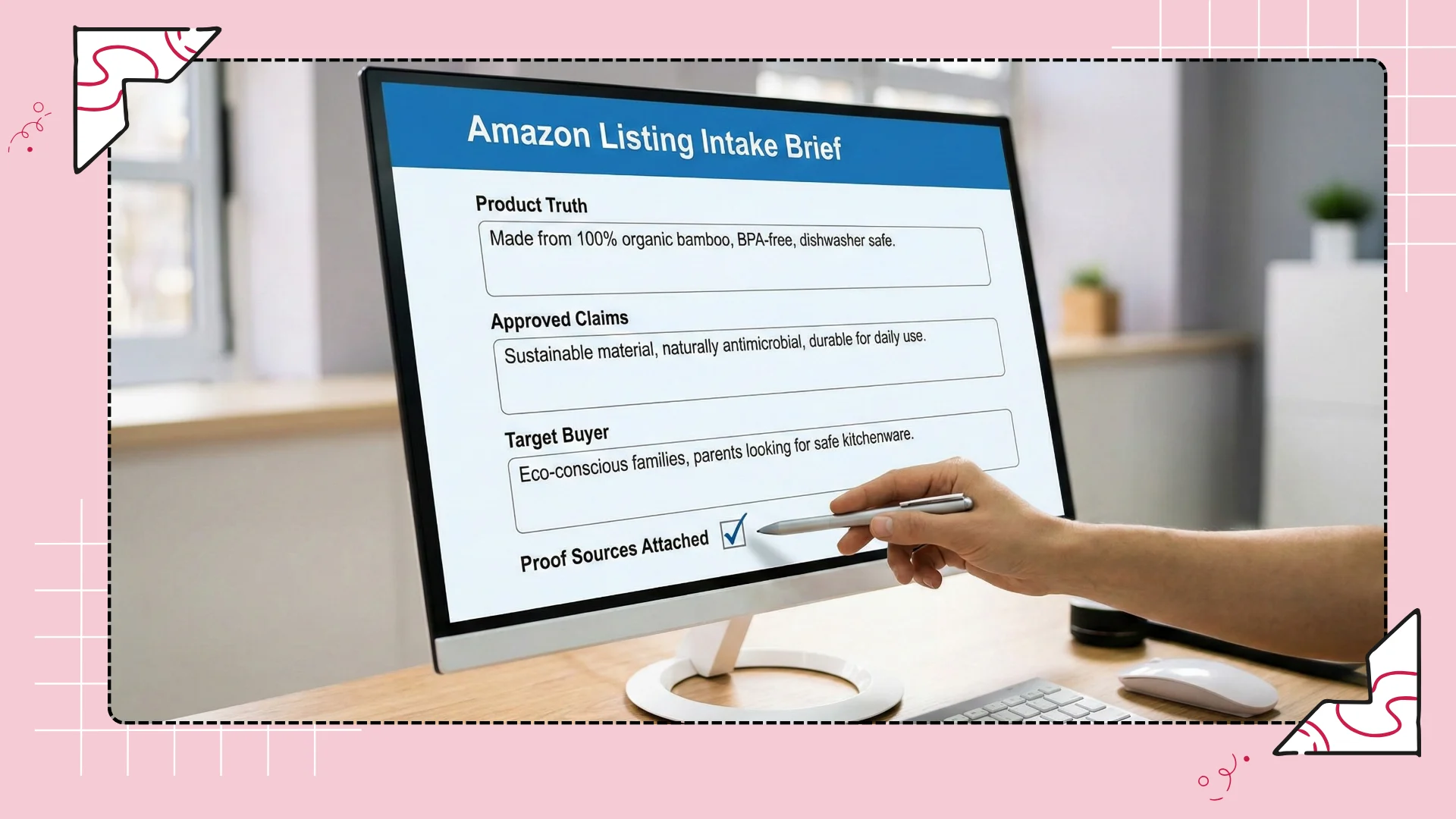
Amazon is strict about health and performance claims. You must give your team a list of claims they are allowed to make.
Provide lab test results or certifications if you claim a product is safe or durable.
List specific awards or patents. This helps your team write a stronger amazon brand story.
Require writers to link every major claim to an approved proof source in your intake document.
Batch Planning That Reduces Context Switching
Updating one listing takes focus. Updating fifty listings takes strategy. You will lose hours of productivity if your team switches between unrelated tasks. You must organize the work into logical batches.
Group By Category And Intent
Do not mix vastly different products in the same work session. You want your team to stay in the same mental space.
Group items by niche. Write all amazon handmade items on Monday and all amazon wholesale products on Tuesday.
Group items by search intent. Optimize all gift-related products in one batch to reuse similar keyword strategies.
Keep amazon merch products separate from complex electronics. The depth of research required is completely different.
Separate Simple Edits Vs Heavy Rebuilds
Not every listing needs a complete overhaul. You must separate minor tweaks from major projects.
Create a batch for fast amazon title optimization. These take minutes per SKU.
Create a separate batch for full rebuilds that require deep amazon keyword research and competitor analysis.
Do not assign a writer a mix of fast edits and slow rebuilds on the same day. It kills momentum.
Define Throughput Targets Per Week
An agency workflow requires measurable output. You must set realistic targets for your team.
Define how many simple edits a writer must complete per week.
Define how many complex listing rebuilds are expected per week.
Track these numbers. If output drops, investigate whether the intake briefs are missing information or if your amazon keyword research tool is causing delays.
Asset Checklist Per SKU That Keeps Teams Aligned
A completed listing is not just text. It is a collection of assets. You must use a checklist to ensure nothing is missing before the listing moves to the QA stage.
Copy Deliverables
Every text field must be accounted for in your checklist. Do not leave blank spaces in your delivery document.
Check off the title, five amazon bullet points, and the product description.
Verify that backend keywords amazon sections are filled out and meet length limits.
Confirm that all text follows the amazon style guide for the specific product category.
Image Direction Notes
Copywriters and designers must work together. The copy document should include directions for the visual team.
Include a section for amazon product photography text overlays.
Ensure the copy matches the visual claims. If the bullet says the item is red, the amazon image guidelines note must confirm the red image is used.
Add notes for amazon a+ content layouts so designers know which text goes with which module.
Variation Notes And Exceptions
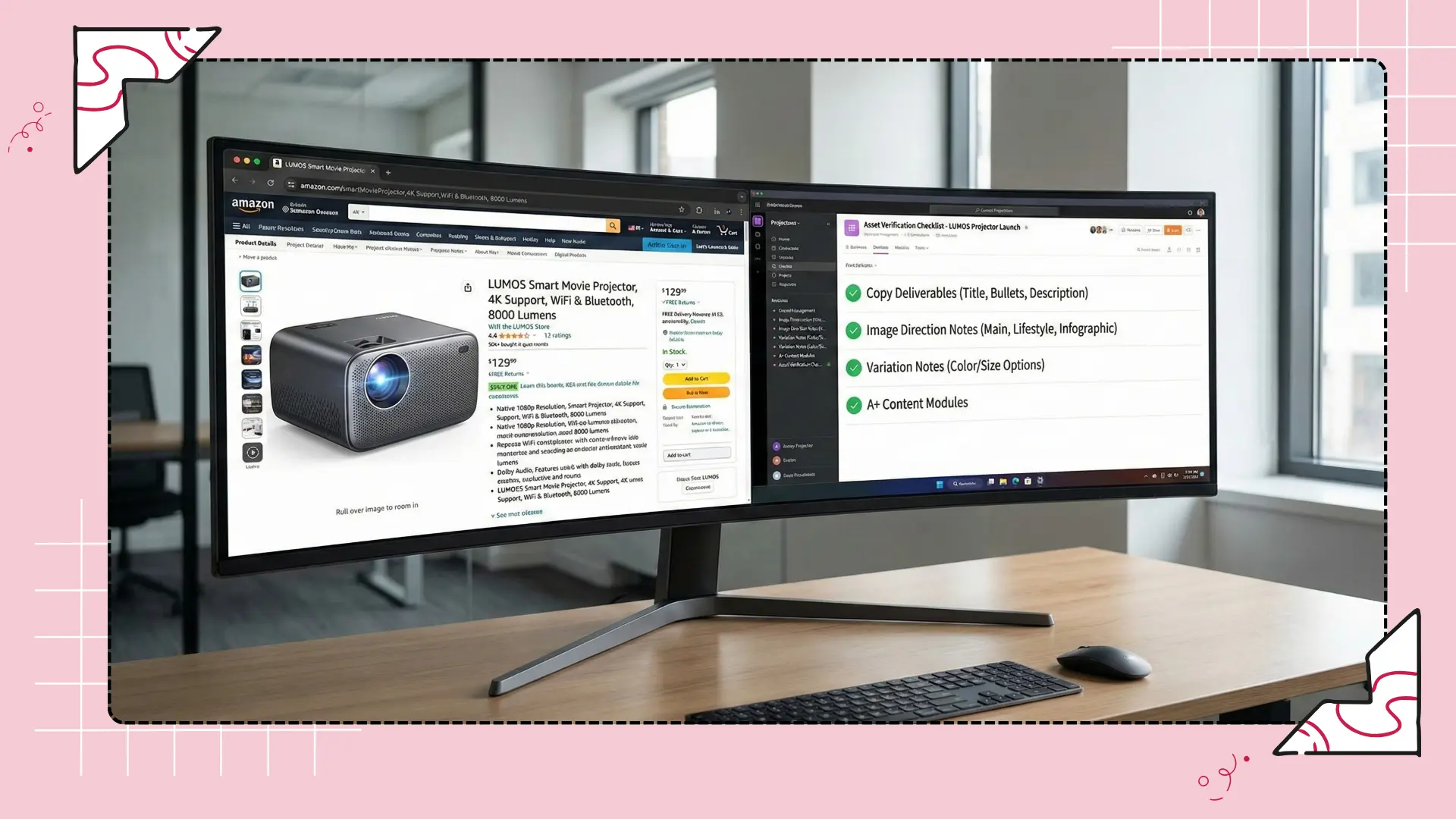
Parent and child listings create confusion. You must clearly state how variations differ.
List exactly what changes between child SKUs. Is it just size, or do features change?
Note which keywords apply only to specific variations to avoid poor search relevance.
Document any exceptions for amazon catalog management, such as a child SKU that requires a different target audience.
QA Gates That Catch Problems Early
You cannot rely on a single writer to be perfect. You must build QA gates. A gate is a hard stop. The listing does not move forward until it passes these specific checks.
Coverage QA Gate
This gate ensures you did not miss the most important search terms.
Compare the draft against the approved amazon keyword tracking list.
Verify that the primary high-volume terms are in the title and early bullet points.
Check that secondary targets and long tail keywords amazon are used naturally in the description.
Clarity And Readability Gate
This gate checks the human element. An over-optimized listing that reads poorly will hurt your amazon conversion rate.
Read the title out loud. If it sounds like a robot wrote it, you must rewrite it.
Check the amazon bullet point guidelines. Ensure the first few words of each bullet clearly state the benefit.
Remove heavy jargon unless the target buyer expects it. Keep the language simple to increase amazon sales.
Compliance Risk Gate
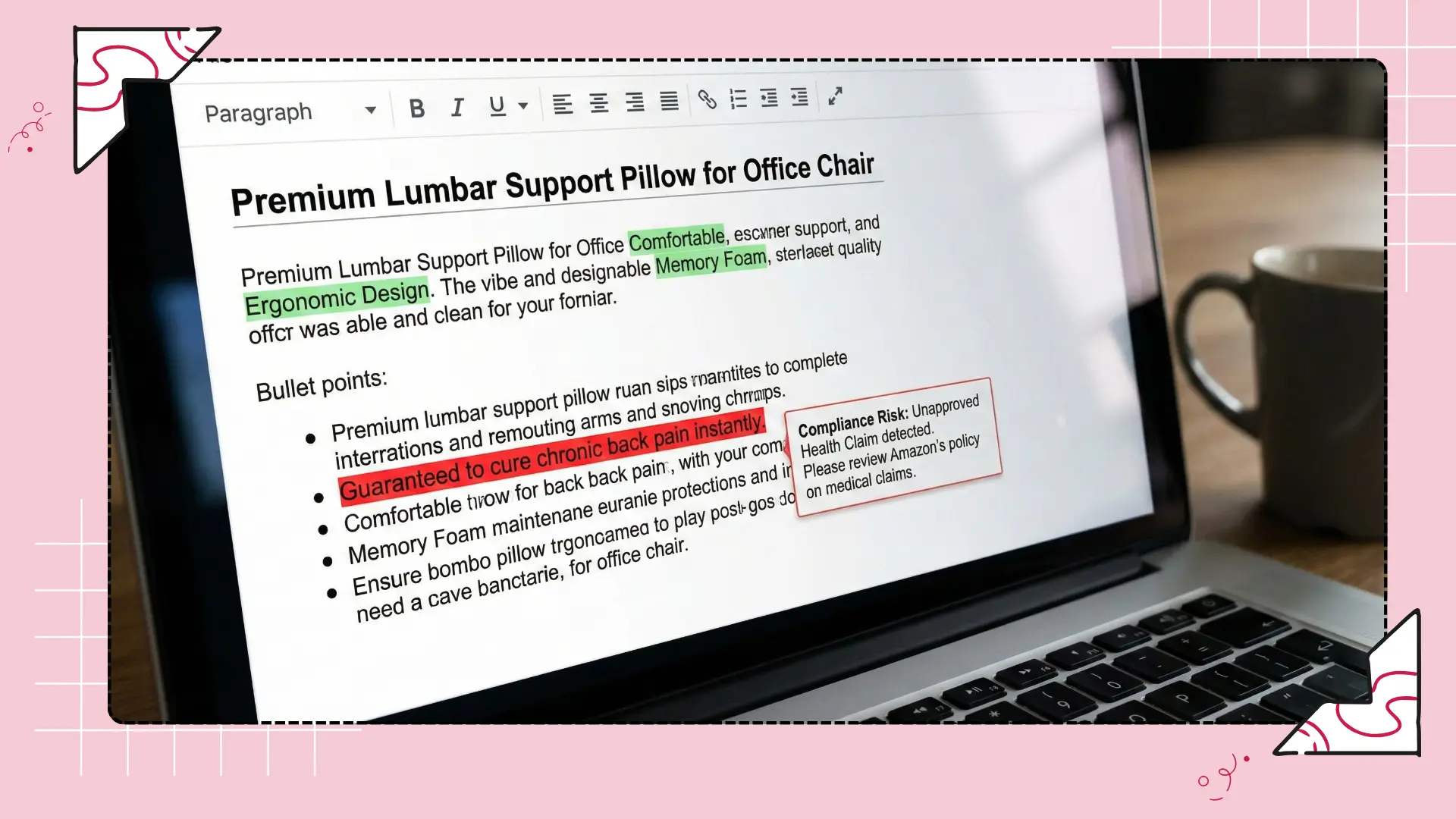
This is the most critical gate. A compliance failure can get your listing suspended.
Scan the text for amazon restricted claims, such as curing diseases or promising guaranteed weight loss.
Verify that you do not mention competitor names or use unauthorized trademarks.
Confirm that you are not directing amazon external traffic away from the platform in your text.
💡 Scale Your Workflow Instantly
Automate Your Batch Listing Optimization
Do not waste hours on manual competitor research. With Flairox Listings, you simply input your Amazon listing URL and your brand website. The software automatically identifies your top 5 direct competitors, builds a keyword comparison table, and generates Amazon-compliant copy that matches your exact brand tone using customer review data.
Claim Your 2 Free Optimizations Now →
Approval Flow That Avoids Endless Revisions
Revision loops drain agency profits. You cannot let clients or stakeholders request unlimited, unstructured changes. You need a strict approval process.
One Round For Factual Fixes
The first review is strictly for accuracy. Do not discuss marketing angles yet.
Ask the client or brand manager to verify dimensions, materials, and features.
Fix any incorrect product specs immediately.
Do not allow stylistic changes during this phase. Focus only on the facts.
One Round For Positioning Tweaks
Once facts are locked, you review the sales message.
Review the tone and the amazon brand story.
Adjust the emphasis on certain benefits if the stakeholder feels a different feature is more important.
Finalize the seo for amazon listings to ensure the new positioning still captures search volume.
Lock Version After Approval
When the second round is done, the document is locked.
Do not accept further changes via casual emails or chat messages.
If a stakeholder wants to change a locked document, require a new intake brief.
This discipline forces clients to review thoroughly during the designated approval rounds and respects your amazon listing services timeline.
Version Control And Change Logs For Every Update
You must track what you change. If you update an amazon product listing and sales drop, you need to know exactly what you did to fix it.
Date And Reason Fields
Every update needs a timestamp and a justification.
Record the exact date the new copy goes live on Amazon.
Write a one-sentence reason for the update. For example, note if you are optimizing for a new amazon product launch or reacting to an amazon algorithm update.
Keep this log in a centralized spreadsheet or within your amazon automation tools.
What Changed And Why
Do not just say "updated bullets." You must be specific about the edits.
Document which specific keywords you added or removed.
Note if you changed the core benefit in the title to improve the click-through rate.
Keep the old version of the copy in an archive tab. You must never delete historical data.
Rollback Plan If Performance Drops
Sometimes an update fails. You must have a fast way to undo the damage.
Set a threshold for failure. If your amazon rank tracker shows a massive drop in organic positions after seven days, you must act.
Use your change log to instantly paste the old, winning copy back into Amazon.
Analyze why the new version failed before you attempt another update.
Post-Publish Verification At Scale
Your job is not done when you hit save in Seller Central. You must verify that Amazon actually accepted and published your changes.
Live Content Check
Amazon glitches frequently. You must check the live product detail page.
Open the live url 24 hours after publishing to see if the new title and bullets appear.
Check mobile devices to ensure the new formatting supports amazon mobile optimization.
If the old copy is still showing, you may need to open a case with amazon seller help to force the update.
Indexing Spot Check (High-Level)
You must verify that Amazon search recognizes your new keywords.
Use an amazon index checker or run a manual search for your new primary keywords along with your ASIN.
If the product does not show up, Amazon is not indexing the new terms.
Review your backend search terms to ensure you did not accidentally use invalid characters or duplicate words.
Performance Watch Window
You must monitor the results of your batch updates without overreacting to daily fluctuations.
Wait at least 14 days before judging the success of an update. The amazon a10 algorithm needs time to test the new relevance.
Check your amazon business growth reports to monitor conversion rates and traffic sessions.
If metrics remain stable or grow, the update is successful. Close the project and move to the next batch.
Frequently asked questions
Agencies use a strict production line model. They standardize intake briefs, group similar products into batches, and push all drafts through rigid QA gates before publishing. This removes guesswork and prevents writers from context-switching.