Bilal Siddiqui
I see many sellers struggle when they start Amazon keyword research. You might feel overwhelmed by the sheer number of Amazon search terms available. We are going to simplify that today. Building a proper competitor keyword pipeline is the most efficient way to gather data that actually converts.
Using a reverse asin keyword method allows you to look directly at what already works for others. This is not about guessing. It is about extracting hard data from the Amazon search engine. When you look at successful listings, you find Amazon keywords that buyers use every single day.
However, you cannot just copy a list and hope for the best. You need a competitor asin extraction process that filters out the noise. If you pull raw data without a plan, you will ruin your Amazon SEO optimization efforts with irrelevant terms.
In this guide, I will show you how to filter competitor keywords effectively. This is strictly the extraction and filtering stage. We are building a clean list of terms derived from your rivals. You can then feed this clean data into your broader Amazon listing optimization process.
Choose Competitor ASINs That Represent The Same Intent
You must select the right targets before you begin asin based keyword discovery. If you choose the wrong competitors, your data will be useless. Bad inputs lead to bad outputs.
Same Buyer Mission, Not Just Same Category
You must look at why the buyer is purchasing the item. Two products might exist in the same category but serve completely different needs. If you sell a heavy-duty garlic press for professional chefs, do not target a cheap plastic garlic press meant for casual cooks. The buyer mission is different. You want competitors who solve the exact same problem you solve.
Similar Price Band And Pack Size Logic
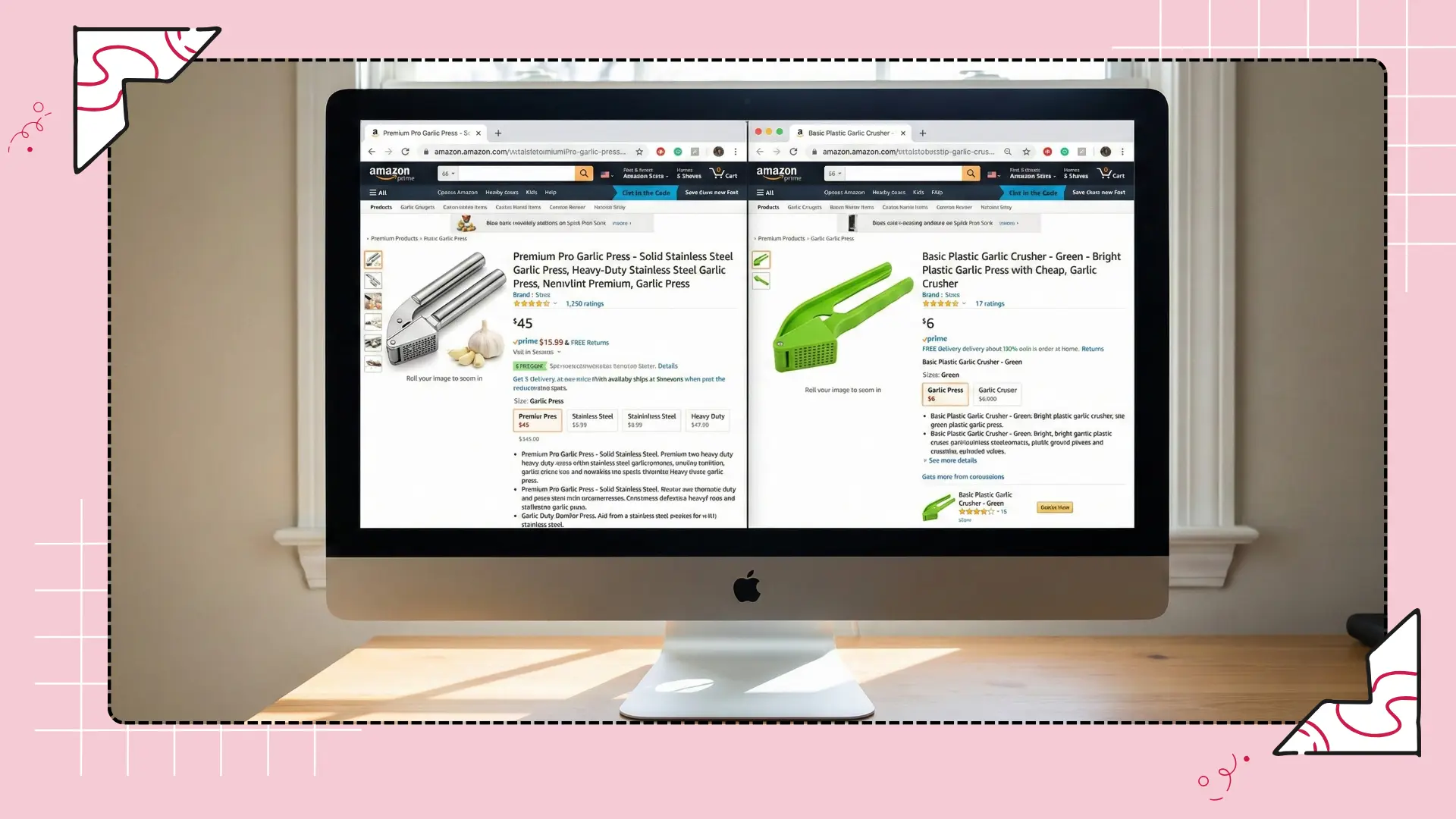
Price changes keyword intent. A buyer looking for a ten-dollar item uses different search terms than a buyer looking for a fifty-dollar item. The same rule applies to pack sizes. If you sell a single unit, a competitor selling a bulk pack of fifty will rank for wholesale terms that you do not need. Stick to competitors who match your price and size closely.
Avoid Mixed Intent Competitors
Some competitors try to be everything to everyone. They stuff their listings with terms that do not match their actual product. If you use Amazon seller tools to analyze a competitor, and you see they rank for wildly unrelated terms, skip them. You want competitors with highly focused, relevant listings.
Extract Terms, Then Label By Intent Immediately
Once you have your target ASINs, use an Amazon keyword research tool to pull their ranking terms. As soon as you export the list, you must categorize the data.
Core Intent Terms Vs Edge Terms
Your first job is to separate the primary keyword variations from the edge cases. Core intent terms perfectly describe your product. Edge terms are loosely related. If you sell a yoga mat, "thick yoga mat" is a core term. "Home gym equipment" is an edge term. Label these clearly so you know where to focus your Amazon SEO services later.
Use-Case And Compatibility Terms
Buyers often search by how they plan to use the item. They might search for "yoga mat for bad knees" or "yoga mat for hardwood floors". These use-case terms are highly valuable. Extract these and tag them. They often have lower competition and higher conversion rates.
Audience And Scenario Terms

Look for terms that describe the person buying the product or the situation they are in. Phrases like "gifts for yoga lovers" or "travel yoga mat for flights" are scenario terms. These are excellent targets for Amazon Sponsored Products because they capture specific buyer mindsets.
Remove Mismatched Terms Using A Relevance Screen
You will pull a lot of garbage during competitor asin extraction. You must scrub the list clean before you use it. Keyword relevance is more important than search volume.
Terms That Describe A Different Product Type
Your competitors might rank for terms that describe something you do not sell. If a competitor sells a mat that comes with a carrying strap, they will rank for "yoga mat with strap". If your product does not include a strap, you must delete this term. Ranking for it will hurt your Amazon ACoS because buyers will click, see no strap, and leave.
Terms Tied To Competitor-Only Features
Do not keep terms that describe a patented feature or a specific material only your competitor uses. If they use a trademarked foam and rank for it, remove that term from your list. It will not help your Amazon ranking.
Terms That Attract Wrong Buyers
Some keywords look great on paper but bring in the wrong traffic. If you sell a premium product, you must remove terms like "cheap", "discount", or "budget". Those words attract buyers who will never pay your asking price.
💡 Pro Tip: Automate Your Research
Extract Competitor Keywords Instantly With Flairox Listings
Stop doing manual reverse ASIN keyword research. Flairox Listings automatically identifies your top five direct competitors and pulls their exact ranking keywords. It then generates Amazon-compliant titles and bullets that match your exact brand voice. Get your first two listing optimizations completely free today.
Optimize My First Listing Free →
Spot Keyword Gaps Between Your Listing And Competitors
Now you have a clean list. You must compare this list against your current listing to find missed opportunities. This is where you find Amazon keywords that will drive new sales.
Terms You Do Not Cover At All
Look for high-value terms that your competitors rank for, but you completely missed. Perhaps they call the product by a synonym you never considered. These gaps are your immediate priority for PPC keyword research, listing updates, and Amazon backend keyword optimization..
Terms You Mention Weakly
Sometimes you include a term, but it is buried at the bottom of your description. Your competitor might have that same term in their title. If the keyword intent is strong, you need to move that term to a more prominent position in your listing.
Terms Missing From Images And A+
Amazon A+ content and images are powerful conversion tools. Do not just look at text. Check if your competitors are visually addressing keywords that you ignore. If they have an infographic targeting "easy to clean" and you do not, you have found a visual keyword gap.
Prioritize Competitor Keywords Without Copying Positioning
You want to use your competitor's data, but you do not want to become their clone. You must maintain your own brand identity.
Keep What Matches Your Truth
Only prioritize terms that are objectively true about your product. If a competitor ranks for "lightweight" and your product is actually quite heavy, do not use that keyword. Always prioritize the truth over search volume.
Build Differentiation Cues, Not Clones

When you find a great competitor keyword, think about how you can position it better. If the keyword is "waterproof dog bed", do not just write "waterproof dog bed" in your bullet point. Write "100% waterproof dog bed that stops odor buildup". You use the term, but you add a differentiation cue.
Avoid Borrowing Claims You Cannot Prove
If your competitor uses terms related to specific certifications or awards, do not add those terms to your list unless you have the exact same proof. Making false claims will get your listing suspended.
Convert Extracted Terms Into Clean Clusters
A massive spreadsheet is useless. You need to organize your findings. Using a keyword clustering tool or a manual spreadsheet method is required here.
Merge Duplicates And Variants
Group plurals and slight misspellings together. "Dog bed" and "dog beds" belong in the same cluster. You do not need to target them as separate ideas. Keyword clustering keeps your data manageable.
Split By Funnel Stage
Separate your clusters by where the buyer is in their journey. Broad terms go into an awareness bucket. Highly specific terms go into a ready-to-buy bucket. This helps you organize your Amazon SEO strategy logically.
Create A “Tests Later” Bucket
You will find interesting terms that you are not sure about. Do not throw them away. Put them in a "tests later" folder. You can test these later using broad match in your advertising campaigns to see if they convert.
Feed Outputs Into Your Keyword Map Process
You now have a clean, filtered, and clustered list of competitor keywords. You are ready to integrate this into your overall system.
Add To Clusters, Not As Random List
Do not just paste these new terms at the bottom of your master document. Merge them into your existing keyword map carefully. Place them into the correct logical groups alongside the research you gathered from Amazon Brand Analytics or other sources.
Mark Source As Competitor-Derived
Always tag these terms with their origin. When you do keyword rank tracking later, it is very helpful to know which terms came from your competitors. If a term fails to convert, knowing it was a competitor term tells you that their audience might be slightly different from yours.
Track Changes After Implementing
Once you push these new keywords to your listing, use an Amazon keyword tracker to monitor the results. Give the Amazon search engine a few weeks to re-index your page. Measure if your new competitor-derived terms actually improve your traffic and sales.
Frequently asked questions
You should select ASINs that share your exact buyer mission, price point, and pack size. Avoid competitors that sell a vastly different quality tier or target a completely different demographic. The tighter the match in product intent, the better your keyword data will be.