Bilal Siddiqui
Key takeaways
AWD is Amazon's bulk, upstream storage programme, separate from FBA's pick-ready storage, designed to feed FBA and other sales channels automatically.
Amazon's 2026 fulfilment fee update took effect 15 January 2026, with 90 days' notice given and no new FBA fee types introduced, per Amazon's own announcement.
AWD does not prep inventory for FBA. Prep and labelling responsibility now sits fully with sellers, so everything arriving at AWD still has to be fully compliant before it ships onward.
AWD sits inside the broader "Supply Chain by Amazon" suite, alongside Amazon Global Logistics, the Partnered Carrier Program, and Multi-Channel Distribution.
It's genuinely well suited to slow-moving, seasonal, or bulk inventory, but hidden costs like prep, loss/reimbursement gaps, and removal fees can erase the headline saving for fast-moving SKUs.
Your inventory is piling up in FBA storage, the fees are climbing every quarter, and a rep or a blog post somewhere told you Amazon has a cheaper way to hold bulk stock. That's Amazon Warehousing and Distribution, and the pitch is genuinely appealing: lower-cost bulk storage that automatically feeds your FBA inventory so you never manually reorder again. What the pitch leaves out is that 2026 changed the fee picture, and Amazon no longer handles prep anywhere in its network, including AWD.
This guide walks through what Amazon Warehousing and Distribution actually is, how it works, who's eligible, what changed with Amazon's 2026 fee update, how it stacks up against standard FBA storage and a third-party 3PL, and the hidden costs worth modelling before you commit a pallet of stock to it. By the end, you'll know whether AWD fits your inventory profile or whether it's solving a problem you don't have.
What Is Amazon Warehousing and Distribution (AWD)?
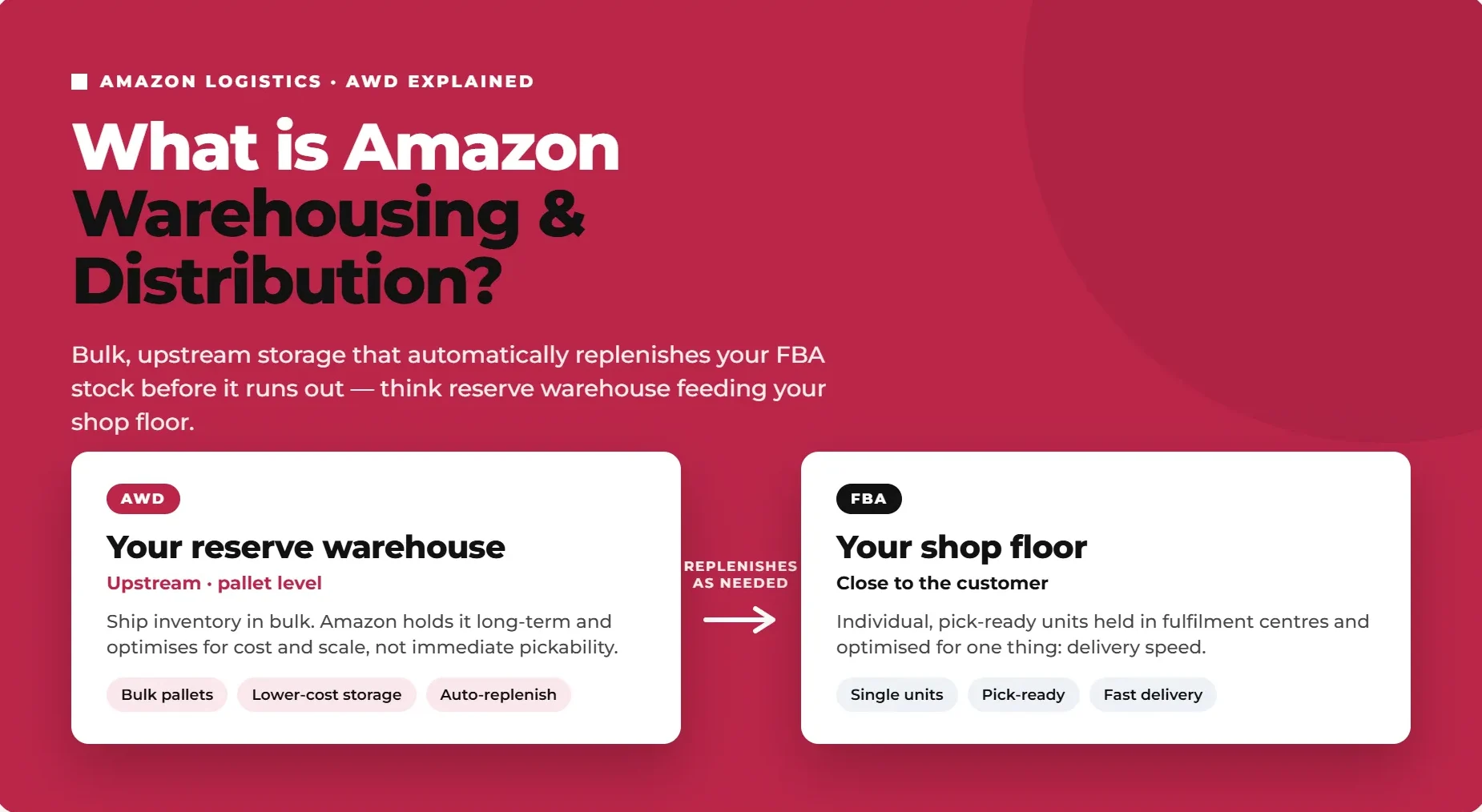
Amazon Warehousing and Distribution is Amazon's own bulk, upstream storage service. Rather than shipping inventory straight into FBA's pick-ready fulfilment centres, sellers ship in bulk to an AWD facility, and Amazon automatically distributes and replenishes that stock into FBA (and, for eligible sellers, other channels) as it's needed. Amazon describes it as "a bulk, long-term storage solution that can help replenish your inventory even before it's needed for customer orders" (Amazon Selling Partners).
The distinction that matters operationally: FBA storage holds individual, pick-ready units close to the customer, optimised for speed. AWD storage holds inventory at pallet level, upstream, optimised for cost and scale rather than immediate pickability. Think of AWD as your reserve warehouse and FBA as your shop floor.
AWD isn't a standalone product either. It sits inside a broader set of Amazon logistics services collectively known as Supply Chain by Amazon (increasingly rebranded toward "Amazon Supply Chain Services" in Amazon's own materials). If you're researching AWD, it's worth understanding where it fits in that larger stack before you enrol, since some of the value sellers expect from AWD alone actually comes from pairing it with the other pieces.
How AWD Fits Inside Supply Chain by Amazon
Amazon has been consolidating its logistics offerings for third-party sellers into a single automated pipeline, described as "an automated solution to help sellers quickly and reliably ship products around the world" (About Amazon). AWD is one component of that pipeline, not the whole thing, and understanding the other pieces helps explain why AWD behaves the way it does.
Component | What it handles |
|---|---|
Amazon Global Logistics (AGL) | International freight and customs clearance, moving inventory from the factory to Amazon's network |
Amazon Warehousing and Distribution (AWD) | Bulk, upstream storage that automatically feeds FBA and other channels |
Partnered Carrier Program (PCP) | Domestic transportation into AWD facilities |
Multi-Channel Distribution (MCD) | Bulk distribution from AWD out to other sales channels, including non-Amazon retailers |
Automatic FBA Replenishment | The mechanism that monitors FBA stock and triggers AWD-to-FBA transfers |
Read as a single pipeline, it's easier to see why AWD's automatic replenishment feature exists: it's the connective tissue between bulk, cost-efficient storage and Amazon's need to keep FBA shelves stocked without sellers manually managing every reorder. Sellers researching "supply chain by Amazon" or an "Amazon supply chain portal" are usually looking for this same umbrella, AWD is the storage layer inside it, not a separate, unrelated programme. Worth noting too that Amazon's own branding for this suite has shifted over time, so you may see it referred to as "Supply Chain by Amazon" in some places and "Amazon Supply Chain Services" in others depending on when the material was published.
How Amazon AWD Works
The three-step flow
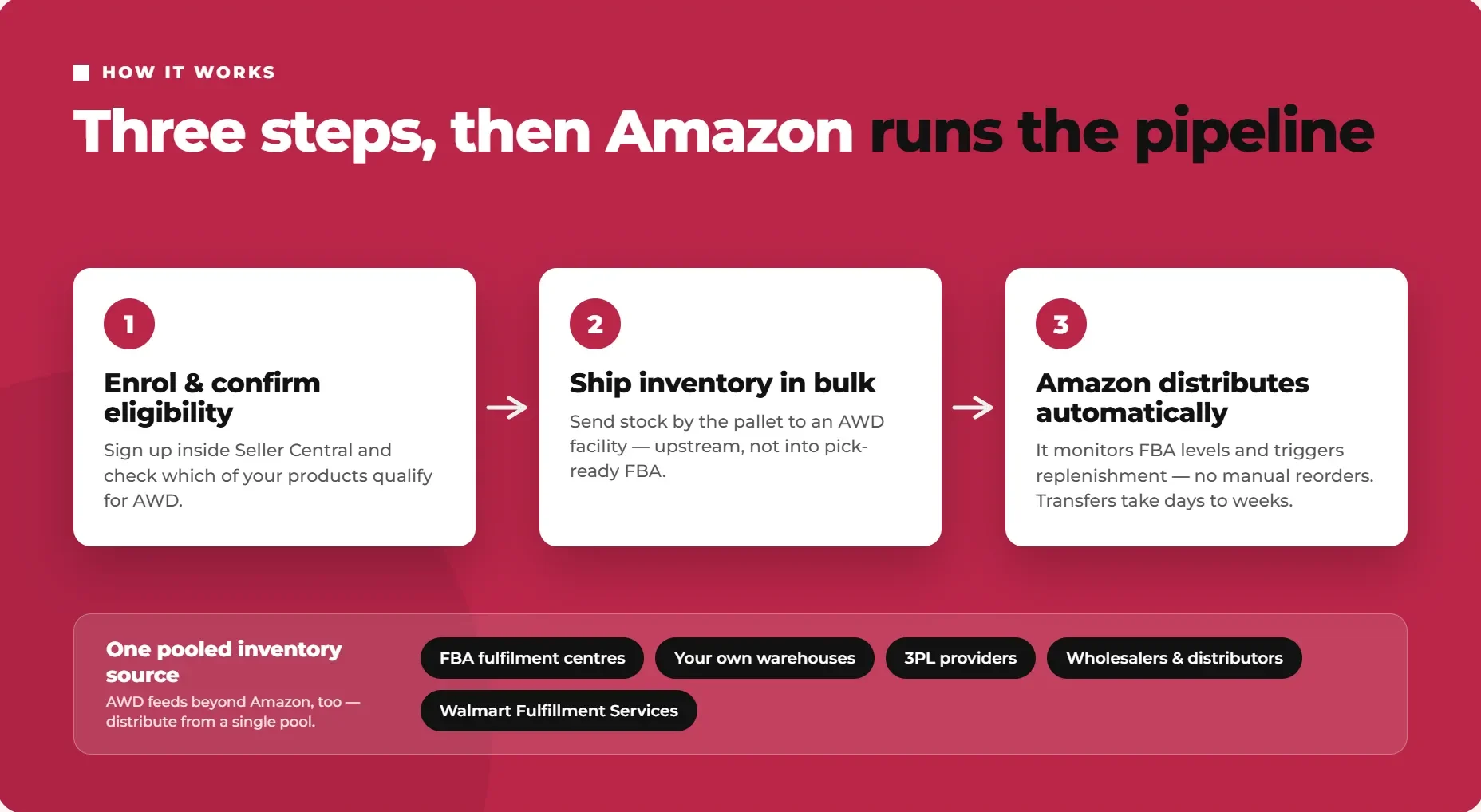
Getting set up with AWD follows a simple sequence: enrol and confirm product eligibility inside Seller Central, ship your inventory in bulk to an AWD facility, and let Amazon handle distribution from there. Once your stock is in AWD, Amazon takes over the job of getting the right quantity to the right FBA fulfilment centres (and other channels, where applicable) as demand requires it.
Automatic FBA replenishment
The core value proposition is automation. AWD "ensures seller FBA inventory is kept in stock and optimally placed for fast order delivery" (Amazon Selling Partners), monitoring your FBA stock levels and triggering replenishment shipments without you manually placing reorders. The trade-off worth knowing upfront: transfers from AWD into FBA aren't instant. They can take anywhere from a few days to a few weeks, so AWD works best when it's feeding steady, forecastable demand rather than reacting to a sudden spike.
Multi-channel distribution
AWD isn't limited to feeding Amazon's own fulfilment network. Sellers can use it to distribute inventory to non-Amazon sales channels too, including their own warehouses, third-party logistics providers, wholesalers, distributors, and channels like Walmart Fulfillment Services, all from a single pooled inventory source. For sellers running an omnichannel operation, that consolidation is one of AWD's more underrated benefits: one inventory pool instead of separately managed stock sitting in different warehouses for different channels.
Amazon AWD Eligibility and How to Enrol
AWD eligibility is assessed at the SKU level, not by broad category. Standard consumer goods, apparel, footwear, and non-hazardous beauty products are generally fine. Hazardous materials, refrigerated goods, and certain restricted or high-value SKUs are excluded.
Carton requirements sit in a similar range to standard FBA boxes: products need to fit in conveyable boxes no larger than 25 inches on any side and no heavier than 50 lbs. If you've already worked through our Amazon FBA packaging requirements for your standard inventory, you're most of the way to AWD-compliant cartons too.
Your seller account needs to be in good standing to enrol, with no active policy violations, and Amazon expects consistent inbound compliance once you're shipping into AWD regularly (accurate labelling, correct declared dimensions, correct facility routing). This isn't a one-time check either. Sellers who enrol and then let inbound quality slip, mislabelled cartons, inaccurate dimensions, inconsistent routing, risk the same kind of receiving delays and defect flags that apply to standard FBA shipments, just at bulk scale, where a single mistake can affect an entire pallet rather than one carton.
It's also worth deciding upfront which SKUs you're actually enrolling. AWD eligibility is evaluated per SKU, so it's entirely normal to run a mixed model: fast-moving, customer-ready inventory stays on standard FBA replenishment, while bulk, seasonal, or slower-turning SKUs move through AWD instead. Trying to force every SKU into one model or the other usually costs more than treating each product line on its own merits.
To enrol: Seller Central → Growth → Explore Programs → Warehousing and Distribution → Enrol, or go directly to Amazon's AWD programme page from your seller account.
Amazon AWD Fees and Pricing in 2026
Effective 15 January 2026, Amazon revised AWD fee rates and introduced differential storage pricing by region for the first time, splitting rates between the West Coast (including a new West Coast Palletizable region) and the East Coast, South East, and South Central regions. AWD continues to price on three separate rate tiers rather than one flat rate: Base rate, Smart Storage rate, and Amazon Managed rate (Amazon Seller Central).
The three AWD rate tiers
Which tier you're actually billed at depends on how you manage replenishment for that SKU, not on which carrier brought the shipment in:
Base rate. Applies when you manually manage replenishment from AWD to fulfilment centres yourself. As of the 2026 update, the base rate is no longer determined by inbound carrier method, only by whether you're managing replenishment manually.
Smart storage rate. Applies automatically once a SKU is using AWD auto-replenishment and meets two qualifying criteria over a rolling window: at least 70% of that SKU's inventory has moved to fulfilment centres through AWD auto-replenishment in the preceding 90 days, and its combined historical days of supply across AWD and FBA is 70 days or more (calculated from both a 30-day short-term and a 90-day long-term average, using whichever figure is higher).
Amazon Managed rate. Applies when a SKU is enrolled in Supply Chain by Amazon Managed Service, Amazon's fully managed option.
Amazon assesses eligibility monthly, using data as of the 25th of each month to determine the following month's charges, with eligibility status itself updated on the AWD Inventory dashboard by the 28th of the prior month. New SKUs qualify automatically for smart storage and Amazon Managed rates once inbounded using Amazon-managed transportation, provided the first AWD shipment lands within 90 days of the monthly assessment date.
AWD fee rates, effective 15 January 2026
Fee | Base rate | Smart storage rate | Amazon Managed rate |
|---|---|---|---|
Storage, West Coast region (incl. West Coast Palletizable) | $0.57/cu ft/month | $0.51/cu ft/month (10% off) | $0.46/cu ft/month (20% off) |
Storage, East Coast, South East, South Central regions | $0.48/cu ft/month | $0.43/cu ft/month (10% off) | $0.38/cu ft/month (20% off) |
Inbound processing (excludes West Coast Palletizable) | $1.40/box | $1.40/box | $1.05/box (25% off) |
Inbound processing, West Coast Palletizable region | $1.05/box* | $1.05/box (25% off) | $1.05/box |
Outbound processing | $1.40/box | $1.40/box | $1.40/box |
Transportation | $1.40/cu ft | $1.40/cu ft | $1.26/cu ft (10% off) |
*West Coast Palletizable region base rate is normally $1.40/box, discounted to $1.05/box under a promotion running through 31 December 2026 for qualifying shipments (see below).
Source: Amazon Seller Central, Amazon Warehousing and Distribution fees
A couple of things worth reading straight off that table. Storage genuinely gets cheaper as you move down the tiers, up to 20% off the base rate under Amazon Managed. Outbound processing is the one fee that stays flat everywhere, $1.40/box regardless of tier or region. And the West Coast Palletizable region has its own inbound processing rate, discounted for the rest of 2026.
The West Coast Palletizable promotion
For shipments received at the West Coast Palletizable region between 15 January 2026 and 31 December 2026, the standard $1.40/box inbound processing fee drops to $1.05/box, a $0.35/box promotional discount, once a qualifying shipment has been received. To qualify, shipments need to be single-SKU pallets up to 60 inches in height, or floor-loaded shipments Amazon can build into pallets, sent with the optimal number of boxes to meet palletisation requirements. If you're shipping bulk, single-SKU pallets into the West Coast, it's worth checking your shipment plan against these criteria before the promotion ends.
How AWD interacts with FBA fees
This is one of the more overlooked benefits of moving a SKU onto AWD auto-replenishment or Amazon Managed Service. Because Amazon is managing inventory levels for that SKU, the FBA low-inventory-level fee, the FBA storage utilisation surcharge, and the FBA aged inventory surcharge for units stored 181 to 365 days all stop applying, as long as 70% or more of that SKU has moved to FBA through AWD auto-replenishment over the preceding 90 days. Cap the maximum units AWD can auto-replenish, and the low-inventory-level fee can still apply once FBA stock falls below the required days of supply. Cap the minimum instead, and the storage utilisation and aged inventory surcharges can still apply if FBA's own criteria aren't met. The fee relief is real, but it depends on letting auto-replenishment run without tight manual limits.
Building your own landed-cost model
Since which tier you're actually billed at depends on your replenishment ratio and days of supply, the useful exercise for each SKU is working out which tier you genuinely qualify for, then modelling the full cost: your tier's storage rate for your region, inbound and outbound processing per box, the transportation rate, prep costs (since AWD doesn't prep for you), and a realistic allowance for loss. Compare that total landed cost per unit against what the same SKU costs to hold in standard FBA storage, factoring in the FBA fee relief above if you qualify for it. Sellers who compare only the headline storage rate, without checking which tier they'll actually be billed at, are the ones most likely to be surprised by their first AWD settlement statement.
What's bundled vs separate
AWD pricing bundles FBA inbound placement into its rate, so the Amazon inbound placement fees that can apply to standard FBA shipments are not charged separately for units sent to FBA through AWD. Storage, processing, and transportation fees still apply.
Amazon AWD vs FBA: Key Differences
FBA | AWD | |
|---|---|---|
Storage type | Individual, pick-ready units | Bulk, pallet-level upstream storage |
Optimised for | Speed and direct customer fulfilment | Cost efficiency and scale |
Best fit | Fast-turning, customer-ready inventory | Seasonal, slow-moving, or bulk inventory |
Replenishment | Manual reorder and shipment planning | Automatic replenishment into FBA |
Placement fees | Charged separately | Bundled into AWD pricing |
Storage rate structure | Seasonal, spikes sharply Oct to Dec | Flat monthly rate, region and tier based, no stated peak surcharge |
Transfer speed | N/A (already at fulfilment centre) | Typically days to a few weeks |
For a broader fulfilment comparison outside the AWD storage layer, see our FBA vs FBM guide.
The core framing: FBA is built for speed and per-unit customer fulfilment, while AWD is built for scale, seasonality, and upstream cost efficiency. They're designed to work together, not to compete for the same inventory. A seller running both isn't choosing one over the other, they're deciding which SKUs, and which portion of each SKU's total stock, belong in which layer of the pipeline.
Worth knowing explicitly: you can't directly transfer inventory sitting in existing FBA storage into AWD. The two are optimised differently (bulk pallet storage versus individual pick storage), so moving stock between them means treating it as a fresh inbound shipment rather than an internal transfer. Plan your next production run or reorder with this in mind rather than assuming you can shuffle existing FBA stock into AWD after the fact.
Is Amazon AWD Worth It? The Hidden Costs to Model
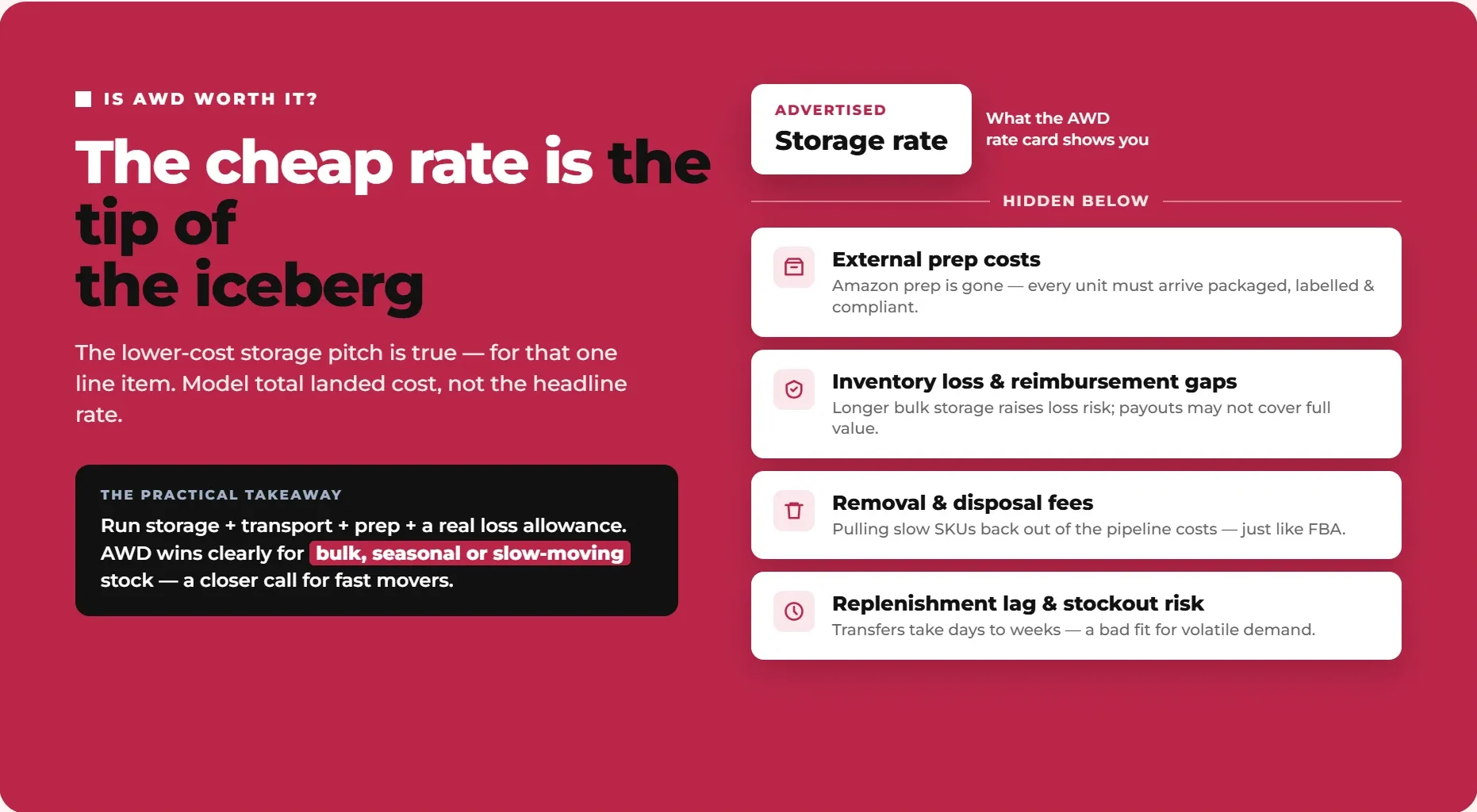
The "lower-cost storage" pitch is true as far as the storage line item goes. Where sellers get caught out is treating that single line item as the whole picture, rather than modelling total landed cost.
A few costs are easy to overlook when comparing AWD's headline rate against FBA storage:
External prep costs. AWD doesn't prep inventory for you. With Amazon's prep service gone from FBA entirely, every unit arriving at AWD still needs to be fully packaged, labelled, and compliant before it ships, whether you handle that in-house, through your supplier, or via a third-party prep provider. For sellers who previously leaned on Amazon to catch packaging gaps, this is often the single biggest cost that doesn't show up on the advertised AWD rate card.
Inventory loss and reimbursement gaps. Bulk storage over longer periods carries its own loss risk, whether from damage, misplacement, or shrinkage, and reimbursement policies don't always make sellers whole for the full value of lost or damaged stock. Sellers moving high volumes through AWD should track their actual loss rate over time rather than assuming it will match their experience with standard FBA storage.
Removal and disposal fees. If a SKU stops selling and you need to pull it back out of AWD, removal and disposal fees apply just as they do with FBA, and pulling bulk pallets back out is not something to plan around lightly once stock has already moved deep into the pipeline.
Replenishment lag and stockout risk. Because transfers from AWD into FBA can take days to weeks rather than happening instantly, AWD is a poor fit for inventory where demand is volatile or hard to forecast. A sudden spike in demand for a SKU sitting in AWD can mean a stockout at the FBA level while replenishment catches up, even though technically you have plenty of stock.
The practical takeaway: before moving a SKU into AWD, run the real landed cost per unit, storage plus transport plus prep plus a realistic allowance for loss, against what that same SKU currently costs to hold in FBA. AWD tends to win clearly on that comparison for bulk, seasonal, or slow-moving inventory. It's a much closer call, and sometimes a loser, for anything that turns over quickly or needs tight, responsive stock control.
Amazon AWD vs a Third-Party 3PL
AWD isn't the only place to park bulk inventory upstream of FBA. A third-party 3PL is the natural alternative, and the right choice genuinely depends on your channel mix rather than one option being categorically better.
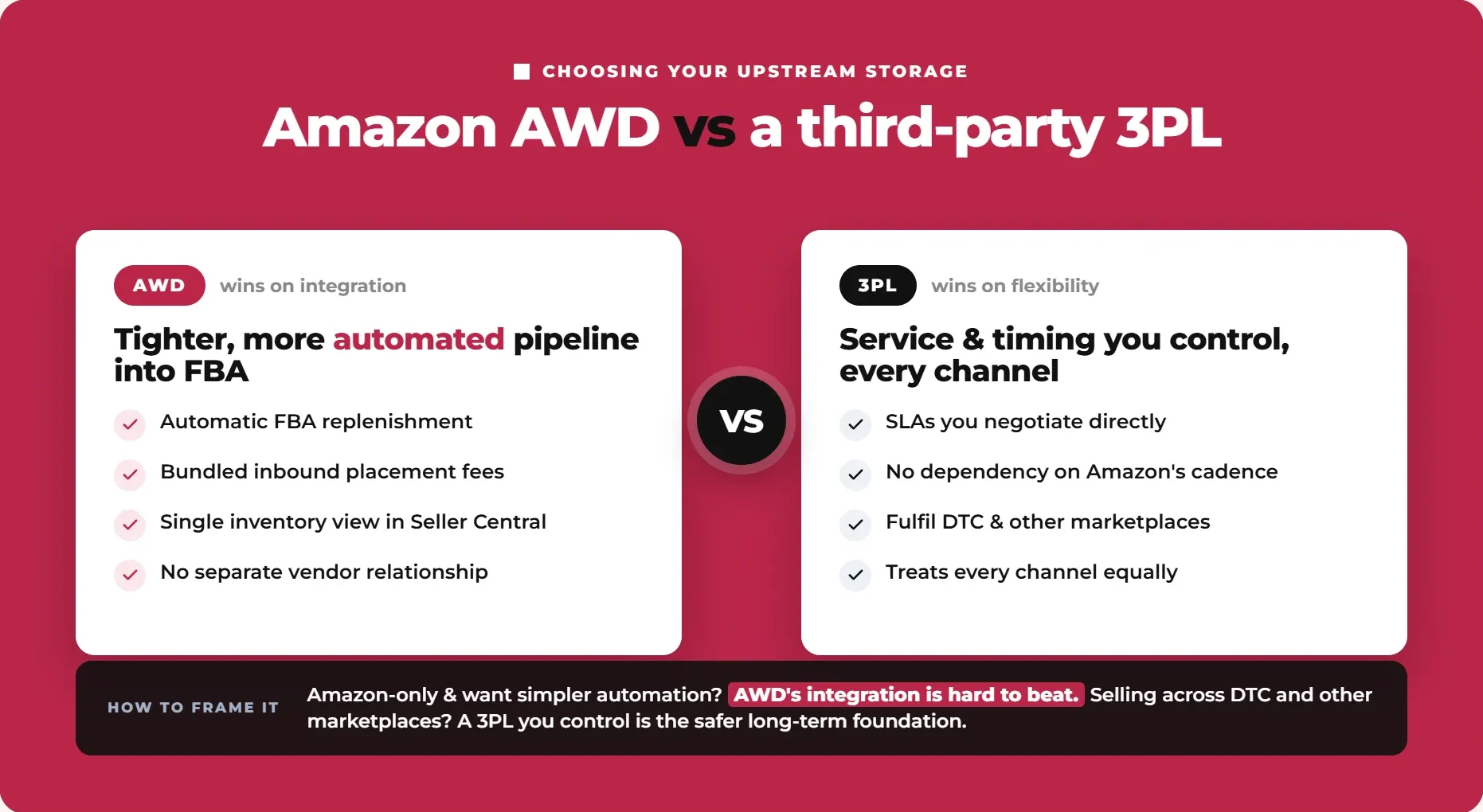
AWD tends to win on tight integration: automatic FBA replenishment, bundled inbound placement fees, and a single view of inventory inside Seller Central without juggling a separate vendor relationship.
A 3PL can still win on flexibility: service-level agreements you negotiate directly rather than accept as given, no dependency on Amazon's own replenishment timing and cadence, and the ability to fulfil direct-to-consumer orders or other marketplaces without Amazon controlling how and when your stock moves. If a meaningful share of your business sits outside Amazon, a 3PL relationship you control directly is often the more flexible long-term bet, even if AWD looks cheaper on the Amazon-only slice of your inventory.
A useful way to frame the decision: if Amazon is effectively your only sales channel and your priority is a simpler, more automated pipeline into FBA, AWD's tight integration is hard to beat. If you're selling across Amazon, your own DTC store, and other marketplaces, and you need consistent service levels and timing you control across all of them, a 3PL that treats every channel equally, rather than prioritising Amazon's own replenishment logic, is often the safer long-term foundation to build on.
Getting Started With AWD: A Pre-Enrolment Checklist
Work through this before you commit your first pallet:
Confirm SKU-level eligibility for every product you're considering moving into AWD.
Check your carton and pallet specs against AWD's requirements (conveyable boxes, 25 inches max per side, 50 lb max per box).
Confirm your packaging is fully prepped and compliant before shipping, since AWD won't prep it for you.
Check which AWD rate tier each SKU will actually be billed at (base, smart storage, or Amazon Managed) and confirm your region's storage, processing, and transportation rates in Seller Central.
Model the true landed cost per unit, storage, transport, processing, prep, and a realistic loss allowance, and check whether the SKU qualifies for FBA fee relief (low-inventory-level, storage utilisation, and aged inventory surcharges) under AWD auto-replenishment.
Decide which SKUs genuinely fit the bulk/seasonal profile AWD is built for, and which are better left on standard FBA replenishment.
Enrol via Seller Central: Growth → Explore Programs → Warehousing and Distribution.
The Bottom Line
AWD is a real cost and operations lever for the right inventory profile: bulk, seasonal, or slow-moving stock that benefits from cheaper upstream storage and automated replenishment. But 2026's fee changes, and the fact that Amazon no longer preps inventory anywhere in its network, mean the decision needs a proper landed-cost model rather than a glance at the headline storage rate.
Working out which SKUs genuinely belong in AWD, which stay on standard FBA replenishment, and how that fits your broader fulfilment strategy is exactly the kind of operational decision worth getting right before you commit inventory. Talk to Flairox about optimising your Amazon fulfilment and storage strategy to build a plan that matches your actual inventory mix, not just the advertised rate.
Frequently asked questions
Amazon Warehousing and Distribution is Amazon's bulk, upstream storage service that sits between a seller's supply chain and Fulfilment by Amazon. Sellers ship inventory in bulk to an AWD facility, and Amazon automatically distributes and replenishes stock into FBA and, for eligible sellers, other sales channels.