Bilal Siddiqui
Key takeaways
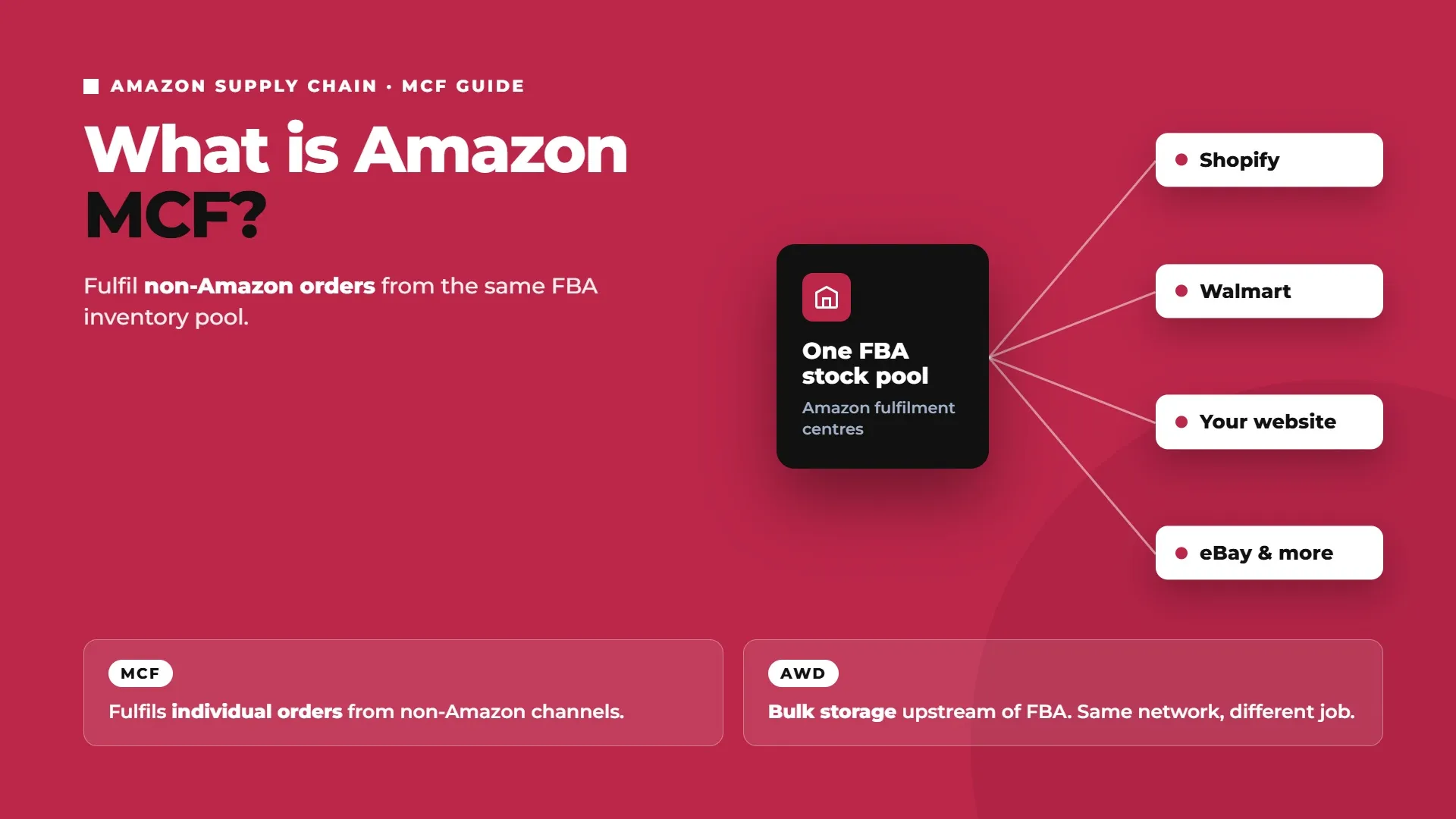
MCF fulfills orders from outside Amazon (Shopify, Walmart, your own site, and more) using the same inventory already sitting in FBA.
2026 brought a real fee increase, averaging about $0.30 per unit, though orders of 3 or more units in the small and large standard-size tiers saw no change.
Delivery runs on two speed tiers, standard (3 business days) and expedited (2 business days), with a 97% average on-time rate reported by Amazon.
Packaging is unbranded by default ("blank box"), at no extra charge, and it's required for Walmart Marketplace orders specifically.
Returns and customer service stay with the seller. Amazon handles the physical return processing once you generate an RMA, but you own refunds and customer communication since the order didn't happen on Amazon.
Shopify integration is free and direct, including a "fast" delivery badge at checkout; other platforms connect through Amazon's Integration Selection Tool.
You're selling on Amazon and Shopify, or Amazon and Walmart, or Amazon and your own DTC store, and every order that doesn't come through Amazon still needs picking, packing, and shipping somehow. Maybe that means a second warehouse relationship, a 3PL contract, or you packing orders from your own garage after hours. Amazon Multi-Channel Fulfillment lets you skip all of that by using the inventory already sitting in Amazon's fulfilment centres to fulfil orders placed anywhere else.
This guide walks through what Amazon MCF actually is, how it works, what it costs in 2026, how to set it up (including Shopify and other integrations), who handles returns and customer service, and how it stacks up against standard FBA. By the end, you'll know whether it's the right fit for your non-Amazon order volume.
What Is Amazon MCF (Multi-Channel Fulfillment)?
Amazon MCF is a service that lets sellers fulfil orders placed on non-Amazon sales channels using inventory stored in Amazon's fulfilment centres, the same pool of stock used for standard FBA orders. If you're already an FBA seller, your existing inventory is immediately usable for MCF, there's no separate stock transfer to arrange. If you're not selling on Amazon.com itself but still want to use Amazon's fulfilment network for your Shopify or Walmart orders, you send inventory into Amazon's network first, the same way an FBA seller would.
It's worth placing MCF alongside Amazon Warehousing and Distribution (AWD) inside Amazon's broader supply chain offering, since the two get confused. AWD stores and redistributes inventory in bulk, upstream of FBA. MCF fulfils individual customer orders that arrive from channels other than Amazon. Different jobs, same underlying network.
The appeal is straightforward once you've already built out FBA: you're paying for storage and access to Amazon's fulfilment centres either way, so using that same infrastructure to fulfil Shopify, Walmart, or DTC orders means you're not standing up a second logistics relationship just for the slice of your business that doesn't run through Amazon. For a seller who's already comfortable with FBA's mechanics, MCF is closer to flipping on a setting than building something new.
How Amazon MCF Works
The sequence is straightforward once inventory is in place:
Inventory already stored in FBA is immediately available for MCF, no separate transfer needed.
A customer places an order on a non-Amazon channel, your Shopify store, Walmart, eBay, or your own site.
Order details reach Amazon MCF one of four ways: manually through Seller Central, via a spreadsheet upload, through the MCF API, or automatically through a platform integration.
Amazon picks, packs, and ships the order using its standard fulfilment process, in unbranded packaging by default.
Tracking information is returned to both the seller and the customer.
The units ship from the same shared FBA inventory pool used for your Amazon.com orders.
The operational catch worth knowing upfront: because MCF draws from the same inventory as FBA, you need to actively monitor combined stock levels across every channel you sell on. It's entirely possible to oversell on Amazon because a wave of Shopify orders quietly drew down the same pool, or vice versa, if nothing is watching total stock across channels. This isn't a hypothetical edge case either, it's the single most common operational complaint sellers raise about MCF once they've been running it for a few months: a promotion on one channel unexpectedly starves stock on another, and neither channel's own inventory dashboard shows the full picture on its own. Whatever inventory management setup you use, it needs to reconcile across every connected channel, not just Amazon's own view of stock.
Amazon MCF Delivery Speeds
MCF offers two domestic delivery tiers: standard delivery (3 business days) and expedited delivery (2 business days). Amazon reports a 97% average on-time delivery rate across orders placed between October 2024 and September 2025 (Sell on Amazon). Expedited costs more per unit than standard, and both speeds can carry additional peak-season surcharges during the busiest shipping months.
Amazon MCF Fees in 2026
The headline change for 2026: MCF fulfilment fees rose by an average of $0.30 per unit, though orders shipping 3 or more units in the small and large standard-size tiers saw no increase at all (Amazon Supply Chain Services).
MCF fulfilment fees apply after inventory is already inside Amazon’s network. For the separate cost of routing stock into FBA, see our Amazon inbound placement fees guide.
Fulfilment fee table (standard 3-day delivery, non-peak)
Size tier | Single unit | Two units | Three units | Four+ units |
|---|---|---|---|---|
Small standard (4 oz or less) | $7.34 | $4.98 | $4.10 | $3.64 |
Large standard (1 to 2 lbs) | $10.64 | $7.19 | $5.90 | $5.25 |
Large bulky (up to 30 lbs) | $18.08 + $0.75/lb above 2 lbs | |||
Extra-large (up to 50 lbs) | $32.17 + $0.62/lb above 1 lb |
Fulfilment fee table (expedited 2-day delivery, non-peak)
Size tier | Single unit | Two units | Three units | Four+ units |
|---|---|---|---|---|
Small standard (4 oz or less) | $10.70 | $6.31 | $4.78 | $3.96 |
Large standard (1 to 2 lbs) | $13.45 | $7.96 | $6.42 | $5.91 |
These figures are drawn from Amazon's published rate card and cross-checked against seller-tooling breakdowns of it; confirm the exact current rate for your SKU using Amazon's own MCF pricing calculator before budgeting, since precise weight and dimensions within a tier affect the final number.
Multi-unit discounts
Notice the pattern in the tables above: shipping multiple units in a single order can cut per-unit fulfilment fees by up to 50% compared to a single-unit order, spread across four discount tiers based on units per order. Take small standard items on standard delivery as an example: a single-unit order costs $7.34 to fulfil, but if your average order across that channel is four units, the per-unit cost drops to $3.64, less than half. If your non-Amazon channels regularly see multi-item orders (a Shopify store running bundle promotions, for instance), this is a meaningful part of the total cost picture, not a rounding difference, and it's worth actively encouraging multi-item checkouts where your margins allow it.
Surcharges
A handful of additional charges layer onto the base fulfilment fee:
Surcharge | Rate |
|---|---|
Fuel/logistics surcharge (US, effective 2 May 2026) | 3.5% of MCF fulfilment fees |
Remote area delivery | +100% (standard-size), +200% (large/extra-large), for Alaska, Hawaii, Guam, Puerto Rico, US Virgin Islands |
Peak holiday surcharge (15 Oct 2026 to 14 Jan 2027) | Roughly +$0.35/unit (standard-size), +$1.00/unit (extra-large) |
Lithium battery surcharge | $0.11/unit |
Storage fees
MCF inventory sits in the same storage rate structure as standard FBA: roughly $0.78 per cubic foot for standard-size items from January to September, rising to $2.40 per cubic foot during the October to December peak (large and extra-large items run $0.56 and $1.40 respectively over the same periods) (Amazon Supply Chain Services).
Discounts available
Amazon runs a Preferred Pricing Program offering 15% off outbound MCF fees plus a $1 FBA credit per MCF unit shipped, for eligible sellers on 6 to 12 month terms, with custom pricing available for high-volume merchants. Worth checking your eligibility for this before assuming the standard rate card is your only option.
How to Set Up Amazon MCF
Setup follows four steps:
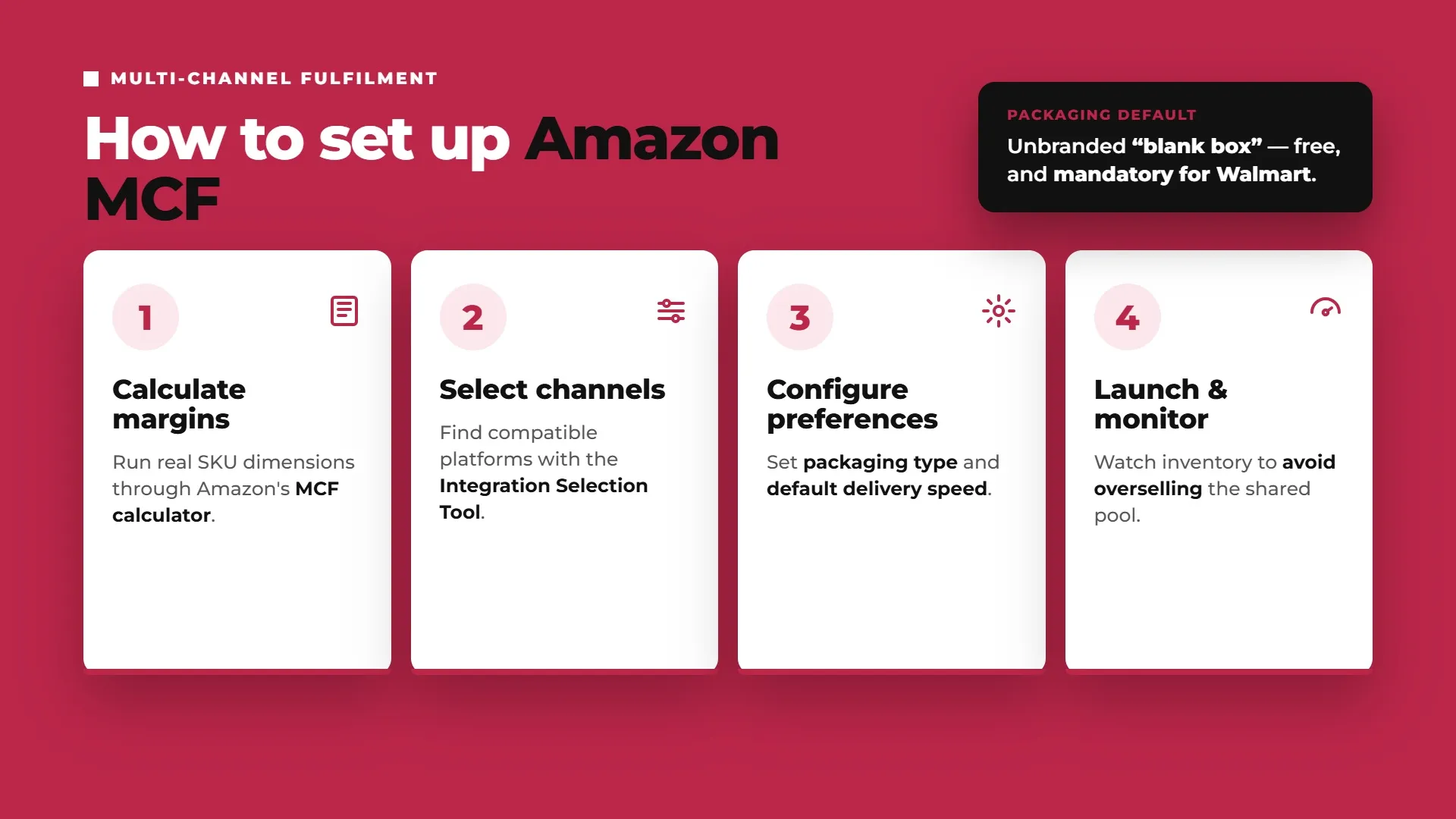
Calculate margins. Run your actual SKU weights and dimensions through Amazon's MCF pricing calculator and current rate card, factoring in fulfilment fees, the fuel surcharge, your marketplace's own referral or transaction fees, and storage costs.
Select channels. Use Amazon's Integration Selection Tool to find which platforms and third-party integrations are compatible with the channels you sell on.
Configure preferences. Set your packaging type (unbranded is the default) and your default delivery speed.
Launch and monitor. Watch inventory levels across both Amazon and MCF channels closely once live, to prevent overselling the shared pool.
Packaging defaults to unbranded, "blank box," automatically and at no extra charge. This isn't just an option, it's a requirement for Walmart Marketplace orders specifically, so if Walmart is one of your channels, there's no branded-packaging alternative to configure around.
Step one, calculating margins, is the step worth spending the most time on before you flip MCF on for a channel. It's tempting to treat the headline fulfilment fee as the whole cost, but the real comparison needs to include your marketplace's own referral or transaction fee, any payment processing fee on that channel, the storage cost of holding that inventory in Amazon's network in the first place, and whichever surcharges apply to your product category and shipping destination. Run that full stack against what you're actually charging on that channel before assuming MCF is cheaper than fulfilling it yourself or through a 3PL.
Amazon MCF Shopify, WooCommerce & Other Integrations
For Shopify sellers, MCF setup is close to plug-and-play. Amazon offers a free, direct integration available through the Shopify App Store that automatically routes eligible Shopify orders into MCF without manual per-order steps. The integration also activates an "MCF fast" badge at checkout, showing real-time delivery estimates to shoppers, which can support conversion the same way Amazon's own Prime badge does on Amazon.com.
For WooCommerce and other platforms, connect through Amazon's Integration Selection Tool, which surfaces compatible platforms and third-party integrations, or build against the MCF API directly if you're running a custom storefront. Expect a bit more setup work than the Shopify path, since it isn't a single native app installation, you may be configuring a third-party middleware app rather than a first-party Amazon integration, so check what that app supports (order routing, inventory sync, returns handling) before assuming it matches the Shopify experience feature for feature.
Whichever integration path you use, the same inventory-monitoring caution from earlier applies. An integration that routes orders into MCF automatically is convenient, but it also means a spike in orders on that channel draws down shared inventory automatically too, so the integration is only as safe as the inventory sync sitting behind it.
Amazon MCF Returns and Customer Service
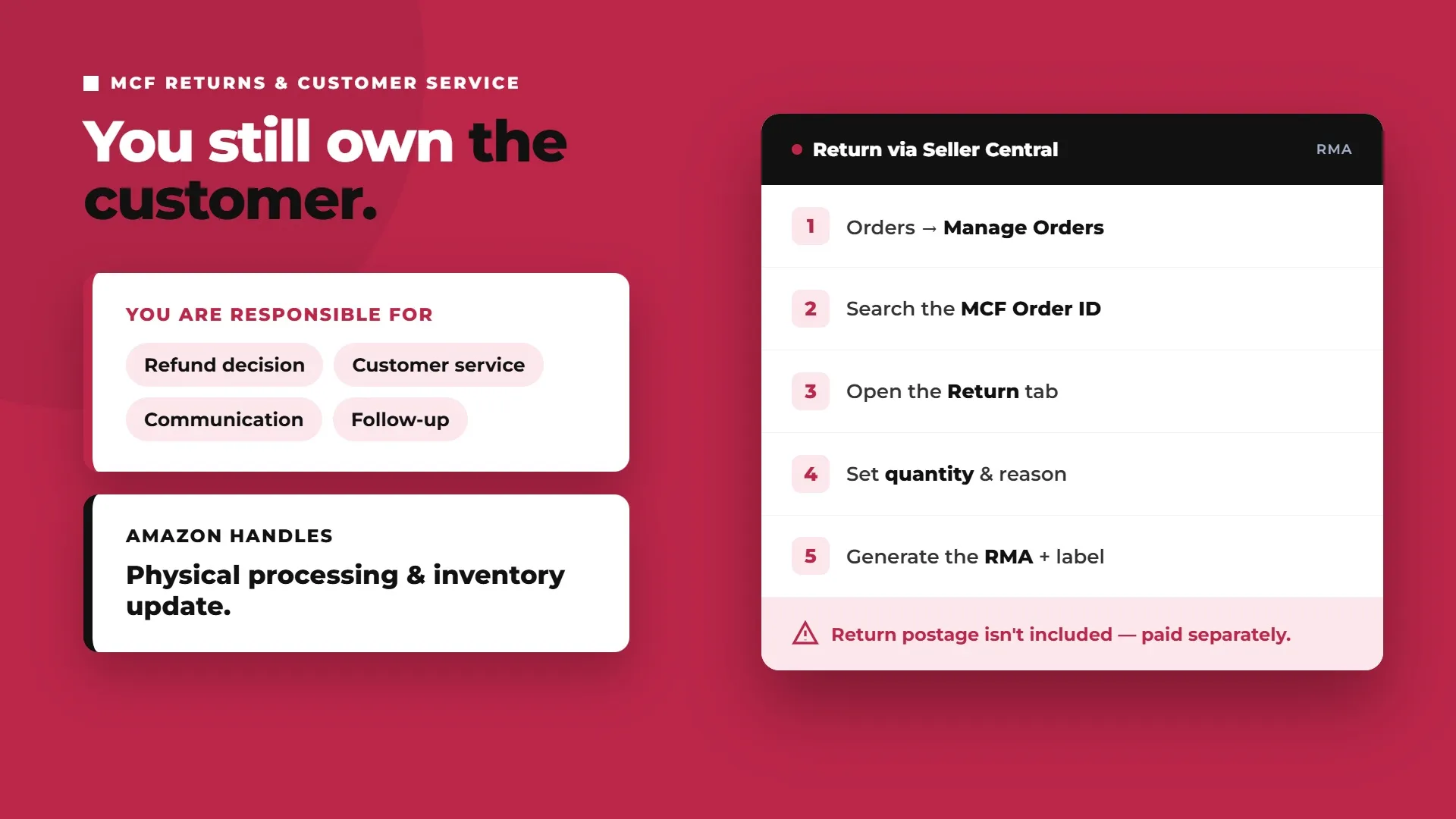
This is the distinction that trips sellers up most often coming from FBA: you remain responsible for customer refunds and customer service on MCF orders, because the order and payment happened outside Amazon in the first place (Amazon Supply Chain Services).
Amazon also publishes an official MCF returns process for initiating RMAs and sending eligible units back into Amazon inventory.
The return process itself runs through Seller Central:
Go to Orders → Manage Orders.
Search for the MCF Order ID.
Click the Return tab on the order details.
Select the return quantity and specify the reason.
Generate a Return Merchandise Authorization (RMA).
The RMA includes a mailing label directing the customer to an Amazon fulfilment centre, plus an authorisation slip that needs to go inside the returned package. One important caveat: return postage isn't included in this process, either you or the customer has to pay for it separately.
Amazon handles the physical processing once the return arrives at the fulfilment centre, checking it in and updating your inventory. But you own the customer-facing side throughout, the refund decision, the communication, and any follow-up, exactly as you would if you were fulfilling the order yourself. Worth planning for explicitly rather than discovering it the first time a Shopify customer emails asking where their refund is: MCF doesn't hand you an Amazon-style, fully managed customer service layer just because Amazon is physically holding and shipping the inventory.
Is Amazon MCF Worth It Compared to a 3PL?
MCF isn't the only way to fulfil non-Amazon orders, a dedicated third-party logistics provider is the natural alternative, and the right call depends on how much of your business already runs through FBA.
MCF tends to win when you're already an established FBA seller: no second inventory pool to manage, no separate vendor relationship to maintain, and Amazon's fulfilment speed and reliability extended to every channel at once. For a seller whose Amazon business is the primary channel and other channels are a smaller, growing slice, MCF is usually the lower-effort option.
A 3PL can still win once your non-Amazon volume becomes substantial in its own right: more flexible packaging (MCF's unbranded default isn't ideal for DTC brands that want their own packaging as part of the unboxing experience), service-level agreements you negotiate directly, and no dependency on Amazon's own inventory and shipping decisions for orders that have nothing to do with Amazon. If branded packaging and a distinct customer experience matter more to your non-Amazon channels than raw fulfilment speed, that's a real point in the 3PL's favour that MCF's "blank box" default can't match.
Amazon MCF vs FBA: Key Differences
FBA | MCF | |
|---|---|---|
Fulfils orders from | Amazon.com only | Non-Amazon channels (Shopify, Walmart, your own site, etc.) |
Customer service | Amazon owns it | Seller owns it |
Returns | Amazon manages the full process | Seller initiates via Seller Central; Amazon processes the physical return only |
Packaging | Amazon-branded where applicable | Unbranded ("blank box") by default |
Inventory pool | Shared with MCF | Shared with FBA |
Typical use case | Amazon marketplace orders | Extending Amazon's fulfilment speed to every other channel you sell on |
For the broader fulfilment model decision beyond MCF, see our FBA vs FBM guide.
The core framing: FBA fulfils Amazon.com orders, and Amazon owns the customer relationship for those. MCF fulfils everything else, and the seller keeps that relationship. Same warehouse, same inventory pool, different responsibilities depending on where the order actually came from.
Amazon MCF Tracking and International Shipping
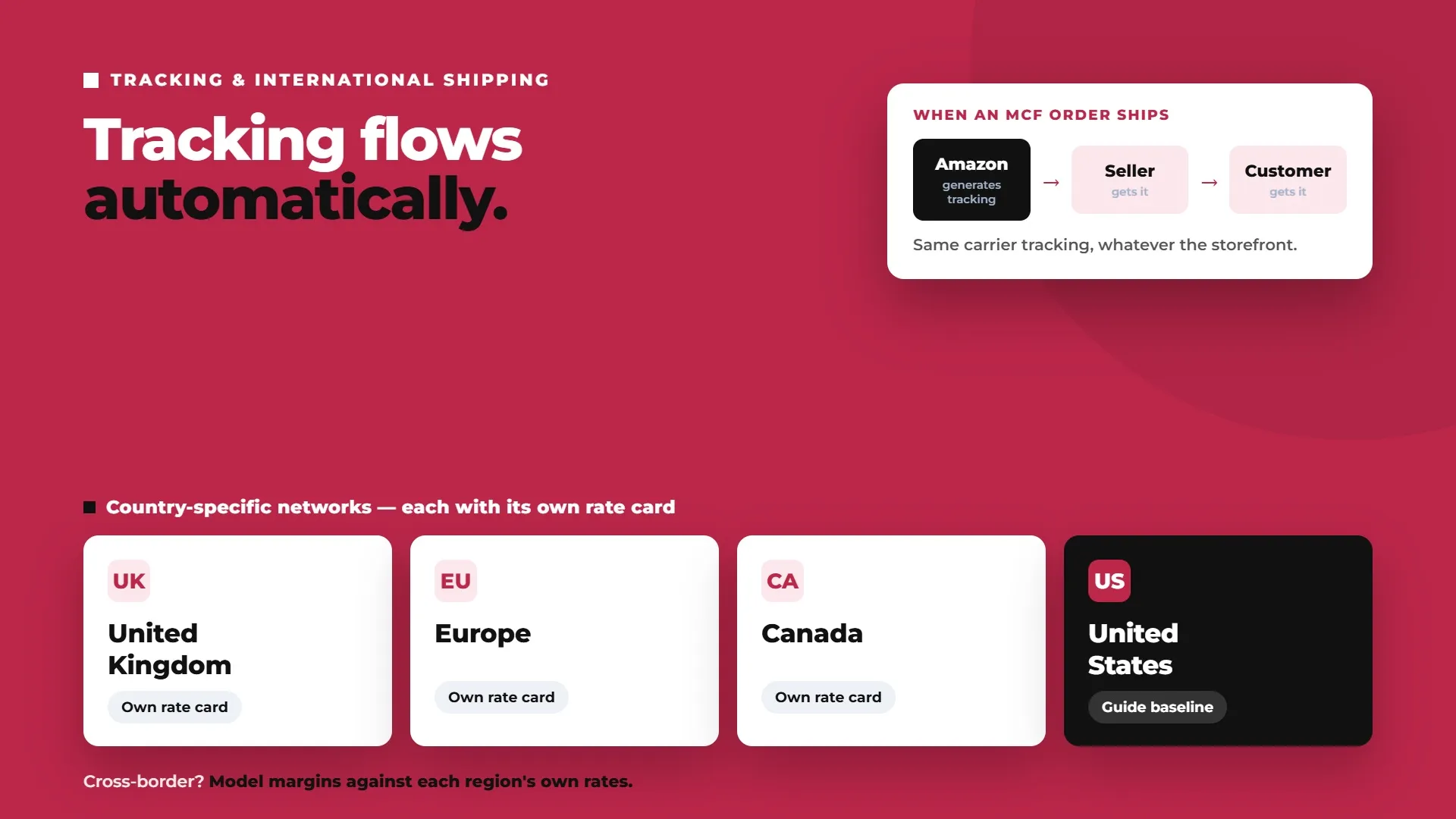
Tracking information generated by Amazon flows back to both the seller and the end customer automatically once an MCF order ships, so customers get standard carrier tracking regardless of which storefront they ordered through, the experience looks the same to them whether they bought on Amazon or your own site.
MCF also operates through country-specific fulfilment networks, including the UK, Europe, and Canada, each with its own rate card and delivery speed options. If you're shipping cross-border MCF orders, check the specific marketplace's current rates directly rather than assuming the US rate card applies, fee structures and delivery tiers don't automatically carry over between regions. A seller running MCF out of the UK network to fulfil European DTC orders, for instance, should expect different per-unit fees and delivery windows than the US figures in this guide, and should model margins against that region's own rate card rather than converting the US numbers at an exchange rate and assuming that's close enough.
Getting Started With MCF: A Setup Checklist
Confirm which non-Amazon channels you want to connect (Shopify, Walmart, your own store, others).
Run the MCF pricing calculator against your actual SKU weights and dimensions to model true per-order margin.
Decide standard vs expedited as your default delivery speed for each channel.
Connect via Shopify's free app, or Amazon's Integration Selection Tool for other platforms.
Set up inventory monitoring so Amazon and non-Amazon channels don't oversell the same shared pool.
Confirm your internal process for handling customer-facing returns and refunds before your first MCF order ships.
Conclusion
MCF lets sellers extend Amazon's fulfilment speed and reliability to every channel they sell on, using inventory they likely already have sitting in FBA. 2026's fee increase, and Amazon's growing emphasis on fast-delivery badges showing up on storefronts beyond Amazon itself, make it worth re-checking the margin math per SKU rather than assuming last year's numbers still hold. For sellers whose non-Amazon channels are still a modest slice of total volume, MCF is usually the path of least resistance. For sellers where that slice has grown large enough to need its own packaging, branding, and service-level guarantees, it's worth genuinely weighing against a dedicated 3PL rather than defaulting to MCF because it's already switched on.
Working out which channels and SKUs make sense for MCF, and getting the setup right the first time, is exactly the kind of detail worth getting right before your non-Amazon orders start relying on it. Talk to Flairox about setting up Amazon MCF across your sales channels to build a fulfilment strategy that covers every channel you sell on, not just Amazon.
Frequently asked questions
Amazon Multi-Channel Fulfillment is a service that lets sellers use inventory stored in Amazon's fulfilment centres to fulfil orders placed on non-Amazon sales channels, such as Shopify, Walmart, or a seller's own website, using the same inventory pool as standard FBA.