 Raahim Sheikh
Key takeaways
An FNSKU identifies your specific inventory inside FBA, not just the product. It ties each unit to your seller account.
Commingling ended March 31, 2026. Stickerless, pooled inventory is no longer supported.
The rules now split by seller type. Brand Registry brand owners can use manufacturer barcodes. Resellers must apply Amazon barcodes to every unit.
Amazon stopped prepping and labeling on January 1, 2026. There is no paid fallback and no fix at the fulfillment center.
Label specifications are strict: Code 128, black on plain white, approximately 1 × 2 inches up to 2 × 3 inches, and printed at 300 DPI or higher.
Only one scannable barcode is allowed per unit. The original UPC or EAN must be covered completely.
The old advice is backwards for brand owners. FNSKUs were mainly a defense against commingling. That threat is gone.
Scan testing before inventory ships is the cheapest quality control you will ever run.
A pallet lands at an Amazon fulfillment center in March. Half the units carry the supplier's UPC and nothing else. In 2025, Amazon would have applied the missing labels for a per-unit fee and the shipment would have been checked in a few days late.
In 2026, nobody will apply for anything. The units sit in problem solve. The listing goes out of stock during your strongest sales week, and the recovery takes longer than the delay itself.
Two policy changes landed within three months of each other, and between them they removed the requirement's flexibility and its safety net at the same time. Most of the FNSKU guides currently circulating were written before either one. Several still tell sellers they can pay Amazon to label for them, which has not been true since January.
This guide covers what an FNSKU actually is, who needs one now that the rules are split by seller type, the exact label specifications, how to print and apply labels correctly, and the mistakes that turn a routine shipment into a receiving problem.
What is an FNSKU?
FNSKU stands for Fulfillment Network Stock Keeping Unit. It is a barcode Amazon generates that identifies a specific product belonging to a specific seller inside the FBA network.
That second half is the part that matters. A UPC tells Amazon what the item is. An FNSKU tells Amazon what the item is and whose it is.
When a customer orders your product and a fulfillment center picks a unit off the shelf, the FNSKU is what confirms the unit came from your inventory and that the sale should be credited to your account. Without a correct, scannable barcode, Amazon cannot receive, track, or attribute your stock.
What an FNSKU code looks like
Amazon-issued FNSKUs are 10 characters and typically begin with X00 or X0A. Something like X001ABCDEF.
If your FNSKU looks like a B0 code instead, that is your ASIN being used as the barcode. That indicates the SKU is set to manufacturer barcode rather than Amazon barcode, which is a distinction that carries much more weight in 2026 than it used to.
What appears on an FNSKU label
Every compliant label carries three elements:
The scannable FNSKU barcode
The product title, usually truncated
The condition, such as New
Amazon generates all three when you print item labels. You should not be designing these yourself or rebuilding them in a label template, because a label that omits condition or title is not compliant even if the barcode scans perfectly.
FNSKU vs UPC vs ASIN vs SKU
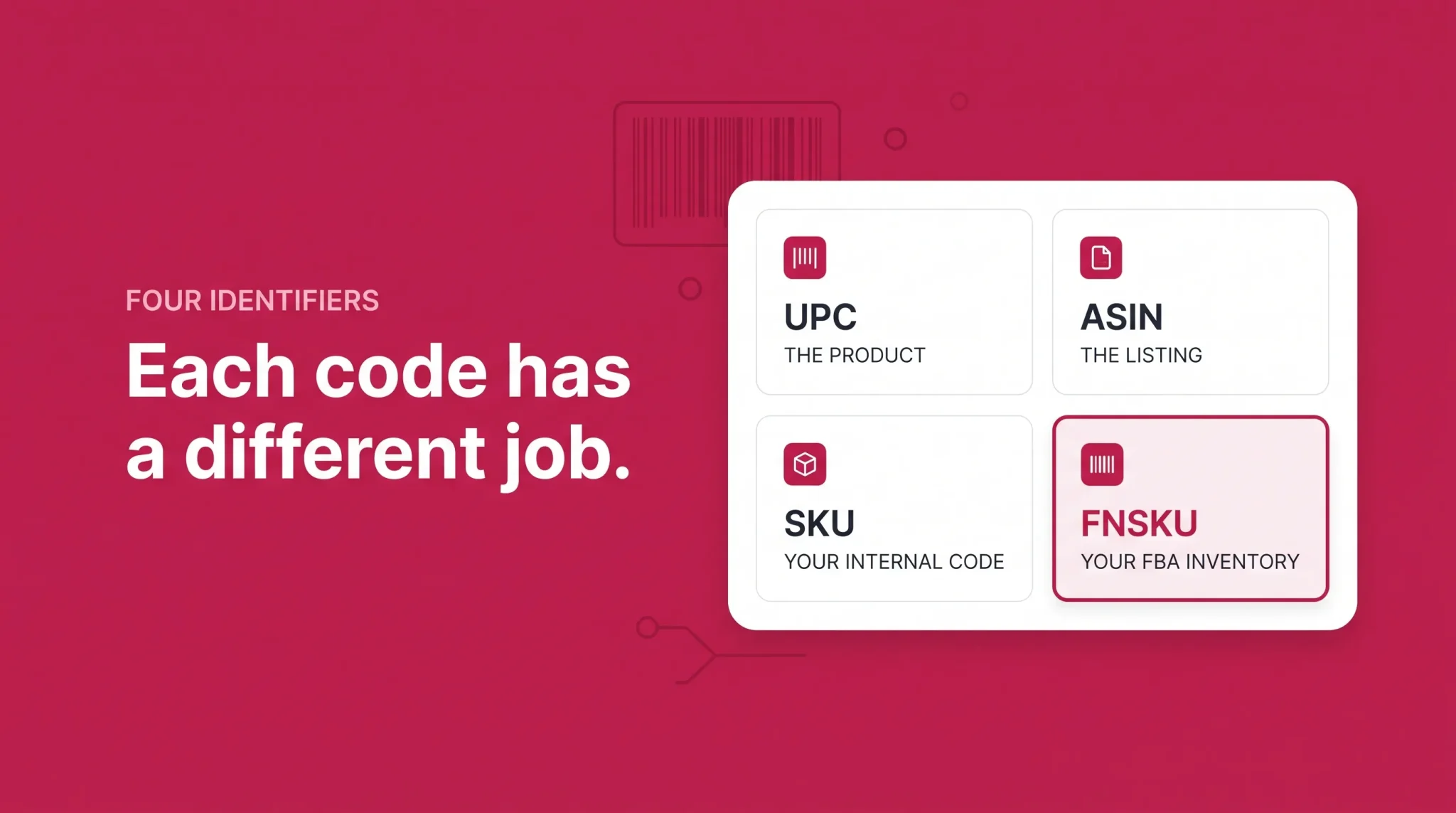
Four identifiers, four different jobs. Confusing them is the root cause of a surprising number of inventory problems.
Identifier | Who issues it | What it identifies | Where it is used |
|---|---|---|---|
UPC / EAN / GTIN | GS1 | The product, globally | Retail, any channel, Amazon listing creation |
ASIN | Amazon | The Amazon listing | Amazon catalog, shared by all sellers on that listing |
SKU | You | Your internal reference | Your own systems and Seller Central |
FNSKU | Amazon | Your inventory inside FBA | Fulfillment centers only |
UPC is your product's passport. You buy it from GS1, it is unique to your product worldwide, and Amazon validates ownership against GS1 records. Using a UPC you do not own leads to listing errors, GTIN verification failures, and suppression.
ASIN is the listing identifier. If ten sellers offer the same product, they all share one ASIN. It tells Amazon nothing about who sent in a particular unit, which is exactly why it cannot do the FNSKU's job.
SKU is yours alone. Amazon does not care what it says. Most sellers use something structured like BRAND-MODEL-SIZE-FBA so it is readable at a glance.
FNSKU is the warehouse-level identifier. Every product has an ASIN. Not every product has an FNSKU, because that depends on your barcode setting and, since 2026, on what kind of seller you are.
Do you need an FNSKU? The 2026 barcode decision
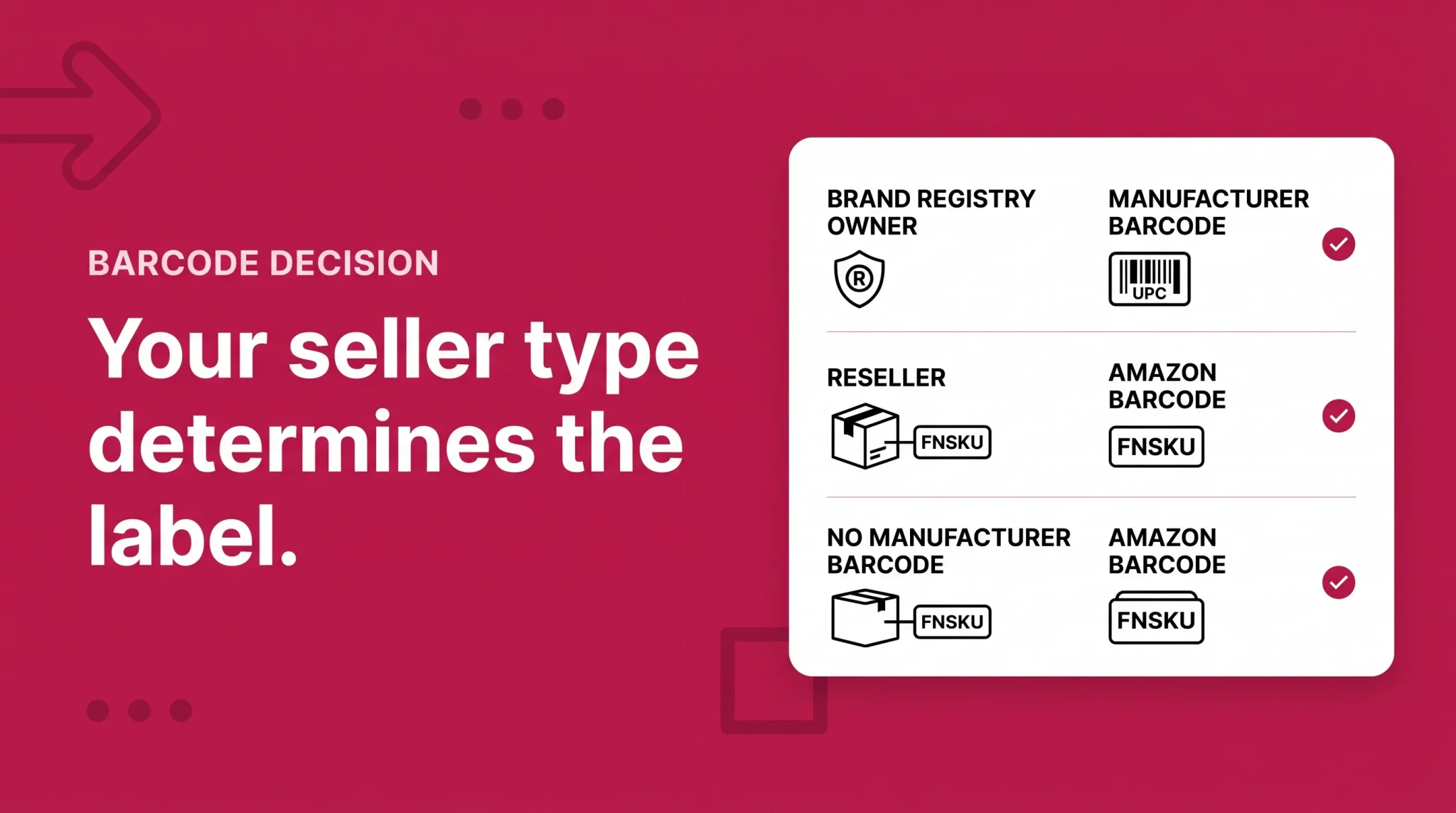
This is where most existing guides are now wrong, so it is worth being precise.
What changed on March 31, 2026
Amazon announced at its Accelerate conference in September 2025 that it was ending commingling, and confirmed the change in Seller Central for inventory shipped on or after March 31, 2026.
Commingling, formally called stickerless commingled inventory, was the practice of pooling identical products from multiple sellers under a shared manufacturer barcode. When a customer ordered, Amazon shipped whichever matching unit was closest, regardless of who sent it in. It was faster for Amazon, and it was the single biggest counterfeit risk in FBA.
Amazon's explanation was that improvements in network placement and virtual unit tracking removed the need for physical pooling. Units can now be attributed to a seller without being physically segregated by a sticker.
The result is that FBA barcode requirements now depend on what kind of seller you are.
If you are a brand owner in Brand Registry
If you are enrolled in Amazon Brand Registry with the Brand Representative selling role, and your product carries a valid manufacturer barcode such as a UPC, EAN, or ISBN, you can use that manufacturer barcode. No Amazon sticker required.
Your inventory is tracked virtually and stays attributed to your account. You are not pooled with anyone.
This is a meaningful operational win. It means:
No per-unit labeling step, in-house or at your supplier
Retail-ready packaging can ship straight into FBA
No pre-allocation of units between Amazon and your other channels, because stock is no longer Amazon-specific
That last point is the one most brand owners underrate. Under the old system, a unit with an FNSKU sticker was committed to Amazon. Without stickers, the same case of product can go to FBA, a retail account, or your own DTC warehouse depending on where demand shows up.
If you are a reseller
If you are not enrolled in Brand Registry as a Brand Representative, you must apply an Amazon barcode to every unit you send to FBA. This applies even when the product already carries a perfectly good manufacturer barcode.
There is no exception after the deadline. Wholesale sellers, arbitrage sellers, and authorized resellers who do not hold the Brand Representative role all fall into this bucket.
Practically, this means resellers who relied on stickerless commingling to skip labeling entirely now have a labeling operation to build, at the same moment Amazon stopped offering to do it for them. Units arriving without the required Amazon barcode after the cutoff can be flagged as defective, which delays sales and generates additional fees.
If your product has no manufacturer barcode
This rule has not changed and applies to everyone. Any product without a UPC, EAN, or ISBN requires an Amazon barcode, whether you are a brand owner or a reseller.
If you hold a GTIN exemption, which lets you list qualified products without a UPC, you are in this category. Exemption from needing a UPC is not exemption from needing an FNSKU.
Why the old advice is now backwards
For years the standard recommendation to brand owners was: always choose Amazon barcodes, always sticker every unit, never go stickerless. The reasoning was sound at the time. Commingling meant another seller's counterfeit could be shipped to your customer under your listing, and the returns and negative reviews landed on you.
That threat no longer exists. Commingling is gone.
If you are a Brand Registry brand owner still applying FNSKU stickers out of habit, you are paying for a defense against a risk Amazon retired. Switching to manufacturer barcodes is worth evaluating properly, including how it affects your multi-channel inventory and whether every SKU in your catalog is eligible.
One caution. Switching barcode settings on a SKU with existing FBA inventory is not instant and needs to be sequenced carefully. Do not flip settings on live SKUs mid-quarter without planning what happens to the units already in the network.
Amazon no longer preps or labels your inventory
This is the change that turns a labeling error into a real cost, and it deserves its own section because plenty of sellers still have not absorbed it.
On July 28, 2025, Amazon notified sellers that prep and item labeling services for FBA shipments in the US marketplace would end on January 1, 2026. Amazon's stated reasoning was that seller packaging capability had improved substantially and that fulfillment centers should focus on fulfillment rather than prep.
What ended:
Applying FNSKU barcode labels
Poly-bagging and bubble wrapping
Applying safety labels such as suffocation warnings
Bundling multiple units into a sellable set
The change covered all inventory sent to US FBA, including inventory routed through Amazon Warehousing and Distribution, Amazon Global Logistics, Amazon SEND, and the Supply Chain Portal.
There is no paid version of this service anymore. It was not repriced. It was removed.
Sellers running FBA in Europe should note that the same change reached European stores on July 1, 2026, so a multi-region operation now has no prep fallback in either market.
What this means in practice
Every unit has to arrive fully prepped and correctly labeled. Responsibility sits with you, your supplier, or a third-party prep center.
When units arrive non-compliant, the outcomes are:
Receiving delays while units sit in problem solve
Unplanned prep fees where they still apply
Rejected or returned shipments
Stranded inventory that is physically present but not sellable
Lost sales velocity on the ASIN, which affects ranking well beyond the stockout itself
The cost of a labeling mistake used to be a fee. Now it is time, and time during a launch or a Q4 week is considerably more expensive.
Amazon FNSKU label requirements
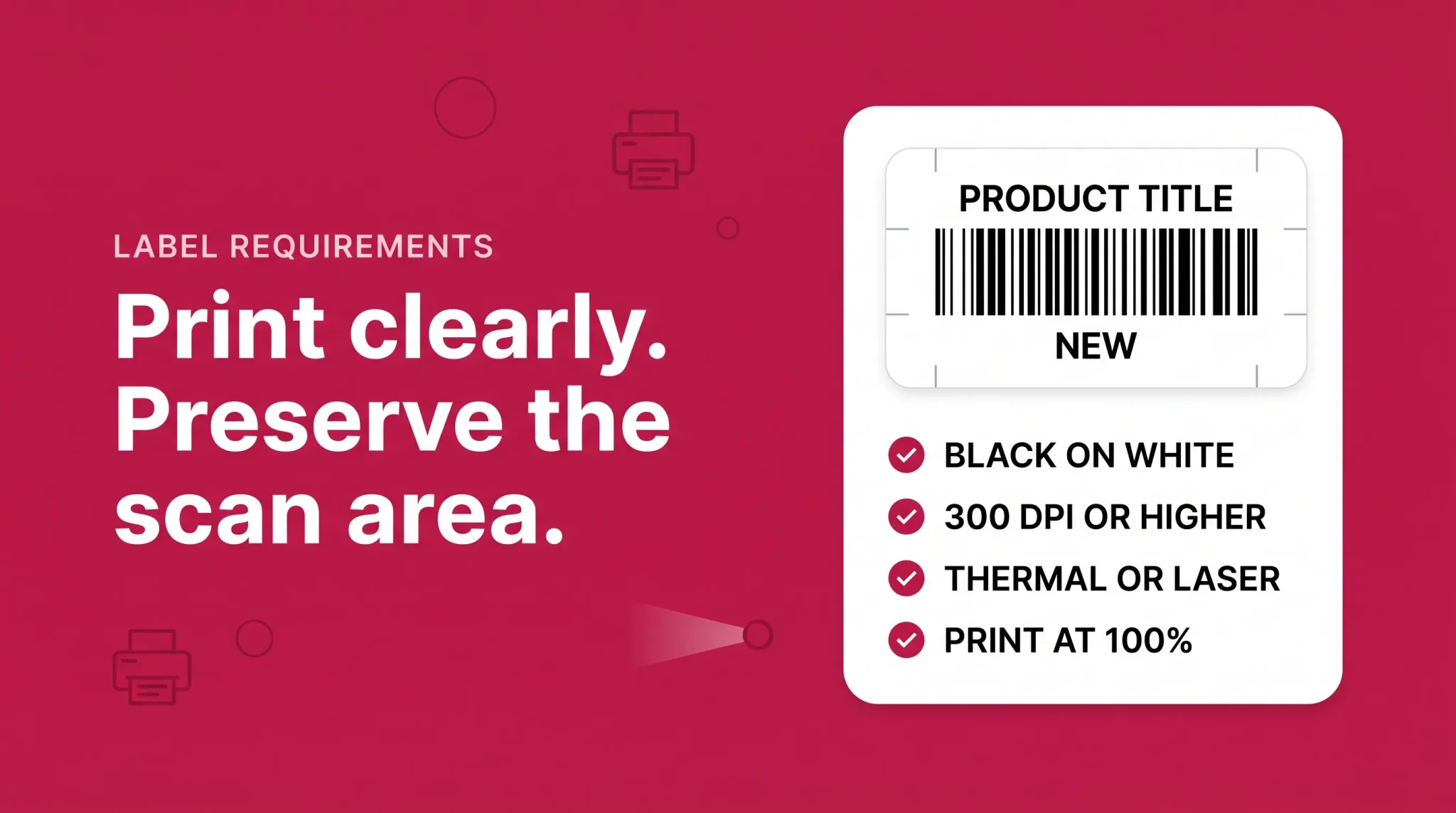
Get these right once, build a template, and stop thinking about it.
Label size
Amazon's guidance points to a size range rather than one fixed dimension:
Spec | Requirement |
|---|---|
Minimum | 1 inch x 2 inches (commonly cited as 1 x 2⅝ inches) |
Maximum | 2 inches x 3 inches |
Common in-range sizes | 1 x 2⅝ in, 2 x 1 in, 1 x 3 in, 2 x 2 in |
Metric equivalents | 25 x 51 mm through 51 x 76 mm |
Default to the larger end of the range when the packaging allows it. Small labels are only a problem at the margins, but the margins are where scan failures happen. A 2 x 1 inch thermal roll label is the workhorse for most sellers.
Barcode format and quiet zones
Barcode symbology: Code 128. This is what Amazon generates and what fulfillment center scanners expect.
Barcode height: at least 0.25 inches.
Quiet zone (white space) around the barcode: approximately 0.25 inches left and right, 0.125 inches top and bottom.
The quiet zone is the specification most commonly destroyed in practice, usually by someone trimming labels to fit a small package or placing a second sticker too close. A scanner needs clear white space to find where the barcode starts and stops. Crowd it and the barcode fails even though it looks fine to the eye.
Print quality and label stock
Black print on plain white stock. No colored, shiny, transparent, or reflective labels.
300 DPI or higher.
Thermal or laser printers only. Inkjet output smudges, bleeds on contact with moisture, and fails scanning. This is the single most common home-office mistake.
Removable adhesive, strong enough to stay on through transit and handling.
Print at 100% scale with no scaling or "fit to page." Scaling is what silently distorts barcode width ratios and produces labels that look correct and scan inconsistently.
What must be on the label
The FNSKU barcode, the product title, and the condition. If you are generating labels through Seller Central, all three are included automatically. If a supplier is producing labels from a file you sent them, confirm all three survived the process.
How to get and print FNSKU labels in Seller Central
The process is short. The mistakes happen around it, not in it.
Log in to Seller Central and go to Inventory → Manage Inventory.
Make the FNSKU column visible. It is often hidden by default. Adjust it through the column preferences on the Manage Inventory page.
Find the SKU you need labels for.
Open the dropdown on the right of that row and select Print Item Labels.
Choose your label layout and quantity.
Amazon generates a downloadable PDF.
Print at 100% scale. Turn off any scaling, page fitting, or auto-rotate settings in your print dialog.
Common US label layouts
Layout | Label size | Typical use |
|---|---|---|
30 per sheet | 1 x 2⅝ in | Letter sheets, general purpose |
24 per sheet | 1 x 2½ in | Letter sheets |
21 per sheet | 1 x 4 in | Larger items |
40 per sheet | 1 x 1½ in | Small items, check scannability first |
Thermal roll | 2 x 1 in | Volume labeling, the best option for most sellers |
If you are labeling more than a few hundred units a month, buy a thermal label printer. Direct thermal rolls cost less per label than sheets, print faster, produce a sharper barcode, and eliminate the partial-sheet waste that sheet labels create every time a run does not end on a multiple of 30.
Sending labels to a supplier
If your manufacturer is applying labels at the factory, send them:
The PDF exactly as Amazon generated it, not a screenshot or a rebuilt version
Written instructions specifying print at 100% scale, 300 DPI or higher, black on white
A placement diagram showing exactly where on the package the label goes
A requirement for a first-article photo and scan test before the full run
Supplier labeling saves substantial cost and time. It also removes your last chance to catch an error before thousands of units are sealed in cartons, which is why the first-article step is not optional.
Where to place FNSKU labels
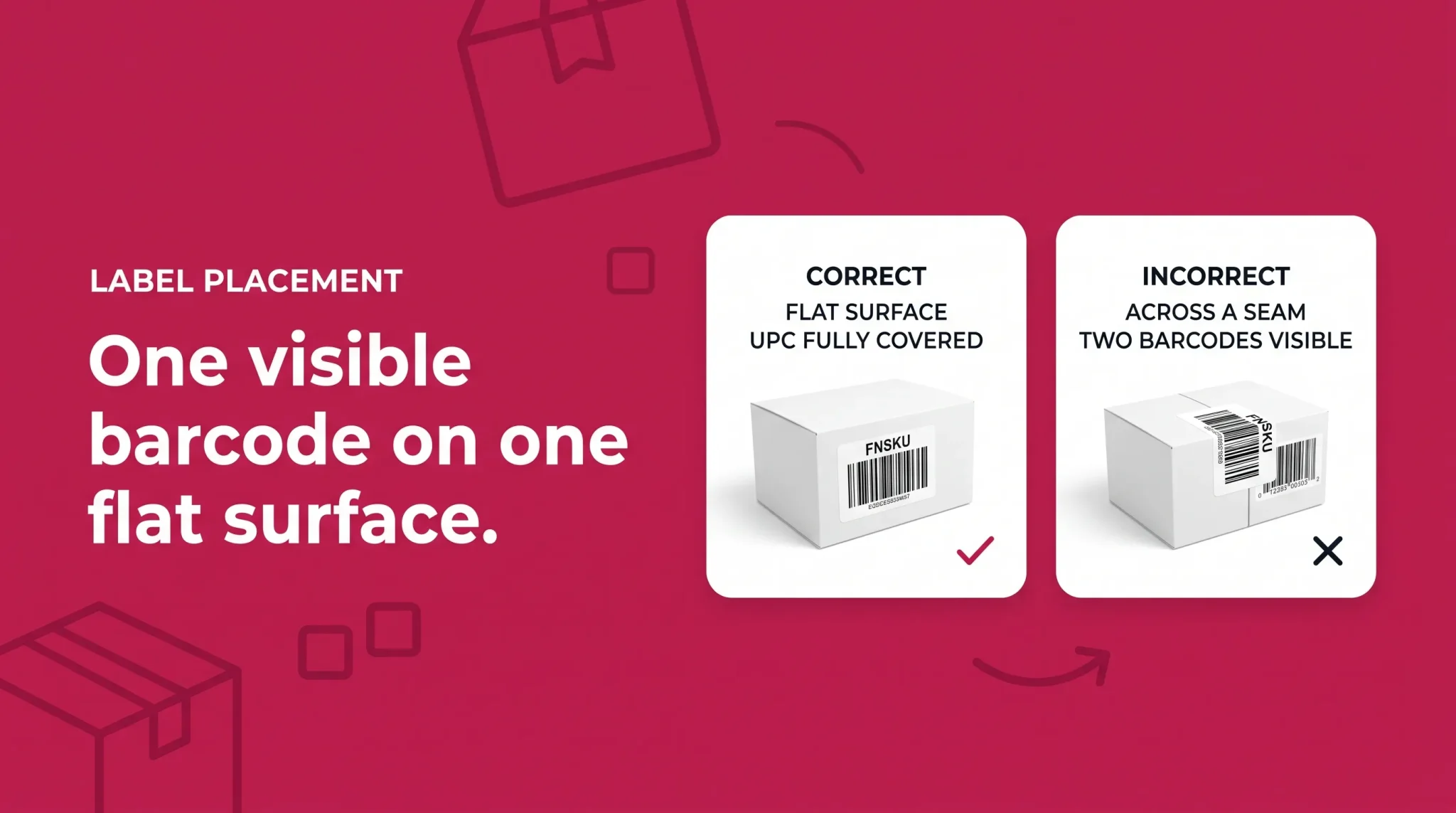
Placement causes more receiving failures than printing does.
Apply the label to a flat, smooth surface. Curved surfaces distort the barcode, and a distorted Code 128 scans unreliably at angle and at speed.
Avoid seams, edges, corners, and shrink-wrap joins. A label bridging a box seam will lift, wrinkle, or split when the package flexes.
Cover the original barcode completely. Only one scannable barcode should be visible on the unit. A unit showing both an FNSKU and an uncovered UPC can be scanned as the wrong item, which is how inventory ends up attributed to another seller or another ASIN entirely.
On poly-bagged or bubble-wrapped items, label the outermost layer. Fulfillment center staff should never have to open packaging to find a barcode.
Keep the label fully on one face. Wrapping a label around a corner to make it fit produces a barcode that cannot be read in one pass.
Common FNSKU mistakes that cause receiving errors
Each of these is routine, and each one costs more in 2026 than it did in 2025.
Leaving the manufacturer barcode exposed. The most frequent error and the most damaging. Two scannable barcodes on one unit means the wrong one gets scanned.
Printing with scaling on. "Fit to page" is the default in many print dialogs. It distorts barcode proportions in ways that are invisible until a scanner fails.
Using an inkjet printer. Output smudges, ink bleeds, contrast is inconsistent. Thermal or laser only.
Colored, glossy, or transparent label stock. Reflection and low contrast defeat scanners. Plain white matte, every time.
Labels across seams or curves. Lifting, wrinkling, and distortion follow.
Assuming Amazon will fix it. This is now the most expensive assumption in FBA. It will not be fixed at the fulfillment center.
Using the wrong barcode path for your seller type. A reseller shipping stickerless after March 31, 2026 is shipping non-compliant inventory.
Mixed-method shipments. Some units labeled, some showing exposed UPCs, in the same box. This creates inconsistent receiving outcomes that are very hard to diagnose afterward.
Reusing old labels after a SKU change. If the FNSKU changed, the old labels are wrong. Destroy printed stock when a SKU is retired rather than leaving it in the label drawer.
No scan test before shipping. A handheld scanner costs less than one stranded shipment. Test a sample from every production run.
Trusting supplier-applied labels without verification. Suppliers make print-setting errors like everyone else, and you find out three weeks later at a fulfillment center.
Labeling bundles as individual units. Bundles need a single FNSKU on the outer packaging and clear "sold as set" marking, not one label per component.
Building an FNSKU quality control process
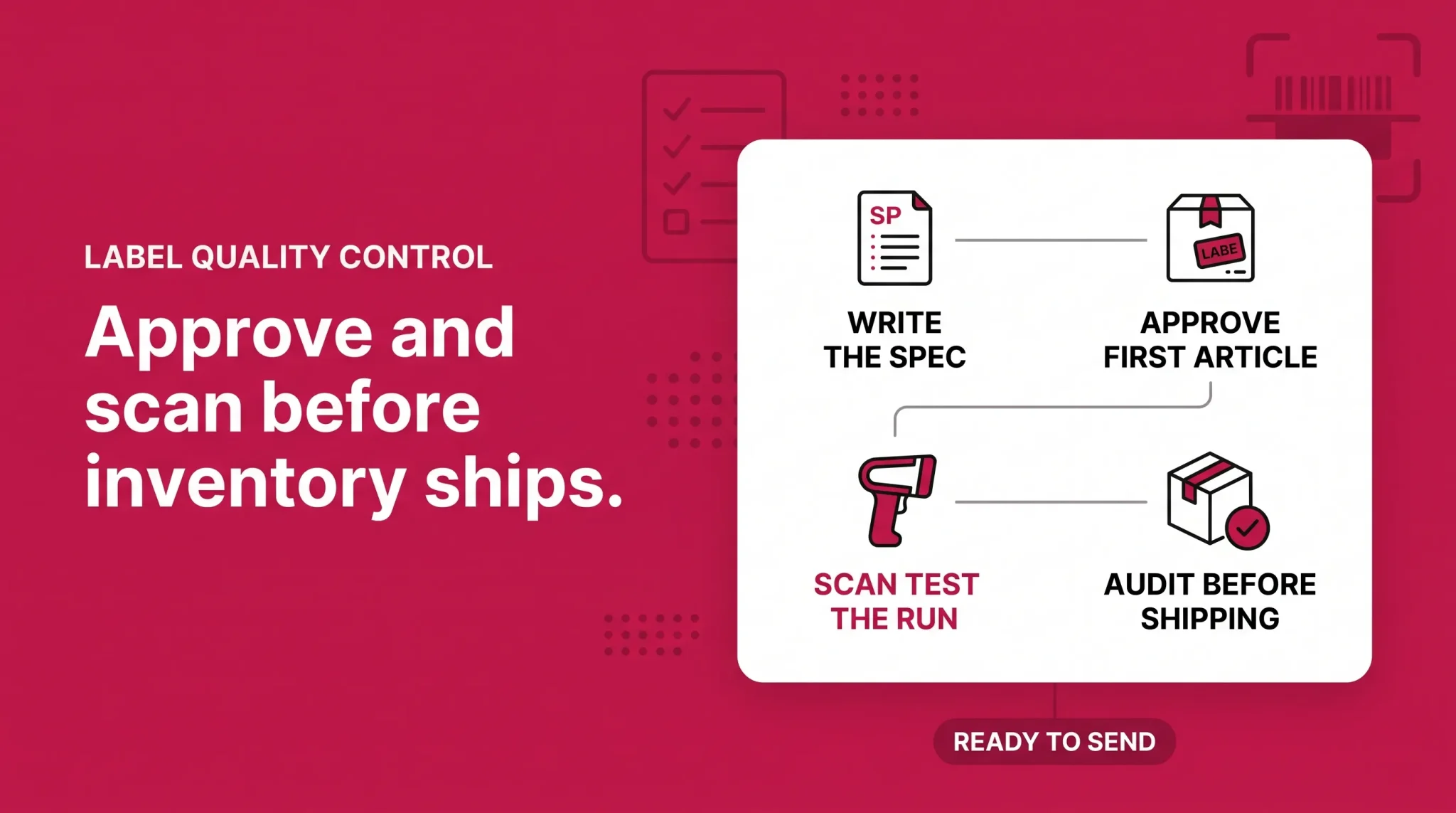
With no Amazon safety net, quality control moves upstream. This does not need to be complicated.
Write a one-page label spec
One document, sent to every supplier and prep partner. It should state label size, print method, DPI, stock type, placement location with a photo, and the requirement that all other barcodes are covered. Most labeling errors come from an instruction that was given verbally once and never written down.
Approve a first article
Before a production run of labels, require one finished, labeled unit. Photograph it and scan it. Approve in writing. This one step catches the majority of supplier errors while they are still cheap to fix.
Scan test every run
A handheld barcode scanner is inexpensive. Pull a sample from each run and scan it. If it does not read the first time, every time, at a natural angle, it is not ready to ship.
Audit on receipt at a prep center
If a third party handles prep, ask for a sample audit at intake rather than only at outbound. Catching a bad label when a container is unpacked is dramatically cheaper than catching it after it has been boxed to Amazon's shipping plan.
Standardize one template per SKU
One label size, one layout, one placement position, per SKU, documented. Consistency is what allows an operation to scale without the error rate scaling with it.
Get your Amazon FNSKU labeling right the first time
An FNSKU is a small piece of printed paper that decides whether your inventory becomes sellable or becomes a problem-solving ticket. In 2026 that is more literally true than it has ever been, because Amazon removed the option to fix it for you at the same time it tightened who has to apply it.
The work itself is not difficult. Confirm which barcode path applies to your account, generate labels through Seller Central, print them properly, apply them to a flat surface covering every other barcode, and scan test before anything ships. Brand owners in Brand Registry should go further and ask whether they still need to be labeling at all.
What makes it costly is treating it as a last-minute task at the end of a production run instead of a documented process with a quality gate.
Flairox manages Amazon operations for brands that would rather not learn this the hard way. Our Amazon marketplace management service covers barcode strategy, Amazon FBA prep requirements, inbound compliance, and the inventory health monitoring that catches receiving problems before they become stockouts.
If you are not certain whether your current barcode setup is compliant after the 2026 changes, we will review your catalog, your seller type eligibility, and your labeling process, and tell you what needs to change. Talk to the Flairox team.
Frequently asked questions
The FNSKU stays constant for a given SKU and condition on your account. If the SKU or condition changes, the FNSKU changes and old labels become invalid.