Bilal Siddiqui
Key takeaways
Use fulfillable inventory as the working number for immediate demand, not total FBA inventory. Reserved, inbound, FC transfer, unsellable, and stranded units have different availability and planning implications.
Review the reason behind reserved inventory before taking action. Customer orders, staging, and FC processing represent different situations, while FC transfer is a separate inventory state used when Amazon repositions units between fulfillment centers.
Calculate the reorder point using expected demand during the complete replenishment lead time plus safety stock. Include production, freight, customs, Amazon receiving, and internal transfers before inventory becomes sellable.
Balance both understocking and overstocking. Low inventory can cause stockouts and fee exposure, while excess, aged, and stranded inventory can increase storage costs, consume capacity, and trap working capital.
Treat Amazon restock recommendations, days of supply, IPI, and capacity limits as planning inputs rather than final decisions. Compare them with actual demand, supplier performance, seasonality, available capacity, and your own cash-flow requirements.
Take a hypothetical seller looking at one FNSKU. The total shows 800 units: 230 currently fulfillable, 180 in Reserved, 140 in FC transfer, and the rest inbound or otherwise not usable right now.
The reorder decision cannot be made on 800, and barely on 230, because what matters is whether the next replenishment becomes fulfillable before demand consumes what is available. Amazon FBA inventory management is a flow problem. Stockouts happen when replenishment becomes fulfillable later than demand consumes the units already available. Reserved inventory, delays, reorder points, fees, and capacity are all inputs into that timing question.
Your FBA Inventory Total Is Not Your Available Supply
Most inventory mistakes start with reading the wrong number. A seller sees a healthy total and assumes there is no urgency, when much of that total cannot cover a single order today.
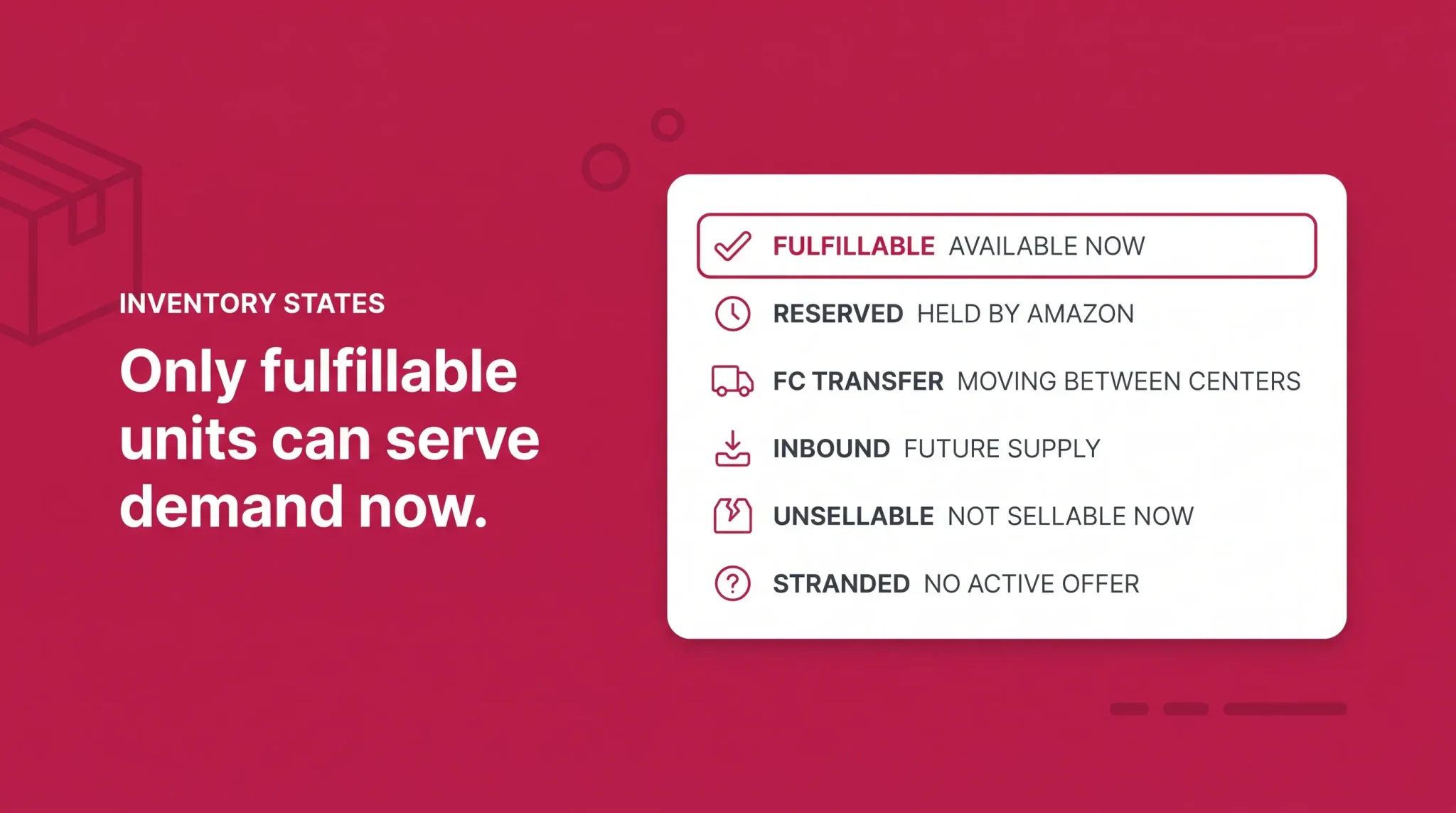
Total FBA units answer how much inventory is connected to this SKU. Fulfillable quantity answers how much Amazon can use for immediate fulfillment. Between them sit several states with different implications, and treating them as one pool produces both surprise stockouts and panic purchase orders.
Inventory state | What it means | Immediately fulfillable? | Should the seller act? |
|---|---|---|---|
Fulfillable | Units in fulfillment centers ready to be picked, packed, and shipped | Yes | No, this is normal available supply |
Reserved customer order | Units already allocated to customer orders | No | No, resolves on shipment or cancellation |
Reserved staging | Units temporarily held to support optimal fulfillment speed | Depends, they release into available supply | No, Amazon states no action is required |
Reserved FC processing | Units set aside for additional fulfillment center processing | No | Only if Amazon notifies you or the hold persists |
FC transfer | Units physically moving between fulfillment centers | Depends, the offer can stay purchasable | Normally no, monitor if it recurs |
Inbound | Units in a shipment created, shipped, or being received | No | Track timing, it feeds your reorder math |
Unsellable | Units in an unsellable disposition | No | Yes, decide on removal, disposal, or investigation |
Stranded | Units in the network with no active offer | No | Yes, fix the offer promptly |
Fulfillable, Reserved, FC Transfer, Inbound, Unsellable, and Stranded
Fulfillable is your working number, the only quantity that can serve demand right now. Reserved covers units Amazon holds for defined operational reasons, detailed below. FC transfer is inventory physically moving between fulfillment centers, reported separately from Reserved.
Inbound breaks into units in a shipment created but not sent, units shipped with tracking supplied, and units Amazon has begun receiving but not fully received. All three are future supply, and the gap between them is where replenishment timing lives.
Unsellable units sit in a disposition Amazon has classified as not sellable in current condition; do not assume the cause from the label. Researching inventory is units Amazon is actively assessing after a suspected or confirmed issue such as loss or damage. It is a status, not an outcome, and does not mean the unit is lost or that a reimbursement is coming. Stranded inventory is stock in the network with no active offer, the one state where the units are physically fine and the problem is entirely on the listing side.
Reserved Inventory Explained
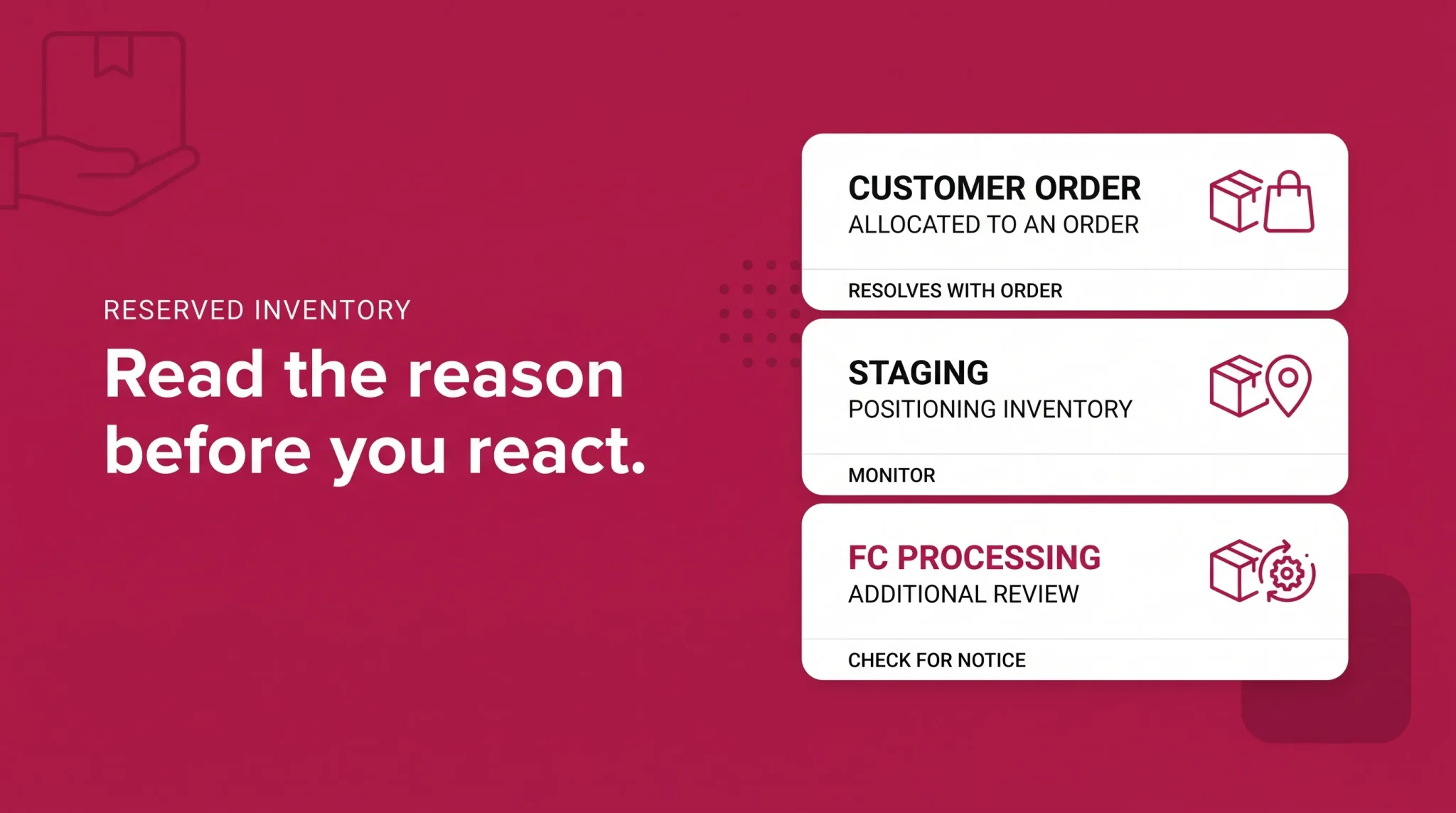
Reserved causes the most unnecessary alarm, largely because much published guidance still describes it with an outdated set of categories. Amazon's current Reserved Inventory documentation identifies three reasons, and the downloadable report reflects them as reserved quantity broken into reserved customer orders, reserved staging, and reserved FC processing.
Customer order covers units reserved to fulfill customer orders. A buyer has committed to them and Amazon has taken them out of the available pool. This resolves when the order ships or cancels, and it rises with order volume, which is why reserved counts spike during peak events without anything being wrong.
Staging covers units temporarily held by Amazon to support optimal fulfillment speed. Amazon currently states that no seller action is required for normal staging. These units are being positioned within the network and released back into available supply as your available pool draws down.
FC processing covers units set aside at a fulfillment center for additional processing. Amazon's documented examples include item dimension or weight verification, pending investigations, and pending removal orders. Amazon states that sellers will be notified when action is required, so the default posture is to monitor rather than open a case.
Notice what is absent. There is no fixed number of days after which reserved inventory becomes a problem and no universal escalation threshold. Reserved is a normal operating state, and the useful response is to read the reason rather than react to the total.
A worked example. Total inventory holds steady while fulfillable drops sharply and reserved climbs. The instinct is an emergency purchase order. The better move is to open the reserved breakdown first. If the increase is customer order, sales are strong and those units are already sold. If it is staging, Amazon is positioning stock and no action is needed. If it is FC processing, the units are genuinely out of immediate supply and the coverage math changes. Three reasons, three decisions, and only one justifies an emergency reorder.
What Reserved Does Not Mean
Reserved does not mean lost or damaged. It does not automatically require Seller Support, and it does not directly reduce Featured Offer eligibility. It is also not accurate to say every reserved unit is unsellable, because availability differs by reason: customer order units are already allocated, staging units are temporarily positioned with no action required, and FC processing units sit outside normal fulfillable supply while processing runs. Flattening those into "reserved means unavailable" is how sellers order inventory they did not need.
Reserved Versus FC Transfer
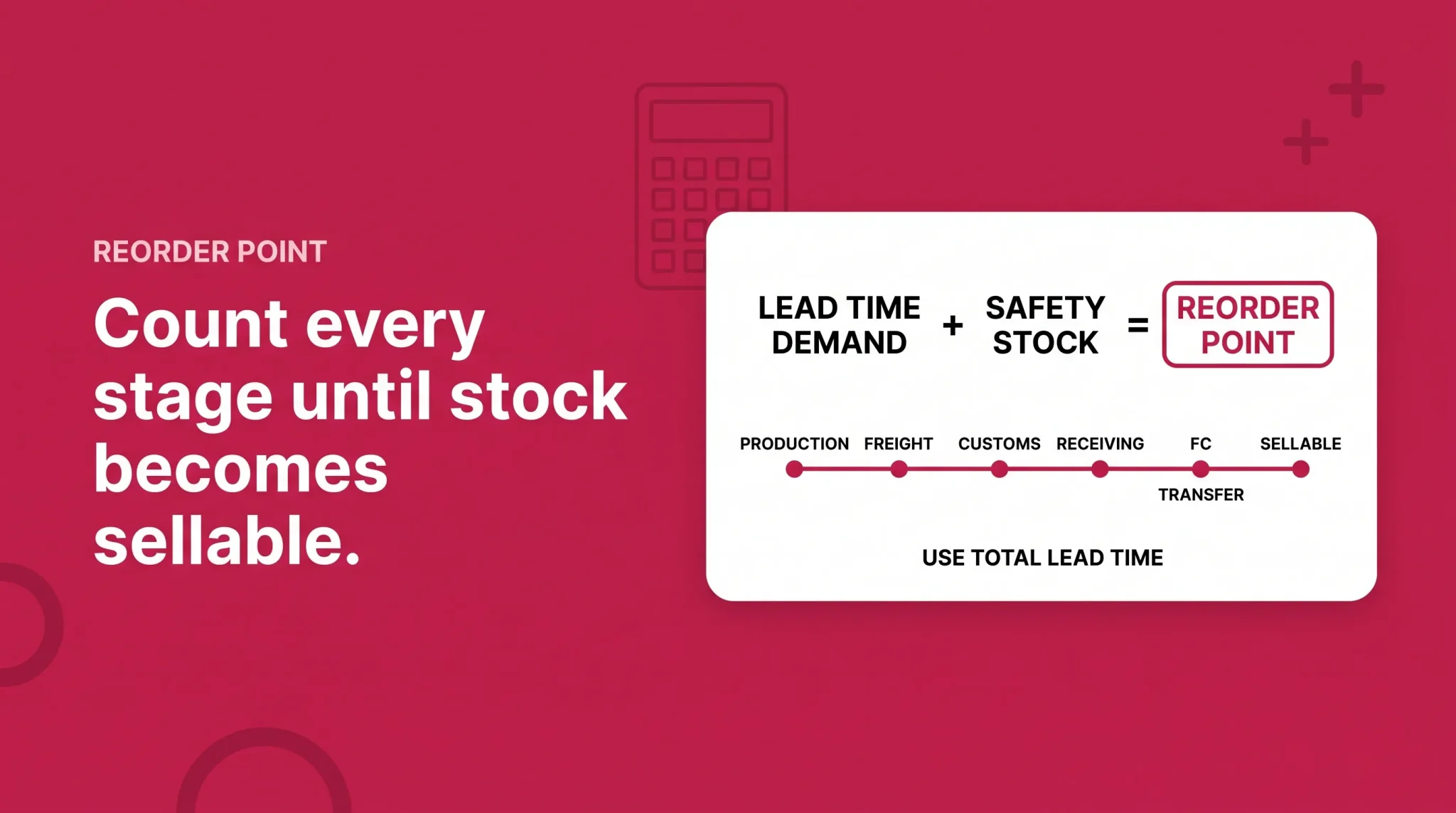
This is the correction most likely to change how you read your own reports. Reserved inventory and FC transfer are not interchangeable. The current Reserved Inventory report explains customer order, staging, and FC processing. FC transfer appears separately in FBA inventory reporting as its own quantity. Much published guidance still lists FC transfer as one of three reserved categories, which no longer reflects how Amazon reports it.
The distinction is practical. FC transfer describes units physically moving between fulfillment centers as Amazon repositions stock closer to expected demand. Those units cannot provide immediate fulfillment while moving, but your offer can remain purchasable and customers may see a later delivery promise until the transfer completes. The correct reading is neither "those units are available" nor "those units are gone."
Keep FC processing distinct as well: there, inventory stays at a facility while Amazon performs additional internal work or investigation. Both reduce immediately fulfillable supply, and they resolve differently. For the physical mechanics of how inventory moves through the network, our Amazon fulfillment centers and LPN numbers guide covers the warehouse side. This article stays with the consequence: which units can cover demand, and when the next ones arrive.
Why FBA Inventory Arrives Late
"My inventory is delayed" is not a diagnosis. It is a symptom with at least nine distinct causes, and the response depends on which stage is actually late. The mistake is treating every availability gap as an Amazon problem, when the delay often sits with the supplier, with freight, or with a shipment plan created too late.
Delay stage | What may be happening | First place to check | Inventory decision |
|---|---|---|---|
Supplier | Production running late, material issue, failed inspection, MOQ reschedule | Purchase order and supplier confirmation | Recalculate coverage, consider partial shipment |
Freight and customs | Booking gaps, congestion, clearance, drayage | Forwarder milestones and tracking | Assess whether faster freight is economically justified |
Shipment creation or inbound placement | Plan created late, wrong destination, missing tracking, inbound defects | Shipping queue and shipment plan | Fix the plan, adjust future inbound timing |
Amazon receiving | Delivered but not checked in, receiving in progress, quantity discrepancy | Shipment status and Contents tab | Wait for processing before assuming loss |
FC transfer | Units received and being repositioned | FC transfer quantity | Normally wait, monitor if recurring |
FC processing | Additional Amazon processing or investigation | Reserved breakdown | Monitor, respond if Amazon requests action |
Stranded offer | Units exist but the offer is inactive | Stranded inventory view | Fix the listing immediately |
Demand spike | Sales outran the plan | Recent unit sales versus forecast | Reorder earlier, revisit safety stock |
Planning error | Lead time or safety stock set too low | Reorder point assumptions | Update lead time inputs, not just quantities |
Preparation affects the receiving stage more than sellers expect. Packaging or labeling problems can slow a shipment through receiving and push out the date units become fulfillable, covered in our Amazon FBA packaging requirements guide. The inbound configuration you choose affects both timing and cost, explained in our Amazon inbound placement fees guide.
A worked example. A shipment is two weeks behind plan. Identify where it is stuck first. If the supplier has not shipped, the fix is upstream and freight choices are still open. If Amazon shows Delivered but not checked in, there is nothing to expedite and the question is whether current stock covers the remaining receiving window. If the units were received and are in FC transfer, supply exists and simply is not positioned yet. Same delay, three responses.
Restock Inventory and Amazon's Recommendations
Amazon's Restock Inventory tool supplies planning inputs: a recommended replenishment quantity, a recommended ship date, sales history, Amazon's demand forecast, seasonality, your configured supplier lead time, case pack quantity, and replenishment frequency. Amazon describes these as recommendations to help balance the cost of a stockout against carrying too much inventory.
They are inputs, not instructions, and only as good as the assumptions behind them. If your supplier lead time setting is stale, every recommendation built on it is wrong in the same direction. Amazon's forecast also cannot see a meaningful part of your business: a supplier pushing production three weeks, customs holding a container, a campaign you are running off Amazon next month, a planned price change, a competitor going out of stock, a product change, or working capital that will not support the recommended order this cycle.
Use the recommendation as a sanity check against your own math. When the two disagree, that disagreement is the useful signal, because it usually points at an assumption one of you has wrong.
Reorder Point, Lead Time, and Safety Stock
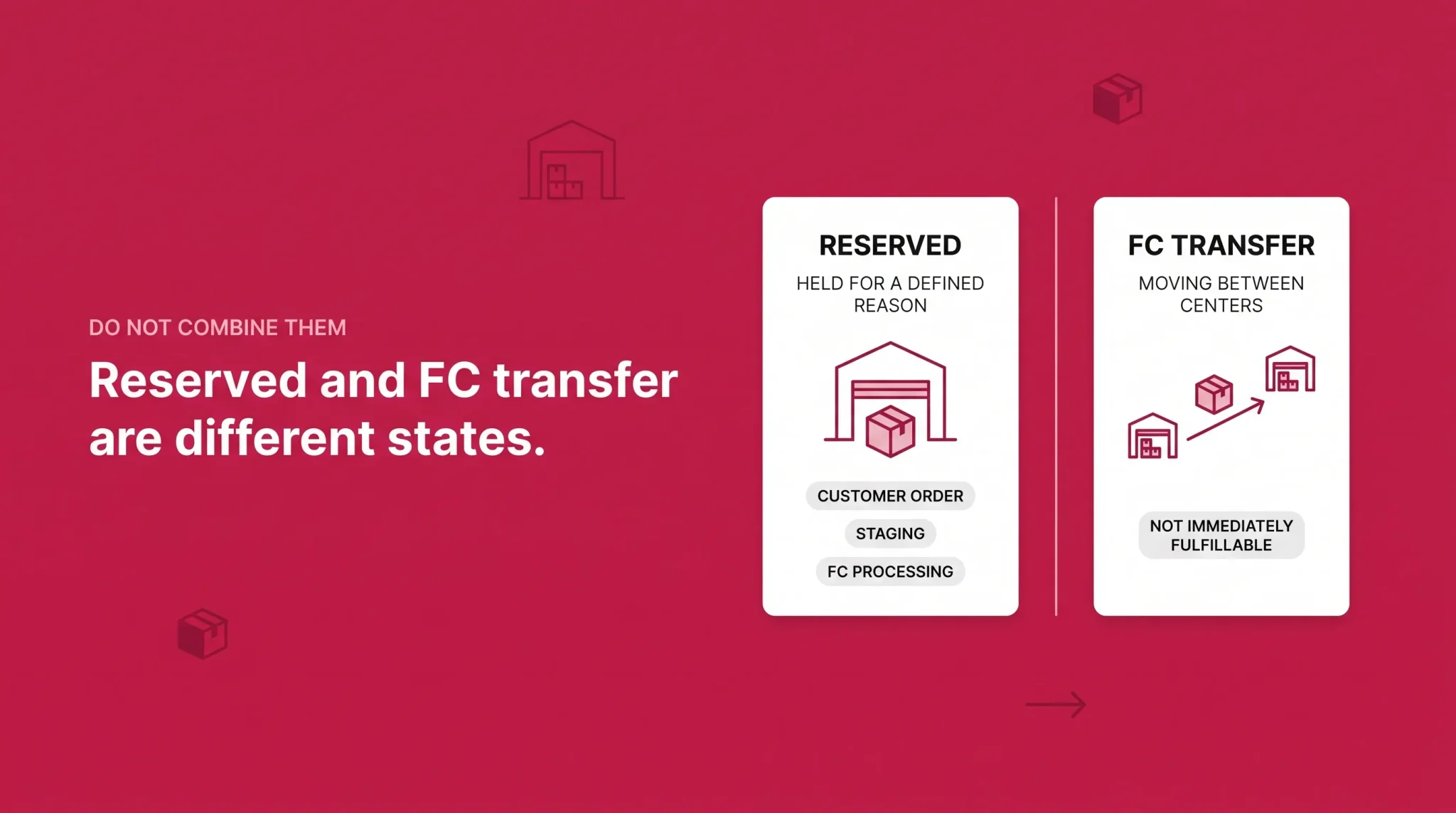
One formula does most of the work here.
Reorder point = expected demand during total replenishment lead time + safety stock
The term sellers consistently underestimate is total replenishment lead time. It is not the time from placing a purchase order to the carrier delivering to Amazon. It is the realistic time from initiating replenishment until that inventory can actually cover customer demand.
Depending on your supply chain, that clock includes supplier production, freight, customs where applicable, domestic transport, Amazon receiving, and internal network transfer. Stopping it at carrier delivery understates the real figure by weeks, and it is the most common reason a seller who reordered on time still ran out.
Safety stock buffers uncertainty, specifically the variance in that lead time and in demand, not a round number that feels comfortable. A SKU with a reliable domestic supplier and steady demand needs a different buffer from one with an overseas supplier, seasonal demand, and a history of production slips. Resist a fixed 30 days, a fixed 60 days, a universal percentage, or a standard reorder multiple. The method transfers across SKUs. The number does not.
Days of Supply and Why Amazon Uses More Than One Concept
Two different things share this name, and confusing them is expensive.
Forward-looking seller days of supply is a planning estimate. It divides usable inventory by expected future demand and answers how long your current position should last. It depends on your forecast.
Amazon historical days of supply is a backward-looking metric Amazon calculates for specific programs and fees. For the current U.S. low-inventory-level fee, Amazon evaluates historical supply over the previous 30 days as a short-term measure and the previous 90 days as a long-term measure.
These are not the same calculation and they can disagree sharply. A seller who just received a large shipment can look comfortable on forward days of supply while Amazon's historical measure still reflects a period when stock was thin. Planning on one and being charged on the other is a genuine trap.
In-Stock Head Start
In-Stock Head Start softens what "out of stock" means. Eligible temporarily out-of-stock FBA products can remain discoverable and purchasable when Amazon has confidence that inbound inventory will arrive, with delivery promises reflecting the expected arrival date.
In reporting this surfaces as Future Supply Buyable, representing inbound units Amazon has made available through the program, and Reserved Future Supply, representing future units customers have already purchased while stock is still inbound.
Amazon automatically enrolls eligible accounts unless the feature is disabled, subject to current program rules. Eligibility is predictive rather than guaranteed, so not every ASIN or shipment qualifies, and Amazon can adjust delivery estimates if the shipment slips.
Treat it as a cushion, not a plan. Amazon's program page offers a best-practice suggestion around carrying several weeks of expected inventory, which is guidance for that feature rather than a universal stock target for your catalog. A feature that sometimes keeps a listing buyable while stock is in transit does not replace knowing your reorder point.
What Happens When Inventory Gets Too Low
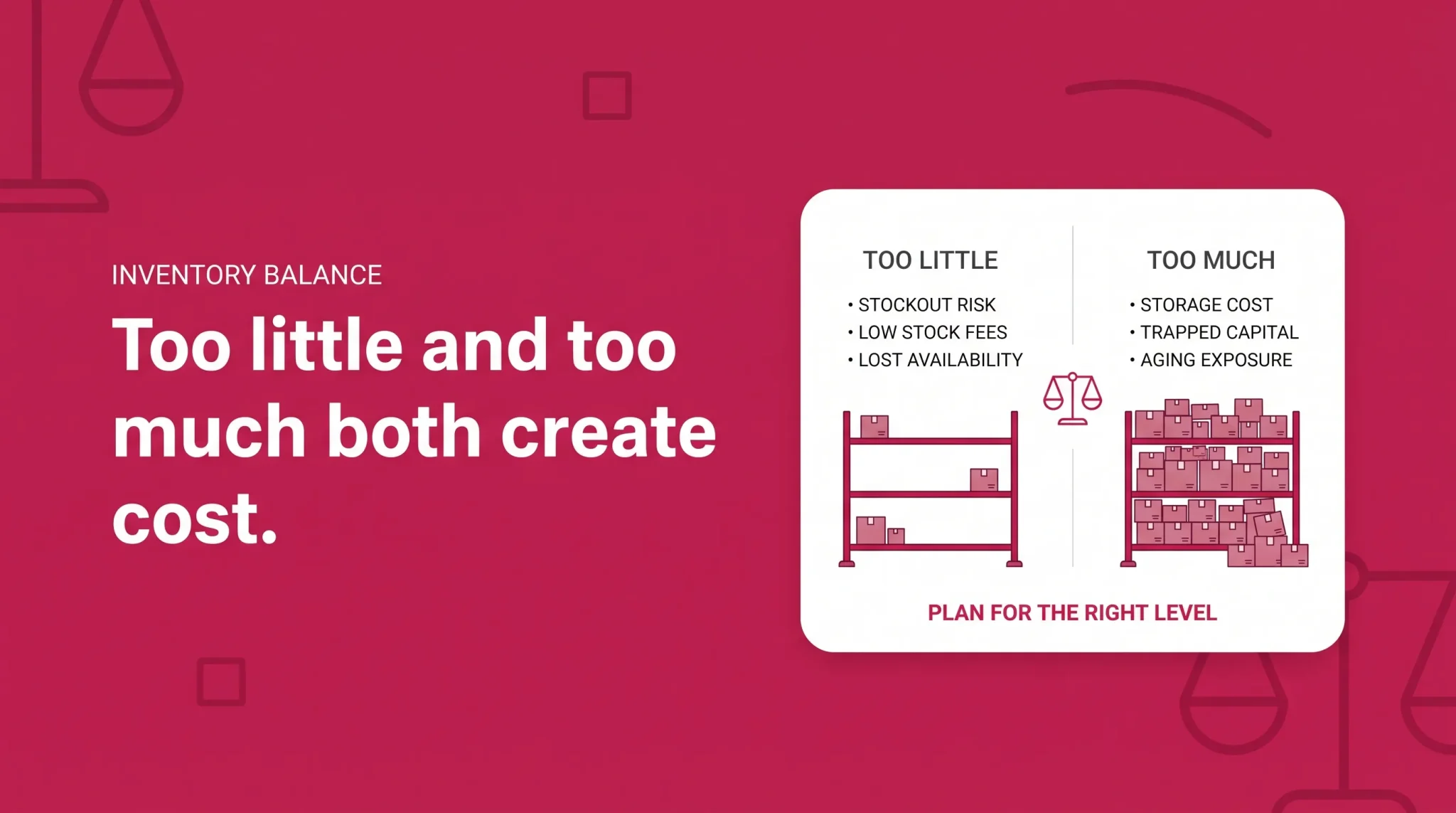
The old assumption was that running lean was at worst a missed-sales problem. That is no longer the whole picture.
Out of stock products cannot fulfill immediate demand, advertising and promotions stop producing useful sales when the offer is unavailable, replenishment gaps interrupt sales history, and customers may see different availability or delivery promises. Those consequences are serious enough without inflating them into claims about fixed ranking penalties. What has changed is that understocking now carries a direct cost for eligible U.S. FBA inventory.
The Low-Inventory-Level Fee
This section is U.S.-specific and current as of August 2026. Confirm the current structure in Seller Central before making decisions against it.
Amazon evaluates historical days of supply using a short-term measure based on the previous 30 days and a long-term measure based on the previous 90 days. For an otherwise eligible seller-FNSKU, the applicable metric must be below 28 days for the fee to apply. Effective January 15, 2026, Amazon calculates this at the seller-FNSKU level rather than the parent ASIN level, so a well-stocked variation no longer masks a thin one.
Under the 2026 structure, small bulky and large bulky inventory are included alongside standard size. Grocery is currently exempt, and other eligibility exemptions apply, including treatment for slower-moving products and newer selection. Being below 28 days does not automatically mean a fee.
The operational point reframes a lot of older FBA thinking. Too little inventory can now increase fulfillment cost for eligible U.S. FBA inventory, just as too much increases storage and aging costs. Lean is not automatically cheap.
What Happens When Inventory Gets Too High
Overstocking costs money through storage and trapped working capital, consumes capacity you may need for another SKU, and starts a clock on aging. Two separate problems live here, and seller vocabulary merges them.
Excess Versus Aged Inventory
Excess inventory is primarily a supply-versus-demand problem. Amazon currently identifies an item as excess when it has over approximately 90 days of supply based on forecasted demand, and also weighs whether continuing to hold the units and pay storage is economically worse than taking an inventory action.
That is not the same as "inventory becomes excess after sitting at Amazon for 90 days." A slow-moving SKU can be excess almost immediately after arrival if demand does not support the quantity, while a fast mover can sit for months without ever being flagged.
Aged inventory measures how long units have been in the fulfillment network, calculated using FIFO logic. Under current U.S. rules as of August 2026, the aged inventory surcharge begins at 181 days with multiple tiers above that, and Amazon changed the rates for inventory aged 366 days or longer effective January 16, 2026. Verify current tiers in Seller Central rather than relying on figures published earlier.
The two concepts pull apart in both directions. Inventory can be excess before it is anywhere near aged, and aged while you still legitimately expect future demand. The response depends on demand and economics, not age alone.
When a SKU is overstocked, work in sequence rather than reaching straight for a discount. Stop or reduce replenishment. Reassess the forecast and identify whether the softness is temporary seasonality or structural. Adjust future purchase orders. Then, if the economics justify it, consider a promotion, Amazon Outlet where eligible, or removal and liquidation. Discounting inventory that would have sold at full price in eight weeks is not a saving.
A worked example. Demand for a seasonal SKU falls after the event it was built around and days of supply jumps. The seller stops the pending reorder, rechecks whether the forecast assumed a repeat of last year's peak, reviews how close the oldest units are to the aged surcharge threshold, then decides whether next season's demand justifies carrying the stock. If it does, holding may beat liquidating. If it does not, acting early is cheaper than acting at month ten.
Stranded Inventory
Stranded inventory is FBA inventory in Amazon's fulfillment network without an active offer customers can purchase.
Causes cluster on the listing side rather than the physical side. A closed or inactive listing, often following a stockout, is the most common. Others include a pricing issue, a listing problem, a SKU or fulfillment channel conflict, and category or compliance problems.
This is the sharpest version of the article's central point: physical inventory can exist at Amazon and contribute zero immediate sellable supply. Those units occupy capacity, accrue storage costs, and age while producing nothing, and they distort planning because total inventory looks healthy. Check the stranded view on a regular cadence. Most stranded issues have a straightforward fix if caught in days rather than weeks.
IPI and FBA Capacity
The Inventory Performance Index is Amazon's summary metric for how you manage FBA inventory. It considers excess and aged inventory, sell-through, stranded inventory, and keeping popular replenishable products appropriately in stock.
Amazon adjusts thresholds and how they are applied, and guidance is account-specific, so check your current score and the guidance shown for your account in Seller Central rather than a number read elsewhere. Be clear about what does not move it: raising prices does not increase IPI, pausing advertising does not increase IPI, reserved inventory does not subtract fixed points, and no single action changes the score immediately.
IPI can influence FBA capacity, but it is not the only factor. Current Amazon capacity documentation describes one capacity limit per storage type per month, with the Capacity Monitor showing your confirmed or current limit plus estimated limits for the next three months. Capacity is influenced by IPI alongside historical sales, seasonality, forecasts, shipment lead time, and fulfillment center capacity. Amazon's own network availability moves limits independently of individual seller performance. Capacity Manager exists as a separate adjustment mechanism and is outside this guide's scope.
The planning consequence is direct. A perfectly calculated reorder quantity is useless if it exceeds the capacity available that month, which is why capacity belongs in the plan rather than being discovered at shipment creation.
One caution. The objective is not to maximize IPI. It is to balance customer availability, working capital, storage cost, aged inventory, low-stock fee exposure, capacity, and replenishment reliability. IPI is one indicator inside that system, not the system itself.
When AWD Changes the Replenishment Model
Amazon Warehousing and Distribution can hold upstream bulk inventory and replenish FBA from it, which changes how much safety stock you need sitting directly inside the FBA fulfillment network.
That change ripples through the planning math. If a reliable upstream buffer moves stock into FBA on a shorter cycle than your supplier can, the effective lead time for the FBA leg shortens and the inventory you need inside FBA to cover the same demand falls, which in turn affects capacity consumption and aging exposure. Whether the trade works depends on program specifics, costs, and your product profile, which our Amazon Warehousing and Distribution guide covers properly.
An Inventory Operating Cadence
Frequency should follow velocity. A SKU selling a hundred units a day and one selling three a week do not need the same attention.
For high-velocity SKUs, check fulfillable quantity, reserved changes, inbound progress, and unexpected demand shifts daily or several times a week. The window between a problem appearing and a stockout is too short for a weekly review.
Weekly, across the catalog, review days of supply, the replenishment plan, supplier timing, FC transfer or FC processing exceptions, stranded inventory, and current capacity. This is where most reorder decisions get made. Monthly, step back to the portfolio: excess inventory, aged inventory, slow movers, forecast accuracy against actual sales, and the assumptions behind open purchase orders. IPI belongs here too, since it moves on a rolling basis and does not reward daily attention.
Inventory Management Checklist
Fulfillable quantity checked as the working number, not total units
Reserved breakdown reviewed by reason before any emergency reorder
FC transfer kept separate from reserved in the coverage math
Inbound shipments tracked through creation, transit, and receiving
Supplier lead time setting updated to reflect actual recent performance
Receiving and internal transfer buffer included in total replenishment lead time
Recent unit sales reviewed against forecast
Seasonality, promotions, and planned price changes factored in
Safety stock reviewed against actual demand and lead-time variance
Reorder point calculated from total replenishment lead time
Amazon restock recommendation compared against your own assumptions
Current capacity checked before creating the shipment
Stranded inventory reviewed and fixed on a regular cadence
Excess and aged inventory reviewed as separate exposures
Low-inventory-level fee exposure checked for eligible U.S. inventory
Next purchase order adjusted based on what the review actually showed
Most inventory problems are not forecasting failures. They come from reading a total when the decision needed a state, or stopping the lead-time clock at the warehouse door when the units were still weeks from being sellable. Once the states are separated and the lead time is honest, the reorder decision usually becomes obvious.
If stockouts, reserved spikes, or slow-moving stock keep recurring across your catalog, Flairox can work through your FBA inventory reporting with you at the SKU level, diagnose where the replenishment plan and actual demand have drifted apart, and help rebuild the reorder assumptions on numbers that reflect what can genuinely sell.
Frequently asked questions
Reserved inventory is FBA stock Amazon is holding for defined operational reasons. Amazon's current Reserved Inventory report separates it into customer order, staging, and FC processing, each with different implications for immediate availability.