Bilal Siddiqui
Key takeaways
Amazon ads may not spend because of campaign status, product eligibility, low bids, limited budget, narrow targeting, negative keywords, or weak listing readiness.
If impressions are zero, check eligibility, campaign setup, bids, budgets, targeting, and negative keywords first.
If impressions are coming but clicks are low, the issue is usually CTR, main image, title, price, reviews, or offer strength.
If clicks are coming but sales are low, the issue is usually conversion, listing quality, pricing, product-market fit, or keyword relevance.
Do not change everything at once. Fix delivery issues step by step, then move into Amazon ads optimization.
If your Amazon ads are not spending, the problem is usually not one single setting. It can happen because your Amazon ads campaign is not eligible to run, your bid is too low, your targeting is too narrow, your budget setup is limiting delivery, or your product listing is not strong enough to win impressions.
This issue is frustrating because the campaign may look active inside the Amazon ads dashboard or Amazon advertising dashboard, but impressions, clicks, and spend remain close to zero. In other cases, the campaign spends a little for a few hours and then stops.
The good news is that most delivery issues can be fixed once you know where to look.
This guide breaks down why Amazon ads are not running, why Amazon ads may not deliver impressions, and what you should check inside Amazon Ads Seller Central to get spend moving again.
Amazon Sponsored Products are cost-per-click ads for individual product listings. Amazon says these ads can appear in shopping results and product pages, and advertisers choose products, targeting, bids, and budgets. Amazon also states that advertisers pay only when shoppers click the ad. (Amazon Ads)
What Does It Mean When Amazon Ads Are Not Spending?
When Amazon ads are not spending, it means your campaign is active but not entering enough auctions, not winning impressions, or not getting enough clicks to use the assigned budget.
This can happen in Sponsored Products, Sponsored Brands, and other Amazon advertising campaigns, but it is most common in Amazon PPC campaigns where bids, budgets, keyword relevance, product eligibility, and targeting all affect delivery.
In simple terms, PPC on Amazon only works when your product is eligible, your targeting matches shopper demand, and your bid is competitive enough to win placement.
So before you assume Amazon Ads is broken, check whether your campaign has enough eligibility, relevance, budget, and bid strength to enter the auction.
1. Your Campaign Is Not Actually Active
The first thing to check is the campaign status.
Sometimes sellers assume a campaign is running because it has been created, but one part of the structure is paused, ended, rejected, or inactive.
Check the status of:
Campaign
Ad group
Product ad
Keyword targets
Product targets
Portfolio budget
Billing or payment method
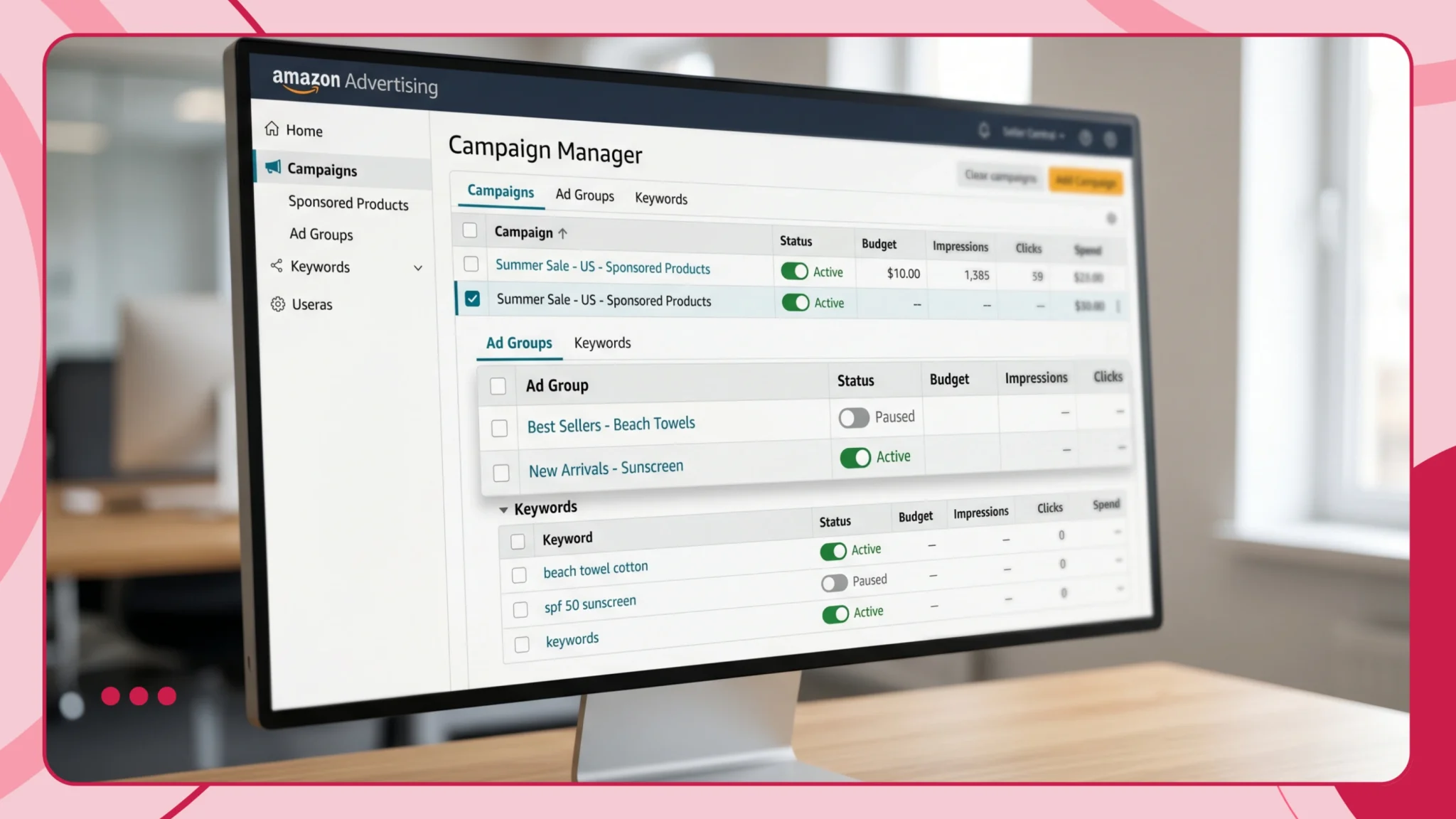
A campaign can look fine at the top level, but if the ad group or product ad is paused, the campaign will not spend. Similarly, if all keywords are paused or archived, Amazon has nothing to serve against.
How to fix it
Go into Campaign Manager and check every level of the campaign structure. Make sure the campaign, ad group, advertised ASIN, and targets are all enabled.
Also check the campaign start and end date. If the campaign start date is in the future, it will not run yet. If the end date has passed, the campaign has already stopped.
For evergreen Amazon PPC campaigns, it is usually better to run without an end date unless you are managing a specific promotion, seasonal push, or launch window.
Amazon recommends running campaigns without an end date to keep products visible and stay aligned with shopping trends. (Amazon Ads)
2. Your Product Is Not Eligible to Advertise
One of the biggest reasons Amazon ads are not delivering is product eligibility.
For Sponsored Products, Amazon says products must be in eligible categories and eligible for the Featured Offer. Amazon also states that adult products, used products, refurbished products, and products in closed categories are not eligible for Sponsored Products advertising. (Amazon Ads)
Your ads may not spend if the product is:
Out of stock
Not winning the Featured Offer
In a restricted or closed category
Suppressed due to listing issues
Missing required product information
Not eligible for the selected ad type
Amazon also notes that Sponsored Products only appear when advertised items are in stock. (Amazon Ads)
How to fix it
Open the product detail page and check if the offer is live, buyable, and in stock.
Then check Seller Central for listing suppression, pricing errors, inventory issues, or category restrictions. If the product is not winning the Featured Offer, review pricing, shipping speed, account health, inventory availability, and seller performance.
If the ASIN is not eligible for Sponsored Products, choose another eligible ASIN or resolve the listing issue first.
This step should always come before Amazon PPC optimization. If the product cannot advertise, no bid or budget change will fix the campaign.
3. Your Bids Are Too Low
If your campaign is active but getting very few impressions, your bids may be too low to compete in the auction.
Amazon Ads works on a CPC model. Your bid is the maximum amount you are willing to pay for a click. Amazon says the more competitive your bid is, the more likely your ad is to be displayed when it matches a customer shopping query. (Amazon Ads)
This is especially important in competitive categories where other sellers are bidding aggressively on the same keywords, placements, or competitor ASINs.
Low bids can cause issues like:
Zero impressions
Very low impressions
Spend starting and stopping randomly
Campaigns only showing on weak placements
Exact match keywords not delivering
This is why Amazon PPC cost should not be judged only by the bid amount. A low bid may look safe, but if it prevents your campaign from entering auctions, it can stop the campaign from collecting useful data.
Good Amazon PPC optimization is about finding the bid level where the campaign can win impressions without overspending.
How to fix it
Increase bids gradually on your most important targets.
Start by checking Amazon’s suggested bid range. If your bids are below the lower end of the range, your campaign may struggle to enter auctions.
A simple fix is to increase bids by 15% to 30% on priority keywords or product targets and monitor impressions over the next 24 to 48 hours.
For launch campaigns or campaigns with no delivery, you may need to bid closer to the suggested range before pulling back later.
4. Your Daily Budget Is Too Low
Budget can also limit ad delivery.

Amazon Sponsored Products campaigns use daily budgets. Amazon explains that the daily budget is the amount you are willing to spend on a campaign over a calendar month, and daily budgets are not paced throughout the day. This means a small daily budget can be spent quickly if there is strong shopper interest. (Amazon Ads)
However, the opposite can also happen. If your budget is too low compared with the bid and CPC required in your category, the campaign may struggle to deliver meaningful volume.
For example, if your bid is $1.50 and your daily budget is $5, Amazon has very little room to test traffic.
For Amazon PPC campaign optimization, the budget should be large enough to support the bid strategy. If the campaign budget is too small compared with the expected CPC, the campaign may never collect enough clicks to prove whether the targeting works.
How to fix it
Make sure the campaign has enough budget to collect data.
As a starting point, keep the daily budget high enough to support several clicks per day. Amazon’s getting-started guide lists minimum daily budget recommendations by marketplace, including $10 for the US, AED 40 for the UAE, SAR 40 for Saudi Arabia, and Rs. 500 for India. (Amazon Ads)
If a campaign is important, avoid giving it such a small budget that it cannot compete.
5. Your Targeting Is Too Narrow
Another common reason Amazon ads are not spending is narrow targeting.
This usually happens with manual campaigns where sellers add only a few exact match keywords. If those keywords have low search volume, weak relevance, or high competition, the campaign may barely deliver.
This can also happen in product targeting campaigns if you target only a few ASINs that do not receive much traffic.
How to fix it
Broaden the campaign structure.
For keyword campaigns, use a mix of:
Broad match
Phrase match
Exact match
Amazon recommends targeting at least 30 keywords when launching manual keyword targeting, then using search term reports to find what works best. (Amazon Ads)
If you are launching a new campaign, do not rely only on exact match. Start with enough broad and phrase match keywords to give Amazon room to find relevant traffic.
For Sponsored Products, Amazon also recommends that new advertisers start with automatic targeting, where Amazon matches ads to relevant shopping queries and products based on your product information. (Amazon Ads)
6. Your Keywords Are Not Relevant Enough
Sometimes Amazon ads do not run because Amazon does not see enough relevance between your product and the keywords you are targeting.
For example, if you sell a premium matcha powder but target broad unrelated terms like “weight loss drink” or “energy supplement,” Amazon may not view your product as the best match.
Amazon uses product information, listing content, category, and shopper behavior to understand relevance.
How to fix it
Make sure your keywords match the product detail page.
Check that your listing includes the core terms you are bidding on in natural places like:
Title
Bullet points
Product description
Backend search terms
A+ Content, where relevant
Category and browse node
Do not add unrelated keywords just to chase volume. Instead, build campaigns around keywords that accurately describe the product and match shopper intent.
If your Amazon ads campaign is not spending, keyword relevance should be checked before you keep raising bids.
7. Your Negative Keywords Are Blocking Delivery
Negative keywords are useful, but they can also stop your ads from spending if used incorrectly.
This often happens when sellers add broad negative keywords without checking how they affect other terms.
For example, if you sell “organic turmeric powder” and add “powder” as a negative keyword, you may block many relevant searches.
Negative phrase and negative exact match work differently, so the wrong setup can accidentally restrict delivery.
How to fix it
Review all negative keywords at campaign and ad group level.
Look for negatives that block your main product terms, category terms, or high-intent search terms.
Remove any negative keyword that is too broad or overlaps with your core targets.
Use negative keywords to block irrelevant or wasteful searches, not to over-control the campaign before it has enough data.
If your Amazon ads are not delivering after you recently added negatives, this should be one of the first areas you review.
8. Your Product Listing Has Poor Retail Readiness
Even if the campaign is active and eligible, Amazon may struggle to spend if the product listing is not retail ready.
Retail readiness means the listing is strong enough to convert shoppers after they click. If the listing has weak images, weak copy, poor reviews, or a poor offer, Amazon may show it less often or it may get clicks without results.
Common listing issues include:
No main image compliance
Weak title
Poor bullet points
Low review count
Low star rating
Bad pricing compared with competitors
Missing variations
No coupon or promotion in a competitive category
Outdated product content
💡 Pro Tip: Fix the Listing Before Increasing Ad Spend
If your Amazon ads are not spending properly, or they are getting clicks without sales, the issue may not only be your campaign setup. A weak listing can make it harder for ads to convert profitably.
Use Flairox to generate optimized Amazon listing content with stronger titles, bullet points, descriptions, and keyword coverage.
Try Flairox Listing for Free →
How to fix it
Before increasing bids aggressively, improve the product detail page.
Focus on the basics first:
Clear main image
Strong secondary images
Keyword-relevant title
Benefit-driven bullet points
Competitive price
Reviews and ratings
Coupon where useful
Strong variation structure
A+ Content for brand-registered products
If your campaign is getting impressions but not clicks, your main image, title, price, reviews, and offer may be the issue.
If it is getting clicks but not sales, your listing content, pricing, reviews, or product-market fit may need improvement.
This is where Amazon ads optimization and listing optimization overlap. Ads can bring traffic, but the product detail page must close the sale.
9. Your Campaign Is Too New
New Amazon Ads campaigns may not spend immediately.
Amazon needs time to process the campaign, match it with relevant auctions, and collect early performance signals. Some campaigns start quickly. Others take longer.
How to fix it
Give the campaign some time, but do not ignore clear setup issues.
If the campaign has had zero impressions after 24 to 48 hours, check:
Campaign status
Product eligibility
Bids
Budget
Targeting volume
Negative keywords
Listing status
If everything is active and eligible, increase bids and broaden targeting.
Do not make too many changes every few hours. Give each adjustment enough time to show whether delivery improves.
10. Your Portfolio Budget Is Limiting Campaigns
If your campaign sits inside a portfolio, the portfolio budget can restrict delivery even when the campaign budget looks fine.
This is easy to miss because sellers often check only the campaign-level budget.
If the portfolio budget is exhausted, campaigns inside that portfolio may stop spending.
How to fix it
Open the portfolio settings and check the budget limit.
If the portfolio is limiting active campaigns, either increase the portfolio budget, remove the campaign from the portfolio, or reorganize how budgets are assigned.
Use portfolio budgets carefully when managing multiple campaigns, especially during launches, Prime Day, Q4, or promotional events.
11. Your Ad Type Does Not Match Your Goal or Eligibility
Not every ad type works the same way.
Sponsored Products are usually the best starting point for direct product visibility. Sponsored Brands can support brand discovery, Store traffic, and collection-level visibility, but they may not be the best first choice if your immediate problem is that one ASIN is not getting enough impressions.
Amazon says Sponsored Products ads promote individual product listings, while Sponsored Brands ads appear in shopping results and feature a custom headline, brand logo, and multiple products. (Amazon Ads)
The Amazon ads platform gives sellers different campaign types for different goals. Sponsored Products are usually best for direct performance, while Sponsored Brands campaigns may be better for broader visibility and brand traffic.
The right Amazon advertising strategy depends on whether your goal is sales, awareness, brand defense, competitor targeting, or new product discovery.
How to fix it
Use the right ad type for the problem.
If your main issue is product-level sales or launch visibility, start with Sponsored Products.
If your goal is brand discovery, product collection visibility, or Store traffic, use Sponsored Brands once the brand assets and landing page are ready.
If Sponsored Brands are not spending, review the creative, landing page, product selection, and approval status.
12. Your Campaign Structure Is Too Fragmented
Some sellers split campaigns too aggressively.
For example, they create separate campaigns for every match type, variation, ASIN, placement, and keyword group. This can work in advanced accounts, but in smaller accounts it often spreads budget too thin.
If every campaign has a tiny budget and a few targets, none of them may get enough data.
How to fix it
Consolidate where needed.
For early-stage Amazon PPC campaigns, keep the structure simple:
One automatic campaign for discovery
One manual broad or phrase campaign for research
One exact match campaign for proven keywords
One product targeting campaign for competitor ASINs
As data grows, you can split campaigns by performance, category, margin, match type, or goal.
Amazon recommends using separate campaigns for product groups to organize keywords and budgets, but the structure should still be practical enough to collect useful data. (Amazon Ads)
13. Your Category Has Low Search Demand
Sometimes the campaign is not spending because there is not enough demand for the keywords or products you are targeting.
This is more common with niche products, seasonal products, expensive products, or products with uncommon terminology.
For example, a very specific accessory may not have enough search volume unless you target broader category terms, use product targeting, or run automatic campaigns.
How to fix it
Expand the traffic pool.
Try:
Broader category keywords
Related use-case keywords
Competitor ASIN targeting
Category targeting
Automatic targeting
Seasonal keywords
Branded keywords, where relevant
Amazon’s getting-started guide recommends using search term reports to discover how customers find products and identify new keyword opportunities. (Amazon Ads)
14. Your Campaign Is Running, But Data Is Delayed
Sometimes the ads are running, but reporting is delayed.
In this case, spend may not show immediately inside the dashboard. This can make sellers think their Amazon ads are not running when impressions or clicks are already happening.
How to fix it
Check multiple signals before assuming the campaign is broken.
Look at:
Impressions
Clicks
Spend
Orders
Detail page sessions
Business reports
Placement reports
If you see impressions but no clicks, the issue is not delivery. It is click-through rate.
If you see clicks but no orders, the issue is not spend. It is conversion.
If you see no impressions at all, then you should troubleshoot campaign delivery.
Quick Troubleshooting Checklist
Use this checklist when your Amazon ads are not spending:
Is the campaign active?
Is the ad group active?
Is the advertised product active?
Is the ASIN in stock?
Is the ASIN eligible for the Featured Offer?
Is the listing suppressed?
Is the product in an eligible category?
Are bids competitive?
Is the daily budget high enough?
Is the portfolio budget exhausted?
Are there enough keywords or targets?
Are match types too narrow?
Are negative keywords blocking traffic?
Is the listing relevant to the targeted keywords?
Is the campaign too new?
Is reporting delayed?
Best Fix Sequence for Amazon Ads Not Spending
If you want the fastest path to diagnosis, follow this order.
Step 1: Check eligibility
Confirm the product is buyable, in stock, not suppressed, and eligible to advertise.
Step 2: Check campaign structure
Make sure the campaign, ad group, product ads, and targets are active.
Step 3: Increase bids
If there are zero or very low impressions, raise bids on priority targets.
Step 4: Broaden targeting
Add broad, phrase, automatic, or product targeting to increase the traffic pool.
Step 5: Review negatives
Remove any negative keywords that may be blocking relevant traffic.
Step 6: Improve the listing
Strengthen title, images, price, reviews, bullet points, and keyword relevance.
Step 7: Monitor for 48 hours
Give the campaign time to respond before making another major change.
When Should You Get Help From an Amazon PPC Expert?
If your campaigns are active but still not spending after you have checked eligibility, bids, budgets, targeting, negatives, and listing readiness, it may be time to review the account with an Amazon PPC expert or Amazon PPC manager.
A good Amazon ads agency or Amazon PPC agency should not simply increase bids. They should check the full structure, including campaign settings, product eligibility, search demand, keyword relevance, listing quality, and budget allocation.
This is especially useful when your Amazon ads campaign is part of a larger Amazon PPC marketing strategy and you need to understand whether the issue is delivery, conversion, or account structure.
Conclusion
When Amazon ads are not spending, the problem usually comes down to one of six areas: eligibility, status, bids, budget, targeting, or listing readiness.
Do not start by changing everything at once. First, confirm the campaign and product are eligible. Then check bids and budget. After that, broaden targeting and remove any negative keywords that may be blocking delivery.
Once your ads start delivering consistently, you can move from troubleshooting to optimization. That is when ACOS, ROAS, conversion rate, and keyword performance become the main focus.
The goal is not just to make the campaign spend. The goal is to make sure your Amazon PPC campaigns spend in a way that supports visibility, clicks, sales, and profitability.
Frequently asked questions
Your Amazon ads may not be spending because the campaign is inactive, the product is not eligible, the ASIN is out of stock, bids are too low, budget is limited, targeting is too narrow, or negative keywords are blocking delivery.
Start by checking eligibility, campaign status, bids, budgets, and targeting before making deeper optimization changes.