 Taimoor Neeshat
Amazon listing optimization is a critical task for sellers. It means crafting product titles, bullet points, descriptions, and backend keywords so your product appears in relevant searches and convinces shoppers to buy.
A number of tools have emerged to help with this process, from all-in-one suites to specialized AI-driven optimizers. In this comparison, we’ll look at four notable solutions for Amazon listing optimization and keyword research:
Flairox Listings
Helium 10
Jungle Scout
Data Dive
We’ll evaluate each tool on keyword research depth, AI content creation features, ease of use, time efficiency, and pricing. At the end, you’ll get a side-by-side comparison table and a clear guide on which tool fits which type of Amazon seller or agency.
TLDR (One-minute Decision Guide)
If you want the fastest answer:
Want a full Amazon suite with keyword tooling and lots of extra features? Choose Helium 10.
Want a simpler suite that is easy to use and still strong at keyword + listing workflows? Choose Jungle Scout.
Want maximum keyword coverage, competitor-driven SEO, and you love deep analysis? Choose Data Dive.
Want high-quality, on-brand listing output with minimal time spent inside tools and straightforward per-listing pricing? Choose Flairox Listings.
What We Compared
We compared all four tools using the same set of practical, seller-focused criteria. First, we looked at keyword research and SEO depth. That included how far each tool can go beyond “obvious” keywords, whether it supports competitor ASIN analysis to uncover what’s actually driving rankings for others, and whether it helps you prioritize where keywords should live (for example, what belongs in the title vs bullets vs backend terms).
Next, we evaluated the listing optimization workflow. Here, the focus was on whether the tool provides a structured listing builder (instead of leaving you to piece everything together manually), whether there are clear optimization scores or checklists to guide improvements, and whether you can sync or publish changes back to Seller Central to reduce friction and speed up implementation.
We also assessed AI features, since most modern tools claim AI support. We compared whether AI can generate titles, bullets, and descriptions, how customizable the output is (tone, instructions, constraints), and whether the writing is optimized for human readability and conversion rather than keyword stuffing. We also checked whether review analysis or voice-of-customer inputs exist, since that tends to separate “generic AI copy” from genuinely persuasive, customer-aware content.
Finally, we looked at usability and time required, including the learning curve and the realistic time it takes to produce a publish-ready listing. Alongside that, we compared pricing and value, specifically whether the model is subscription-based or per-listing, and whether the pricing makes sense if your main priority is listing optimization rather than a broader seller suite.
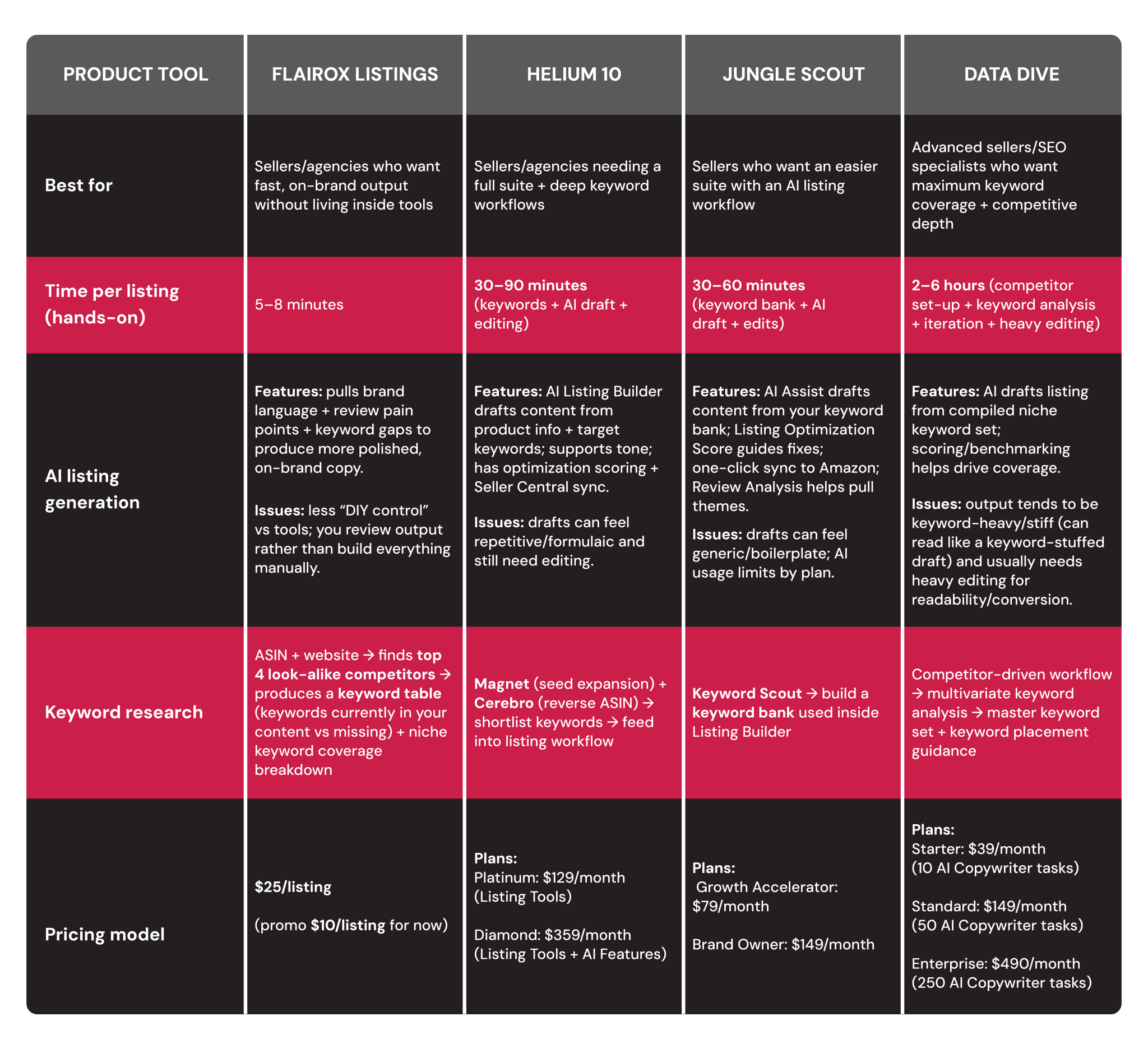
Quick Comparison Snapshot Table
Helium 10: The All-in-One Powerhouse
Overview
Helium 10 is one of the most well-known all-in-one suites for Amazon sellers and agencies. It goes far beyond listing optimization, which is great if you want a complete toolkit for running and scaling on Amazon, but it can feel like overkill if your main goal is simply writing better listing copy.
Its AI strength is speed: it can generate a solid first draft quickly, with options to customize how the output reads. The main tradeoff is that AI features typically sit in higher-tier plans, and the AI drafts still need editing before they feel truly on-brand and persuasive.
Keyword Research
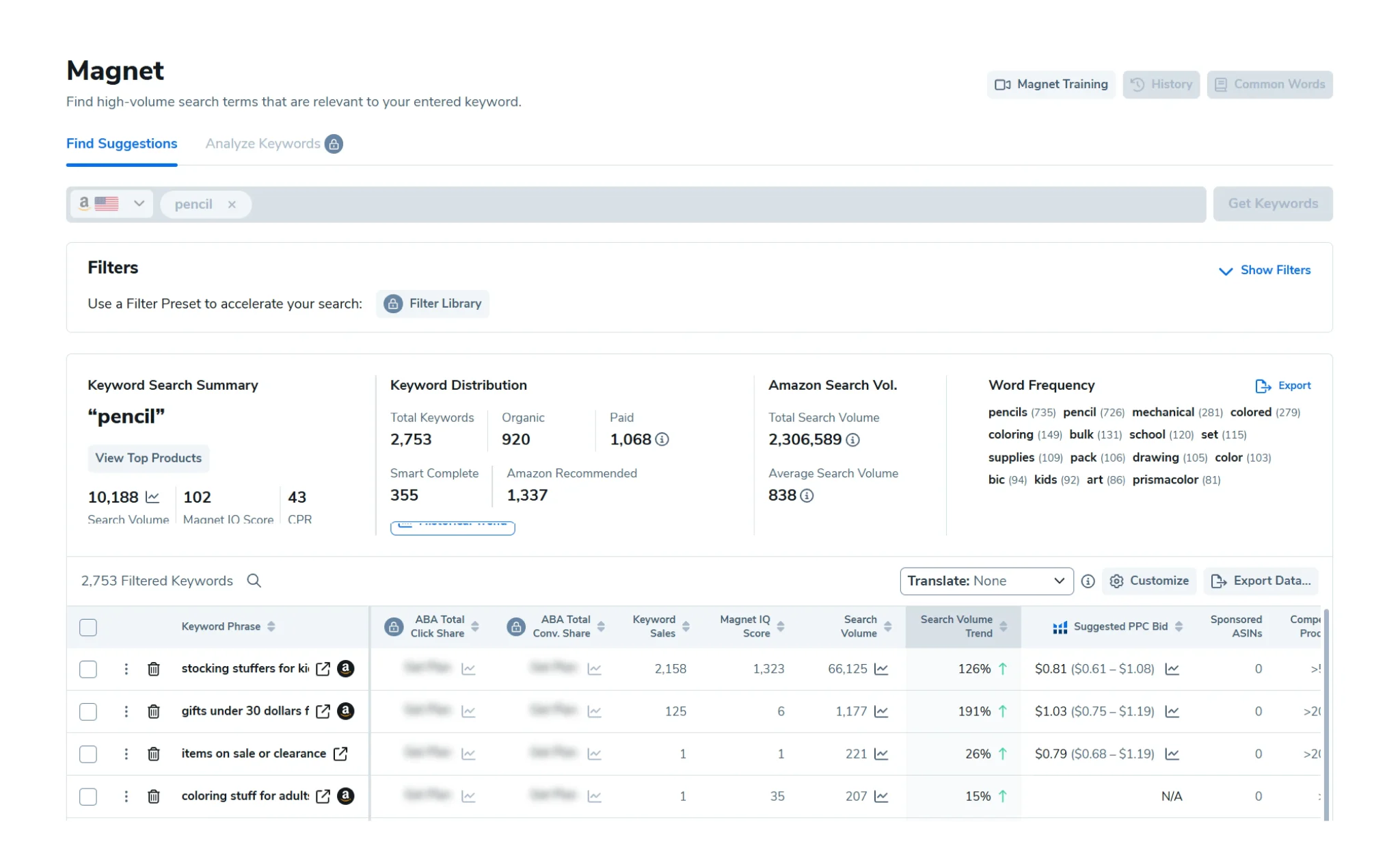
Helium 10’s keyword research is one of its strongest areas, and two tools do most of the heavy lifting. Magnet focuses on seed keyword expansion. You start with a few seed terms and Magnet expands them into a wider pool of related keywords you can potentially target. Cerebro is the reverse-ASIN tool. You plug in competitor ASINs and Helium 10 pulls the keywords those listings rank for, which is especially valuable for established sellers because it gives you competitor-driven direction instead of guessing. In practice, most sellers use Magnet and Cerebro together, then shortlist the best terms and carry that keyword set into the listing workflow.
Listing Optimization Workflow
How does it work?
Helium 10’s AI Listing Builder uses OpenAI’s GPT model to generate listing copy “in minutes.” The typical workflow is straightforward: you first gather keywords using Magnet and/or Cerebro, then add your product information (features, use cases, differentiators), and generate an AI draft for the title, bullet points, and description. From there, you edit and polish the content for conversion and brand voice, then use the built-in feedback to validate optimization before publishing.
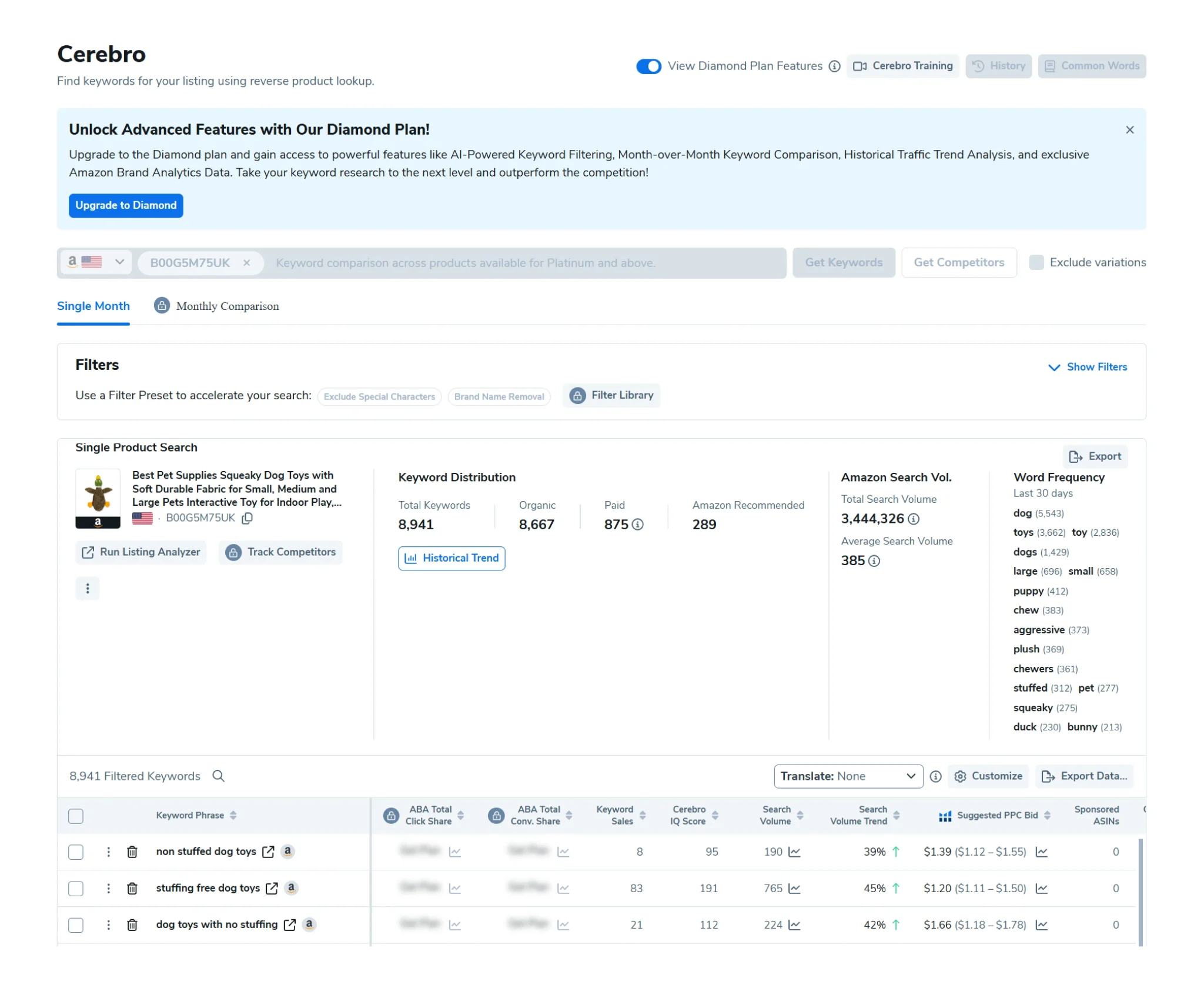
Key Features
A few features tend to matter most to sellers once they’re using it regularly. Tone control lets you pick a style (like casual or professional) to steer how the AI writes. Include/avoid instructions act like guardrails, so you can force certain details in (like your brand name) and avoid others (like competitor terms). The Listing Optimization Score updates as you edit, helping you spot gaps such as missing keywords, length issues, and listing completeness signals. Finally, one-click sync to Seller Central reduces the manual copy-paste process, which is a meaningful time-saver for teams iterating on multiple listings.
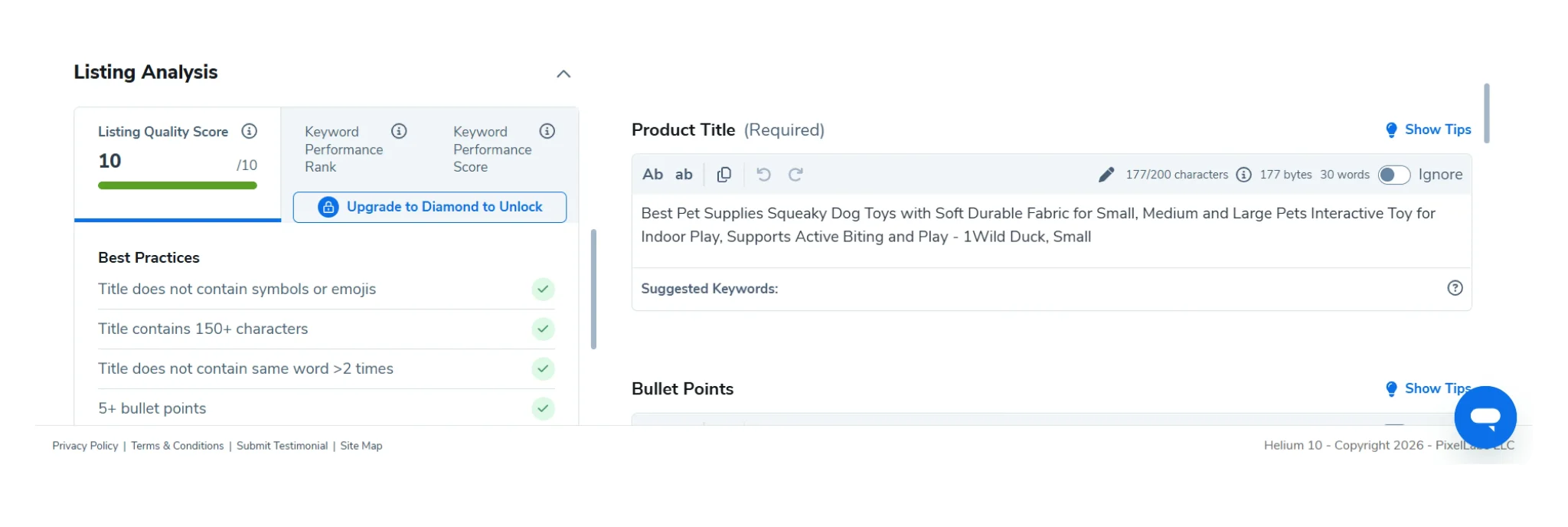
Quality
Helium 10 is excellent at getting you to a usable first draft quickly and making sure you don’t forget important keywords. But it’s not a “final copy” button. Drafts can sometimes feel repetitive or formulaic, so it’s common to rewrite parts of the output to improve persuasion, tighten the message, and make the copy sound more natural and aligned to your brand.
Extra Tools
For sellers who want more hands-on control, Helium 10 also includes classic optimization tools. Scribbles helps track keyword inclusion so you don’t miss important terms as you write and edit. Frankenstein helps clean keyword lists by removing duplicates and reducing the mess that often comes from exporting large keyword sets. Together, these tools make Helium 10 a strong option for sellers who want a hybrid workflow: AI for speed, and manual tools for precision.
Pros
Big, comprehensive toolkit beyond listings (research, analytics, PPC, etc.)
Strong keyword workflows (Magnet + Cerebro are a solid combo)
AI speeds up drafting and reduces blank-page time
Helpful optimization feedback + easy publishing workflow
Mature platform with lots of users and resources
Cons
AI Listing Builder is typically in higher tiers.
AI output often needs human polish to avoid “template” copy.
Feature-heavy interface can overwhelm, especially if listing optimization is your only goal.
If you won’t use the broader suite, ROI can drop.
Jungle Scout: User-Friendly Suite
Overview
Jungle Scout is another popular Amazon seller toolkit known for its clean interface and straightforward workflows. It’s especially appealing to small-to-mid-sized sellers and agencies because it makes listing optimization feel simple and guided, while still giving you strong keyword research and AI-assisted writing.
Jungle Scout is an all-in-one style seller platform with a strong focus on usability. It’s best at providing an efficient workflow that connects keyword research directly to listing creation. Its AI strength is speed and structure: it can generate listing sections using your keyword bank and then guide you with an optimization score. The main tradeoff is that AI output can still feel generic, and heavier users (especially agencies producing lots of listings) may run into usage limits depending on the plan.
Keyword Research
Jungle Scout’s keyword research tool is Keyword Scout, which helps sellers find relevant search terms to target and provides supporting metrics. The typical workflow is to pull keyword ideas in Keyword Scout, then move those keywords into a keyword bank inside Listing Builder. That keyword bank becomes the foundation for both optimization and AI writing, keeping the process structured and easy to follow.
In practice, Jungle Scout is strong for most sellers because the keyword research flows cleanly into the listing workflow. While it may not go as deep as specialist tools designed purely for advanced SEO analysis, it covers what most sellers need to build a keyword-informed listing.
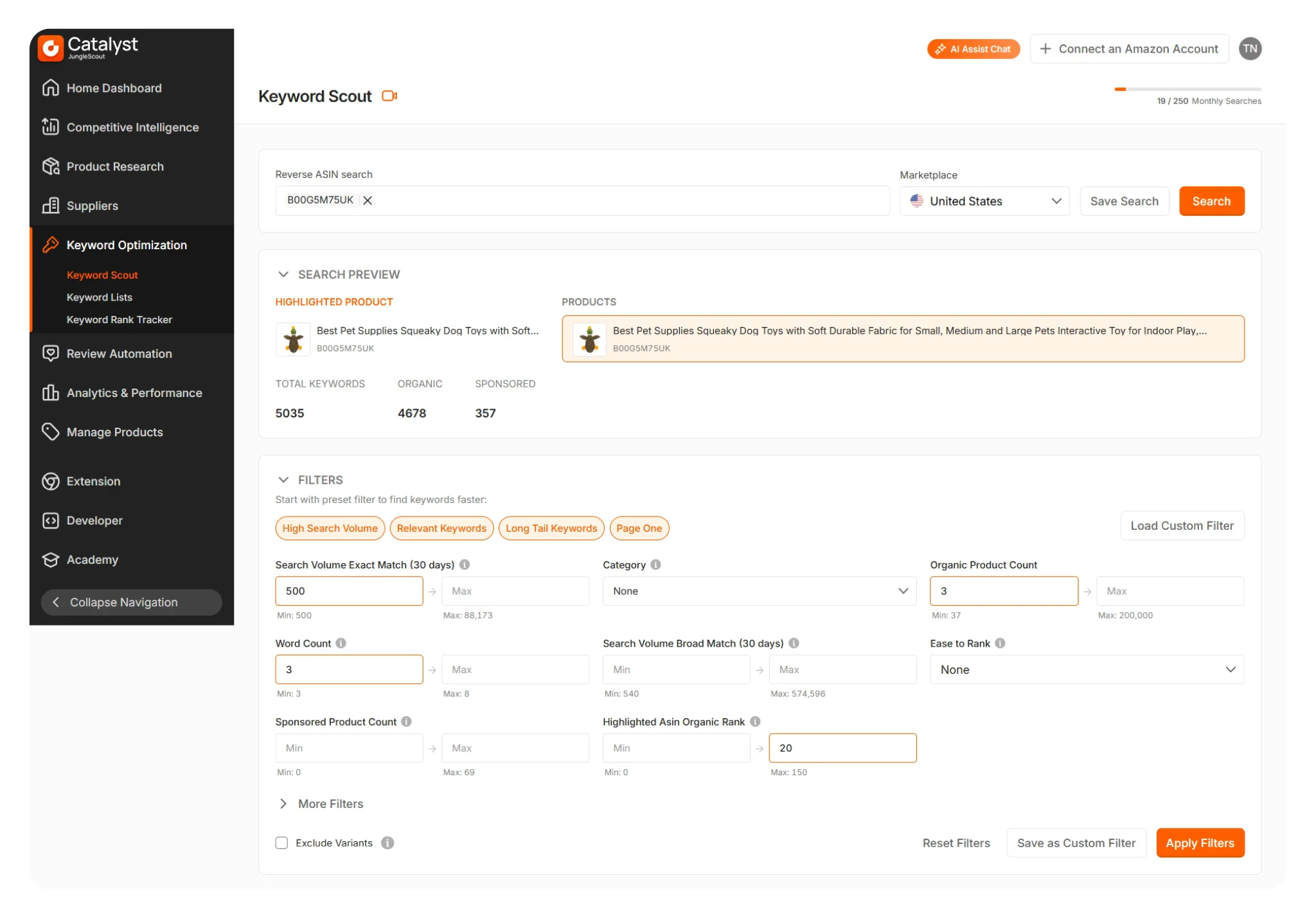
Listing Optimization Workflow
How does it work?
Jungle Scout’s Listing Builder is where listing work happens, and this is where its workflow really shines. A common process is straightforward: you import your existing listing (or start from scratch), build a keyword bank using Keyword Scout suggestions, and then use AI Assist to draft key listing sections. After that, you edit and refine the copy, use Jungle Scout’s live optimization scoring to fix gaps, and once you’re happy, you sync the finalized version back to Amazon with one click. The Listing Builder is designed to keep everything in one place, so you’re not constantly bouncing between tools, and it supports both importing from Seller Central and syncing changes back once you’re done.
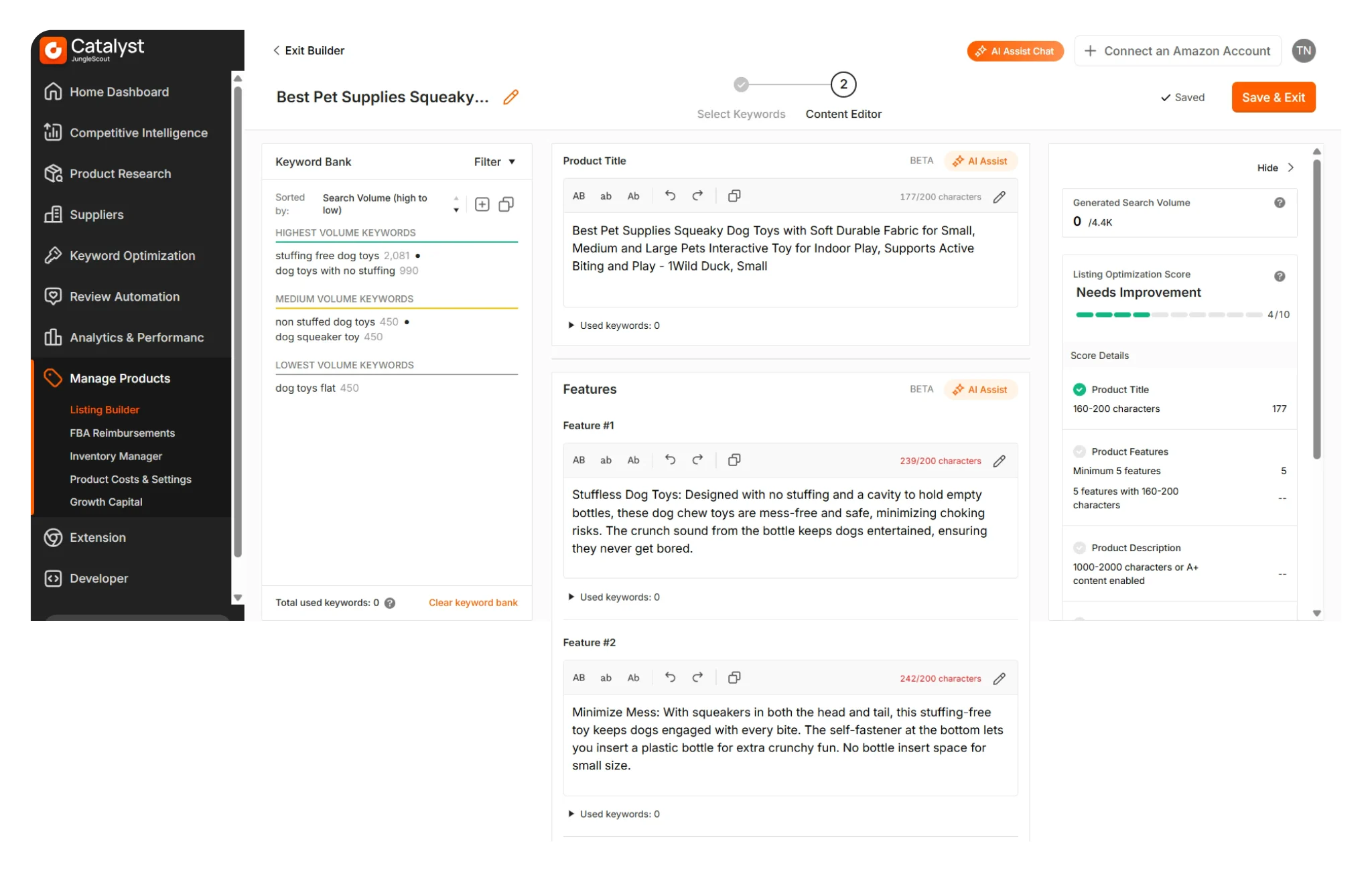
Key Features
A few features inside Jungle Scout’s Listing Builder are especially useful for teams that value speed and clarity. AI Assist acts like a copywriting helper that weaves your top-priority keywords into the listing content, letting you generate the title, bullet points, and description quickly. Alongside that, Jungle Scout provides an AI-driven Listing Optimization Score that updates in real time as you edit. It grades your listing content and structure and points out what to improve, such as missing high-volume keywords, opportunities to strengthen listing completeness (like images), or areas where the listing could be more competitive overall. One of the biggest workflow advantages is the one-click sync back to Seller Central, which makes implementation faster and reduces the friction of manual copy-paste.
Quality
In terms of AI output quality, Jungle Scout’s AI is best seen as a strong starting point. It’s great for producing fast first drafts, ensuring your main keywords are included, and giving you a structured base that you can improve quickly. That said, it’s not typically a final draft. The AI text can sometimes read a bit generic or boilerplate, and it may not naturally capture a strong brand voice or emotional appeal without human edits. In most cases, you’ll still want to refine wording, sharpen persuasion, and add personality so the listing feels unique to your product and brand rather than “standard AI copy.”
Extra Tools
Jungle Scout also includes extra tools that help you get more control and improve conversion quality. A standout complement is its AI-powered Review Analysis, which summarizes themes and patterns from customer reviews to reveal what buyers consistently praise or complain about. This is useful because it gives you real customer language and insights you can reflect directly in your bullets and description, making the listing feel more aligned with what shoppers actually care about. Finally, Jungle Scout’s AI features come with plan-based usage limits, meaning the number of AI generations varies by plan. For most sellers, this won’t matter day to day, but agencies or high-volume operators building lots of listings should factor those limits into their workflow planning.
Pros
Easy interface and smooth workflow
AI included on lower plans
Faster drafting with built-in guidance
Live optimization score with fix suggestions
One-click import/sync with Amazon
Review insights from AI analysis
Lower cost than Helium 10
Cons
AI generations capped by plan
AI drafts still need polishing
AI features mainly listing-focused
Less granular for advanced SEO users
Data Dive: Deep Keyword Research
Overview
Data Dive sits in a category of its own. Unlike all-in-one suites, it’s a specialist tool built for sellers and SEO operators who want to win through depth of keyword research and competitive analysis. The whole product philosophy is “start with the data,” then build a listing that mirrors what the market is already ranking for, while making sure you don’t miss important search terms in your niche.
Its AI can generate listing drafts, but the real value comes from the way it builds a comprehensive keyword set and measures your listing against that set. The tradeoff is that it’s not beginner-friendly, the workflow can feel heavy, and the AI output often needs significant editing to read naturally.
Keyword Research
Data Dive’s keyword research typically starts by gathering a set of top competitor ASINs in your niche. You use its Chrome extension (as part of the workflow) to collect those competitor listings, and then Data Dive “dives” into them to extract the keywords they’re ranking for. Instead of only showing you keyword ideas one-by-one, it performs a multivariate analysis across that competitor set, helping you understand which keywords matter most based on how consistently they appear across the market and how relevant they are to your niche.
The end result is a master keyword list that’s extremely comprehensive. Importantly, Data Dive goes a step further by helping prioritize where keywords should go, for example, flagging certain “must-have” terms that belong in the title vs keywords that are fine to include in bullets or other sections. This is the core reason advanced sellers use it: it helps you build a structured keyword strategy, not just a list of words.
Listing Optimization Workflow
How does it work?
Once you have the keyword set, Data Dive’s listing optimization workflow becomes a process of drafting, scoring, and iterating. You take the curated keyword list and begin building your title, bullets, and description with those terms in mind. Data Dive updates scores as you go, both section-level and overall listing quality, and you can actively track how your listing improves as you incorporate more of the important terms.
A major part of the workflow is competitive comparison. Data Dive allows you to compare your listing’s keyword stats to a top competitor side-by-side, so you can see where you’re behind and where you’ve caught up. It becomes a very measurable approach to listing SEO: you’re not guessing if you’ve “covered enough,” you can quantify it.
Key Features
What makes Data Dive compelling to power users is the visibility it provides into performance and progress. The live scoring mechanism turns optimization into something you can measure and improve systematically, you can watch keyword coverage percentages and listing scores move as you refine copy. It also provides strategic insights through competitor overlap: it can surface opportunities where only one competitor is targeting a term (a potential gap), or where every competitor emphasizes a feature you’re not highlighting (a signal about customer priorities).
Data Dive also includes AI-driven review theme analysis as part of the process. That helps you pull out common language, pain points, or benefits customers repeatedly mention, which you can then reflect in your copy. The overall feel is “SEO-first with conversion support,” where the engine is keyword depth and the supporting layer is customer insight.
Quality
Data Dive’s AI can generate a first draft for the title, bullets, and description using your compiled keyword set. It’s strong at one thing: getting keywords into the listing. That’s also where the weakness shows up. Because the tool is designed to maximize coverage, the AI output can often read stiff and unnatural, and it may lean toward a keyword-heavy structure that needs work to become customer-friendly.
In practice, you should treat the AI draft as a base for SEO coverage, then do a second pass to improve readability, persuasion, and flow. If you push too hard for “100% keyword coverage,” the first draft can start to feel like keyword stuffing, so the real skill is balancing completeness with clarity.
Extra Tools
Data Dive also comes with a few supporting tools that make the workflow more actionable for power users. Most notably, it uses a Chrome extension to quickly collect competitor ASINs and pull them into your analysis, which is the starting point for building a deep, competitor-informed keyword set.
On top of that, Data Dive includes AI-assisted review/theme insights that help you pull out recurring customer language and priorities from reviews, so your listing doesn’t become purely keyword-driven. These add-ons are mainly there to support the core SEO workflow without forcing you to rely only on raw keyword coverage.
Pros
Extremely deep keyword coverage (incl. long-tail)
Data-driven keyword tracking and progress
Strong competitor gap insights
Clear guidance on keyword placement
Built for advanced sellers in tough niches
Cons
Steep learning curve (spreadsheet-like)
Multi-step workflow feels clunky
AI drafts need heavy rewriting
Time-heavy per listing (often hours)
Pricey if you do low volume
Not a full suite (listing SEO only)
Flairox Listings: AI-Powered Amazon Listing Optimization
Overview
Flairox Listings is positioned differently from the other tools in this comparison. Instead of being a broad software suite or a highly technical DIY research platform, it works more like an AI-driven listing optimization service that prioritizes output quality, brand alignment, and speed. The core idea is to combine the efficiency of AI with a more hands-on, brand-tailored approach to listing copy, so the final result feels less like generic AI content and more like something a strong copywriter would produce.
Flairox Listings is best for established Amazon sellers and agencies that want fast, on-brand listing output without spending hours inside keyword tools and editors. Its strength is delivering polished content that balances keyword inclusion with readability and conversion intent. The tradeoff is that it’s focused on listing optimization rather than being an all-in-one platform for product research, PPC, inventory, and reporting.
Keyword Research
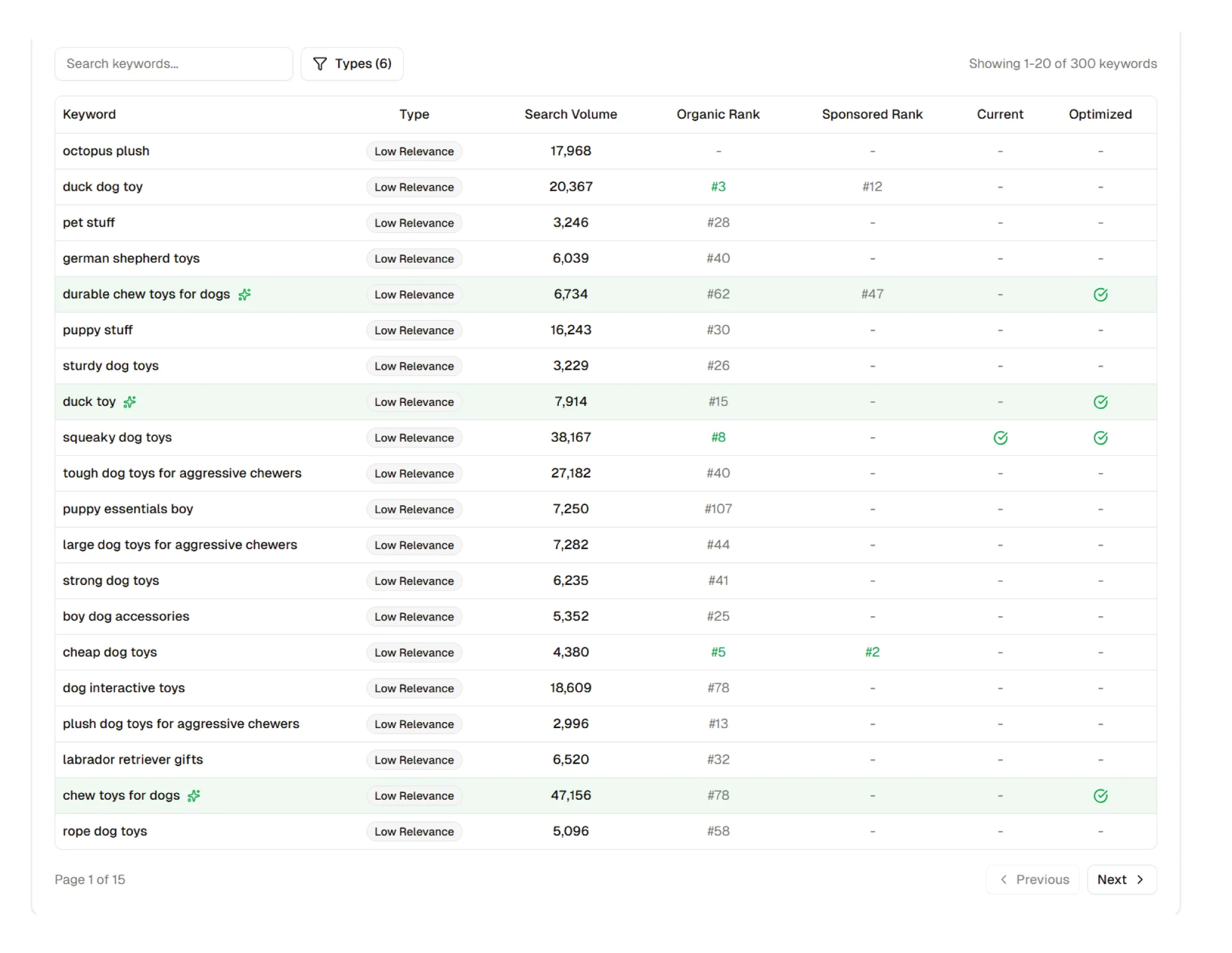
Flairox’s keyword research is different because it’s built around direct competitor matching + keyword gap output, not just keyword discovery.
With Helium 10 and Jungle Scout, you typically generate large keyword lists (via seed expansion or reverse ASIN), then you still have to shortlist, clean, and decide what matters. Data Dive goes deeper by aggregating competitor keywords at scale, but it often requires heavy analysis to turn that data into a practical action plan.
Flairox starts by selecting your top 4 look-alike competitors that target the same audience, then outputs a table that clearly shows keywords already in your listing vs keywords you’re missing. Instead of handing you a big dataset, it gives you the gaps you need to act on immediately.
Listing Optimization Workflow
How does it work?
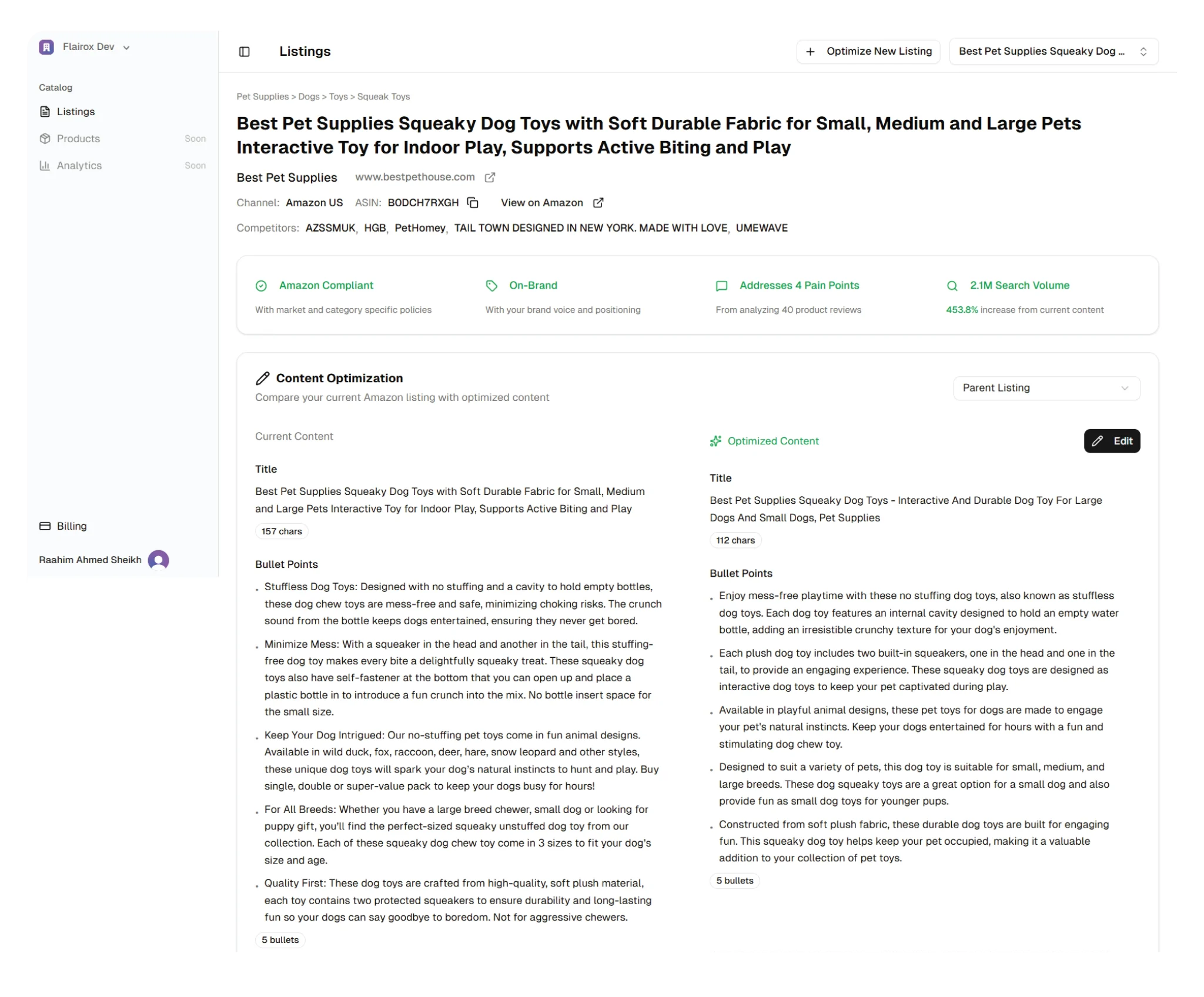
Flairox Listings is designed to be lightweight from the user’s perspective. The workflow is simple: enter your ASIN and website link, and the system handles the heavy lifting behind the scenes. It analyzes competitors and keywords, mines review insights, and then generates refreshed listing copy that is intended to be ready for upload. It also checks listing content against Amazon policy guidelines as part of the process, so the output is not only keyword optimized but also built to be policy compliant.
Because the work is done for you, you’re not spending time inside multiple dashboards or exporting keyword lists. Your role is mainly to provide inputs and then review the final output, which makes it especially practical for busy operators and agencies managing multiple brands.
Key Features
The most important “feature” of Flairox is the end result: an on-brand listing that is keyword optimized and Amazon policy compliant, produced with minimal time investment from the seller. The process explicitly includes understanding your brand language and aligning the copy to how your brand communicates, which is where many AI-first listing builders fall short. It also pulls in customer pain points from reviews, which helps the listing speak more directly to what customers actually care about.
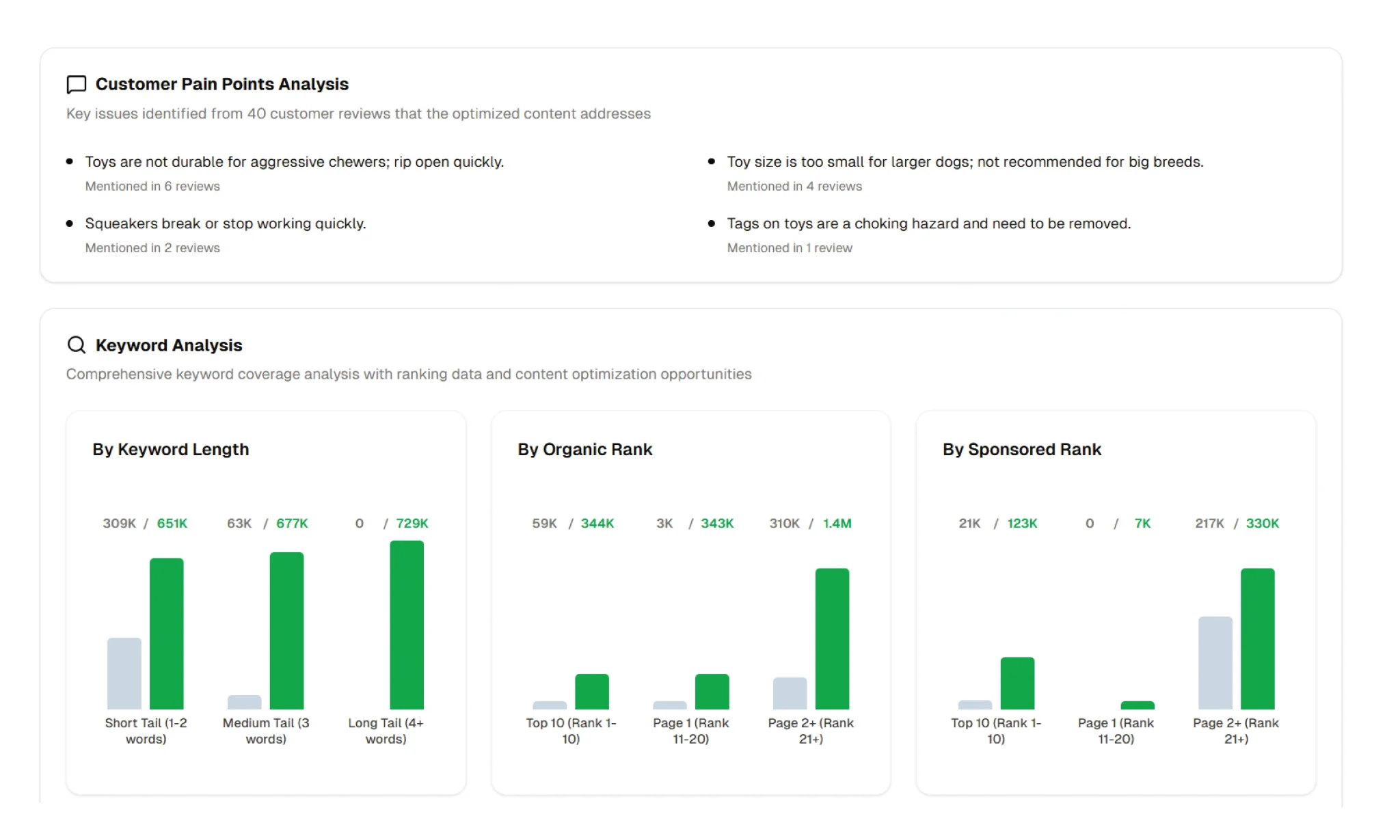
Another meaningful feature is transparency after the fact. Flairox provides a breakdown of how the new content performs across your niche keywords, so sellers can see that the output is not only better-written but also strategically stronger from an SEO coverage perspective.
Quality
Flairox is built around the idea that AI should help produce content that reads naturally, not content that simply squeezes in keywords. The output is intended to feel more polished and brand-specific than generic AI drafts, because the workflow includes brand voice alignment and customer language inputs from reviews. That makes it especially useful for brands that care about how they present themselves on Amazon and do not want their listings to look like a cookie-cutter template.
The main tradeoff is that you’re receiving a finished output rather than controlling every step of the process. For many brands that’s a benefit, but for extremely data-driven teams who enjoy doing research manually, it can feel less hands-on than tools that expose the entire keyword set and scoring system during drafting.
Extra Tools
Flairox includes a few supporting tools that are all focused on listing optimization. It provides review analysis that highlights customer pain points and recurring themes, a keyword table that pulls the relevant keywords from the niche and shows what you already have vs what you’re missing, and a listing compliance checker that flags policy issues and runs checks before you upload. All of these tools are built specifically around improving the listing itself, not broader Amazon operations.
Pros
Human-sounding, on-brand copy
Good balance: keywords + readability + conversion
Uses review pain points in the copy
Built-in policy compliance check
Very fast workflow (about 5–8 minutes)
No subscription, pay per listing
Cost-effective for priority listings
Great for agencies needing distinct brand voice
Cons
Listing optimization only (not a full suite)
Newer & less widely known tool
Less manual control for DIY sellers
Per-listing cost can add up at scale
Summary
If your main goal is to improve listing performance without turning listing optimization into a weekly project, Flairox Listings tends to be the most straightforward fit. It’s built around the outcomes most established sellers and agencies actually want: competitor-aware keyword research, clear keyword gaps, review-driven customer insights, and compliance checks — all packaged around the listing itself. It’s especially useful when you’re optimizing a set of priority ASINs and want the work to stay focused on SEO + conversion copy, without paying for a broader suite you may not fully use.
Helium 10 and Jungle Scout make more sense when listing optimization is only one part of a larger workflow you want inside the same tool. Helium 10 is the best match if you want a broad ecosystem and deep keyword tooling across the business. Jungle Scout is a strong option if your team values a simpler UI and a guided listing workflow. Data Dive is best when you have an SEO-heavy team that wants maximum keyword coverage and is comfortable investing more time per listing to squeeze out incremental gains in competitive niches.
The practical takeaway: if you want a solution that’s listing-first and action-first, Flairox often fits more teams day-to-day. If you want a larger operating system for Amazon, or you’re doing advanced SEO work at depth, the suite/expert tools may be the better match.
Frequently asked questions
It depends on how you work. If you want listing-first outputs with minimal time investment, Flairox Listings is typically the most practical. If you need a full Amazon suite, Helium 10 is stronger. If you want a simpler workflow, Jungle Scout fits well. If you want maximum keyword coverage and can invest more time, Data Dive is the best match.