Bilal Siddiqui
Key takeaways
A/B testing replaces opinion with evidence. Two versions run at once, so seasonality and luck can't fool you.
Manage Your Experiments (MYE) is free for brands enrolled in Amazon Brand Registry.
You can test the main image, title, bullets, description, A+ Content, and Brand Story. You can't test price, backend keywords, or ads.
Run tests for 4 to 10 weeks and never stop early; let Amazon call the winner at statistical significance.
Change one variable at a time and start with high-traffic ASINs so tests reach significance faster.
Test the main image first, it is the single biggest lever on click-through and conversion.
You spent hours rewriting your title, redesigning your main image, or rebuilding your A+ Content, pushed it live, and then stared at your sales chart trying to work out if it actually helped. Maybe conversion ticked up. Maybe it was just a good week. You genuinely can't tell, because you changed the listing and the calendar at the same time.
Amazon A/B testing removes that guesswork. Instead of swapping content and hoping, you show two versions to comparable shoppers at the same time and let real buying behavior pick the winner. And the best tool for it is already built into Seller Central and free to use: Manage Your Experiments. This guide covers exactly how it works, what to test, how to set up a test, the best practices that make results trustworthy, and the mistakes that quietly waste weeks of traffic.
What Is Amazon A/B Testing?
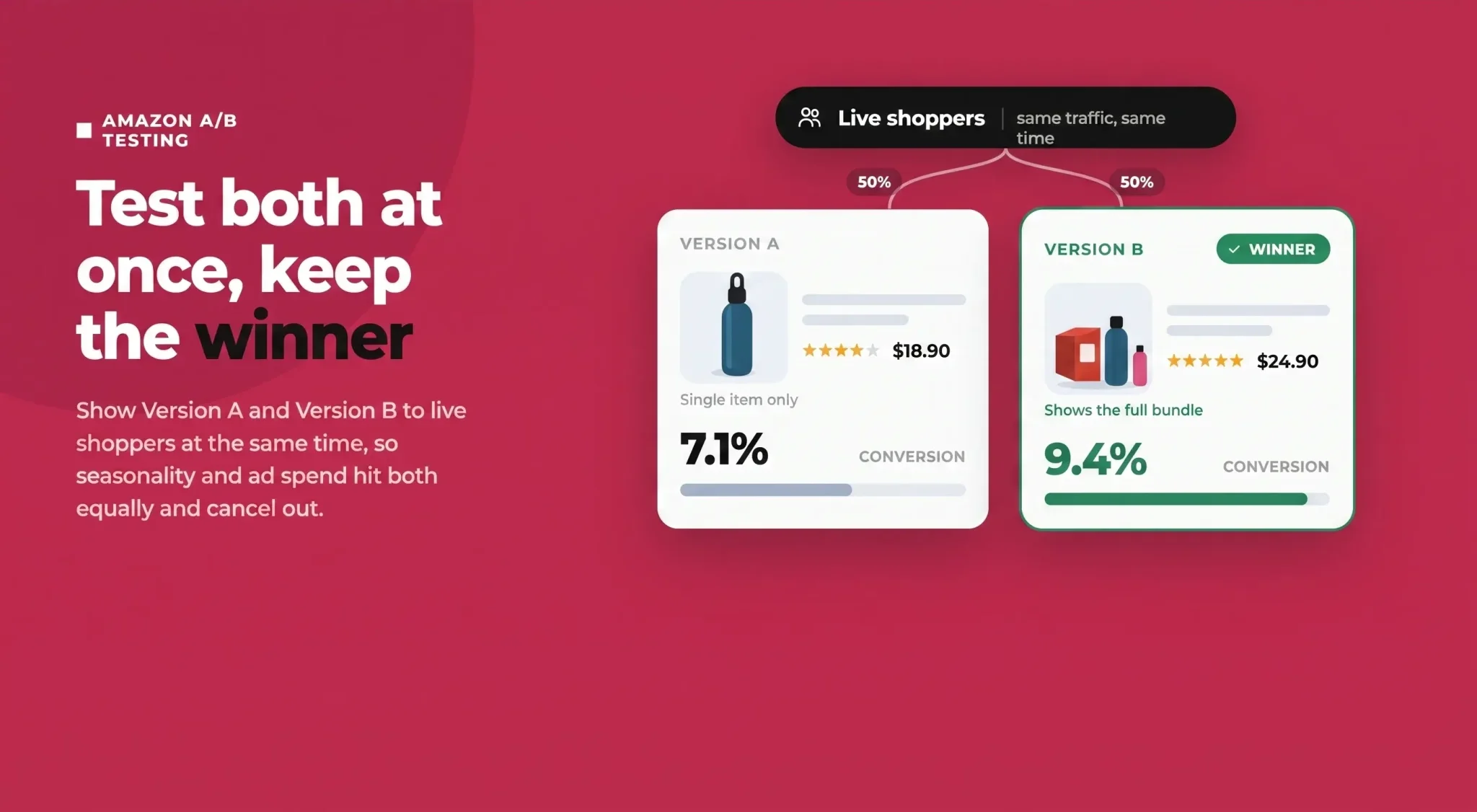
Amazon A/B testing, also called Amazon split testing, is the practice of running two versions of a listing element (Version A and Version B) at the same time, splitting live shoppers between them, and measuring which version drives more sales. Whichever version converts better wins, and you keep it.
The key word is simultaneous. Plenty of sellers do "before and after" testing instead: change the title on Monday, compare this month to last month. That approach is unreliable because too many other things move at once, seasonality, competitor pricing, ad spend, day-of-week patterns, and a Prime Day in the middle. A true split test shows both versions to shoppers during the same period, so those outside factors hit both versions equally and cancel out.
Why it matters: conversion is one of the strongest signals Amazon's algorithm rewards. A listing that converts better earns more sales from the same traffic, which improves organic rank, which brings more traffic. It's also why testing pays off, Baymard Institute's UX research shows shoppers judge a product page on its images and content before anything else, so small, validated improvements to those elements compound into real revenue. Testing also protects you from "improvements" that actually hurt, the redesign that felt cleaner but quietly cost you 8% of your conversions. Over a year, a disciplined testing habit compounds into a meaningfully stronger listing.
How Amazon's Manage Your Experiments Tool Works
Manage Your Experiments (often shortened to Amazon MYE) is Amazon's native, free A/B testing tool inside Seller Central. It runs a genuine controlled experiment on your live product detail page.
Here is the mechanism. When a test is live, shoppers who view your detail page are randomly split roughly 50/50 into two groups. One group sees Version A, the other sees Version B. Amazon runs the experiment for 4 to 10 weeks, gathers data, and declares a winner once results reach statistical significance (around 95% confidence). You then see how each version performed on metrics like units sold, sales, conversion rate, units sold per unique visitor, and sample size. Amazon has said tests like these can lift sales by up to 25%, though real results vary by product and by how good your challenger version is.
Eligibility: Who Can Use Manage Your Experiments
MYE is not open to every seller. To run experiments you need:
A Professional selling account
Enrollment in Amazon Brand Registry, with Brand Representative status for the brand
An ASIN with enough recent traffic to reach a valid result. Amazon doesn't publish a hard number, but low-traffic listings may never hit significance
Published A+ Content or a Brand Story if you want to test those specific elements
What You Can Test in Manage Your Experiments
MYE lets you split test the elements that most influence the shopper's decision:
Main image
Product title
Bullet points
Product description
A+ Content, including Brand Story
Product video
What You Can't Test
Set expectations up front. MYE does not let you test price (Amazon requires every shopper to see the same price at the same time), backend keywords, or PPC ads. Those need different approaches outside the scope of this tool.
How to Set Up an Amazon A/B Test Step by Step
Learning how to A/B test on Amazon takes about ten minutes the first time. Here is the process inside Seller Central:
Open the tool. Hover over Brands in the main menu and select Manage Your Experiments.
Create a new experiment. Click Create a New Experiment and choose the element you want to test (for example, Main Image or Title).
Select your product. Pick the ASIN you want to run the test on. Choose one with healthy traffic.
Write a hypothesis. Name the experiment and state a clear hypothesis, for example: "A lifestyle-context title will lift conversion because it clarifies the use case." A hypothesis keeps the test honest and makes the result meaningful either way.
Add Version B. Upload or enter your challenger version. Version A is your current live content; Version B is the alternative.
Schedule it. Set the duration (aim for the longer end of the 4 to 10 week window) and launch.
The 50/50 traffic split is automatic and cannot be adjusted, which is exactly what keeps the test fair.
What to A/B Test First on Your Amazon Listing
If you're new to Amazon listing testing, don't test at random. Prioritize the elements shoppers see first and that most influence the click and the buy.
Start with your main image, because it's the highest-impact test you can run. It's the only image shown in search results, and it drives your click-through rate before anything else gets a chance, so if you only ever test one thing, test this. Our full guide to Amazon main image optimization breaks down exactly what to try. From there, move to your product title, the second most visible element in search and a major driver of both clicks and conversion.
Once you've worked the top of the funnel, turn to the elements that persuade shoppers already on the page. A+ Content and Brand Story have a strong influence on conversion, while your bullet points are where buyers scan for benefits and objections, so even small wording changes can move the needle. Your product description is lower priority, but still worth testing on high-traffic listings.
A useful way to think about it: image and title mostly win the click, while A+, bullets, and description mostly win the conversion. Test across the funnel over time.
Amazon A/B Testing Best Practices
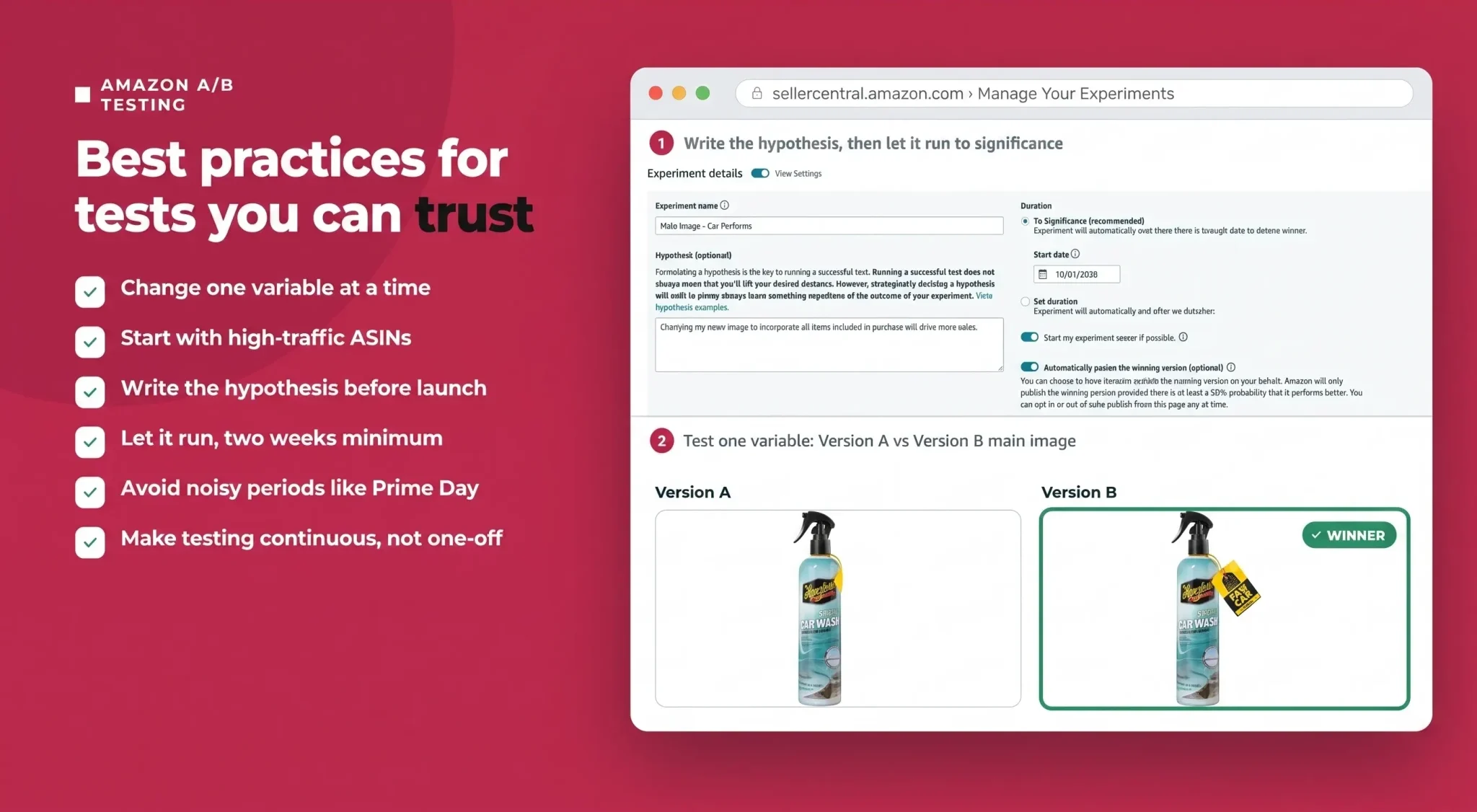
Good tests are trustworthy tests. Follow these to make sure your results mean something:
Change one variable at a time. If you test a new image and a new title together, a win tells you nothing about which one worked.
Start with high-traffic ASINs. They reach statistical significance faster and offer bigger absolute upside from the same percentage gain.
Write the hypothesis before you launch. It forces clarity and prevents you from rationalizing whatever result appears.
Let it run. Give the test the full window and wait for Amazon to declare significance. Two weeks is a bare minimum; day-of-week and payday effects distort anything shorter.
Avoid noisy periods. Don't run tests during Prime Day, Black Friday, Cyber Monday, or aggressive PPC pushes that distort normal shopper behavior.
Make testing continuous. Treat it as a roadmap, not a one-off. Roll out each winner, then queue the next experiment.
Common Amazon A/B Testing Mistakes to Avoid
Most failed experiments come down to a short list of avoidable errors:
Stopping early on a "hot start." An impressive lead in week one often evaporates. Don't call it yourself; wait for Amazon.
Testing multiple elements at once, which makes results impossible to interpret.
Testing low-traffic ASINs that never gather enough data to reach significance, wasting weeks for no answer.
Running during peak events or promos that skew behavior.
Trusting gut feel over significance. If Amazon says the difference isn't significant, it isn't, no matter how much you prefer Version B.
Ignoring external noise like a stockout or an ad-spend spike mid-test that quietly contaminates the data.
How to Read Your Amazon Test Results
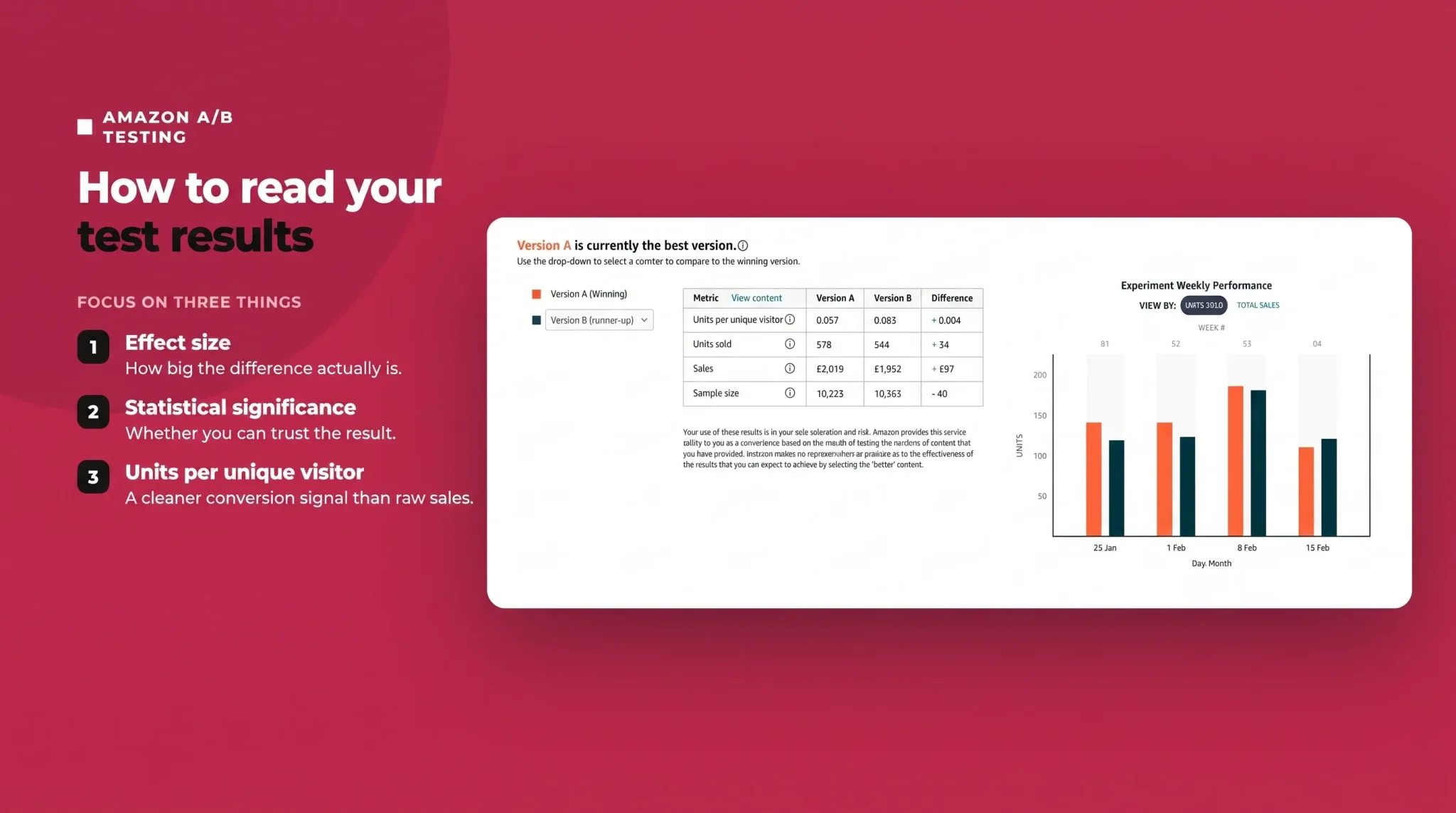
When the experiment ends, Amazon shows you which version won and whether the difference was statistically significant. Focus on three things: the effect size (how big the difference is), the statistical significance (whether you can trust it), and units sold per unique visitor (a cleaner conversion signal than raw sales).
Sometimes the result is "no significant difference." That is still useful. It tells you the change is neutral, so you're free to keep whichever version you prefer for other reasons (brand consistency, easier maintenance) without worrying you're leaving money on the table. When you do have a clear winner, roll it out to the live listing, record what you learned, and immediately set up your next test. The compounding comes from the cadence, not any single experiment.
Amazon A/B Testing Examples
A few practical examples of experiments worth running:
Element tested | Version A | Version B | What you learn |
|---|---|---|---|
Main image angle | Straight-on product shot | Slight hero angle | Which reads better as a thumbnail |
Title structure | Brand-and-features-first | Benefit-and-use-case-first | Which framing drives more clicks and sales |
A+ Content layout | Comparison-chart-led module | Lifestyle-and-benefits-led module | Which layout converts on-page browsers |
Bullet order | Leading with the top feature | Leading with the most common objection or FAQ | Whether answering doubts first lifts conversion |
Brand Story | With a Brand Story module | Without a Brand Story module | The module's real conversion impact |
Each is a single, clean variable with a clear hypothesis, exactly the kind of test that produces an answer you can act on.
Turn Guesswork Into a Testing Habit
Amazon A/B testing is the difference between hoping a change worked and knowing it did. Manage Your Experiments hands you a free, statistically sound way to let real shoppers settle every debate about your images, titles, and content, so you keep only what genuinely sells more.
The hard part isn't the tool, it's having strong challenger versions worth testing in the first place. Sign up to Flairox Listings to generate optimized, Amazon-compliant titles, bullets, descriptions, and image concepts in seconds, then run them head-to-head in Manage Your Experiments and let the data crown the winner. Your first two listings are free, no credit card required.
Frequently asked questions
Yes. Manage Your Experiments is free to use for brands enrolled in Amazon Brand Registry with a Professional selling account.